EducationSoftwareStrategy.com
StrategyCommunity

Knowledge Base

Product

Community

Knowledge Base

TopicsBrowse ArticlesDeveloper Zone

Product

Download SoftwareProduct DocumentationSecurity Hub

Education

Tutorial VideosSolution GalleryEducation courses

Community

GuidelinesGrandmastersEvents
x_social-icon_white.svglinkedin_social-icon_white.svg
Strategy logoCommunity

© Strategy Inc. All Rights Reserved.

LegalTerms of UsePrivacy Policy
  1. Home
  2. Topics

KB327371: Web user session is lost while document is automatically refreshed using MicroStrategy Web 10.x on IIS


Community Admin

• Strategy


This Knowledge base article describes a behavior that users are prompted to login after leaving a document to automatically refresh over several hours or days and provides a possible explanation and steps to address the behavior.

SYMPTOM
Using Strategy Web, Report Services documents can be configured to automatically refresh as described in KB44946 - Document Auto-Refresh in MicroStrategy Web 9.4.0 .
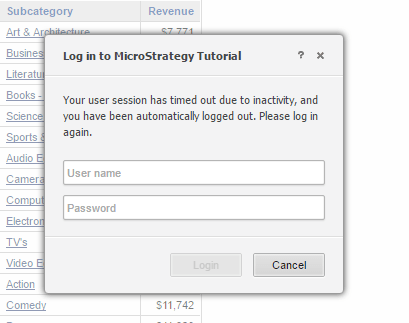
Automatically refreshing documents will maintain the user session alive until the browser is closed. The issue described here leads to users leaving a document to automatically refresh over several hours or days will encounter a login prompt to re-authenticate.
 

ka04W000000OfqnQAC_0EM4400000025Mt.jpeg

 
CAUSE
This issue might be caused by Microsoft IIS application pool recycling. By default, IIS recycles the Strategy Web application pool every 1740 minutes. When the application pool is recycled, all currently active sessions are lost and users are required to re-authenticate.
 
ACTION
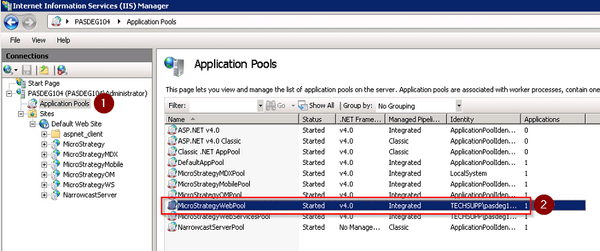
Disable application pool recycling using IIS Manager:
1. Navigate to Application Pools > StrategyWebPool > Advanced Settings (via context menu or right-hand side toolbar)
ka04W000000OfqnQAC_0EM4400000025Ma.jpeg

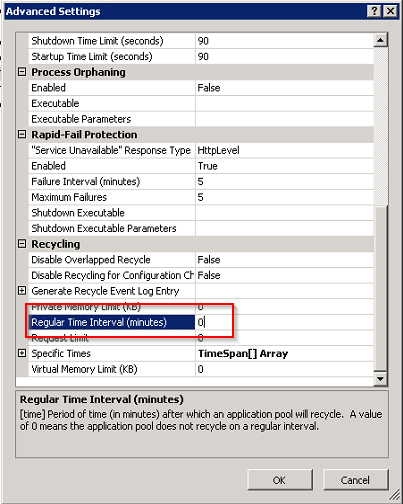
2. Set "Regular Time Interval (min) to 0
ka04W000000OfqnQAC_0EM4400000025N3.jpeg

Comment

0 comments

Details

Knowledge Article

Published:

June 13, 2017

Last Updated:

June 13, 2017