EducationSoftwareStrategy.com
StrategyCommunity

Knowledge Base

Product

Community

Knowledge Base

TopicsBrowse ArticlesDeveloper Zone

Product

Download SoftwareProduct DocumentationSecurity Hub

Education

Tutorial VideosSolution GalleryEducation courses

Community

GuidelinesGrandmastersEvents
x_social-icon_white.svglinkedin_social-icon_white.svg
Strategy logoCommunity

© Strategy Inc. All Rights Reserved.

LegalTerms of UsePrivacy Policy
  1. Home
  2. Topics

10.112 Introduction to Analytics Reporting


Stefan Zepeda

Salesforce Solutions Architect • Strategy


Create reports and the objects used on reports (filters, metrics, and prompts) with hands-on exercises. Transform datasets into appealing, insightful Visual Insight (VI) dashboards. Exercises use the MicroStrategy Web interface.

SYMPTOM
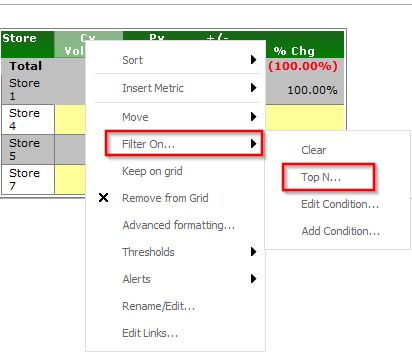
In Strategy Web 9.3.x and above, regular report grids have the option to "Filter on..." > "Top N" when right-clicking on a metric value, like shown below:
 

ka04W000000OelVQAS_0EM4400000026Wn.png

 
However, when this report is used as a dataset in a Report Services Document and viewed in Strategy Web 9.3.x and above, this option is not available.
CAUSE:
The context menu in Report Services Document grids does not include this option in Strategy Web 9.3.x.
ACTION:
Editing the grid's view filter in the document allows to create the same Top N filter. 


Comment

0 comments

Details

Knowledge Article

Published:

April 10, 2017

Last Updated:

April 10, 2017