EducationSoftwareStrategy.com
StrategyCommunity

Knowledge Base

Product

Community

Knowledge Base

TopicsBrowse ArticlesDeveloper Zone

Product

Download SoftwareProduct DocumentationSecurity Hub

Education

Tutorial VideosSolution GalleryEducation courses

Community

GuidelinesGrandmastersEvents
x_social-icon_white.svglinkedin_social-icon_white.svg
Strategy logoCommunity

© Strategy Inc. All Rights Reserved.

LegalTerms of UsePrivacy Policy
  1. Home
  2. Topics

KB442047: 10.x MicroStrategy Web Pie Chart component on Dossiers not visible when using a Derived Metric that is created from an Attribute duplicated as a metric


Darren Burns

Senior Cloud Support Engineer III • MicroStrategy


This knowledge base article describes a defect in MicroStrategy Web Dossiers where the Pie Chart visualization will not display for a Derived Metric that is created from an Attribute duplicated as a metric

Starting with the release of Strategy ONE (March 2024), dossiers are also known as dashboards.

SYMPTOM

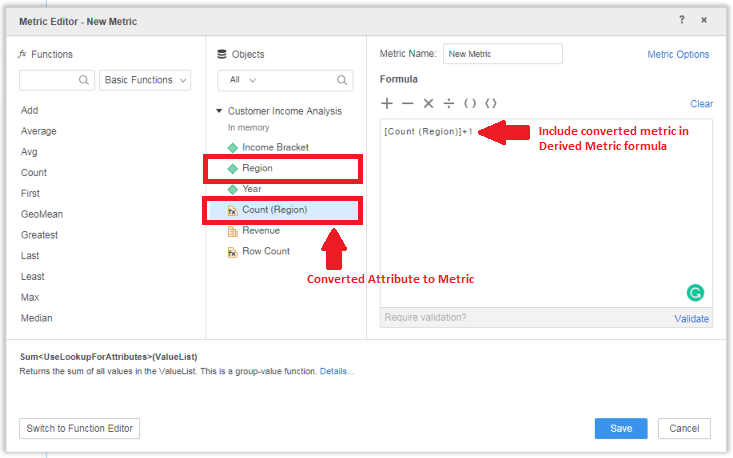
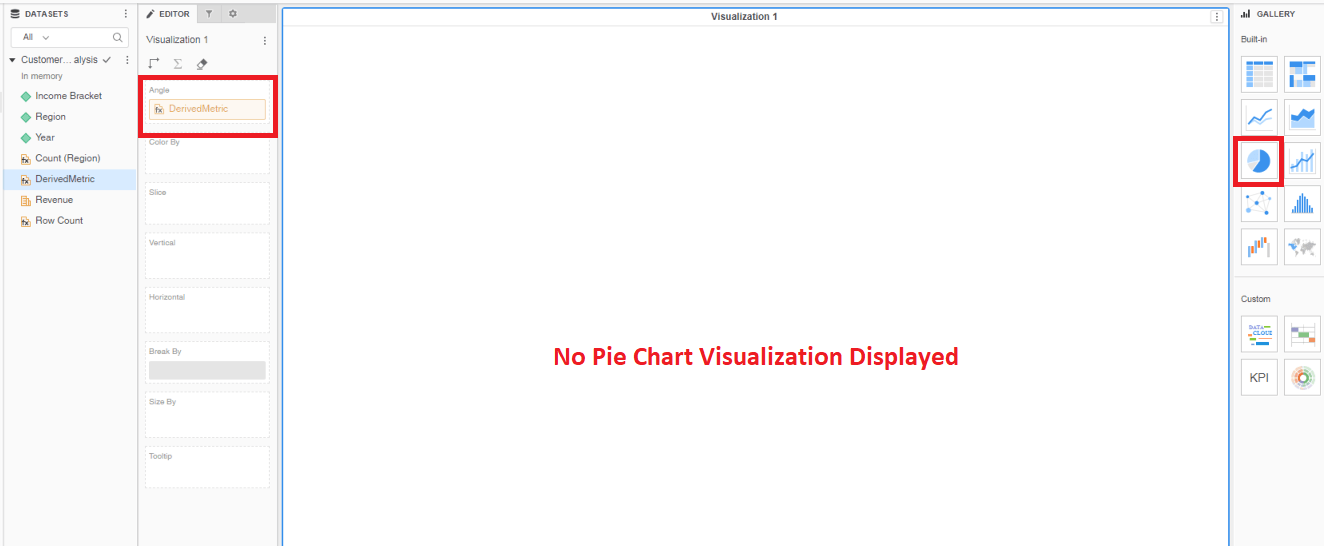
When duplicating an attribute as a metric, and then creating a derived metric that incorporates that duplicated metric in the formula for the derived metric; components of the Pie Chart represented from that derived metric will not display in the visualization.
 

ka0PW0000001JTcYAM_0EM44000000QxzS.png


STEPS TO REPRODUCE

  1. In Strategy Web, Create a Dossier
  2. Add existing Dataset: >> Shared Reports > Subject Areas > Customer Analysis> Customer Income Analysis
  3. Right-click "Region" and select “Duplicate as Metric” --> Count(Region)
  4. Create a Derived Metric >> Include Count(Region) in the formula for the derived metric

IE >> [Count (Region)]+1

  1. Change Visualization to Pie Chart
  2. Add the created Derived Metric to "Angle" in the Editor Panel
  3. Note that the Pie Chart does not display
ka0PW0000001JTcYAM_0EM44000000QxzX.png


CAUSE


This is an identified defect in Strategy where a derived metric that incorporates a duplicated attribute as a metric in the formula for the derived metric cause the Pie Chart visualization not to display.

ACTION


The issue was addressed in Strategy 11.0. Consider upgrading to take advantage of the fix.
 
THIRD PARTY SOFTWARE INSTALLATION WARNING:
The third-party product(s) discussed in this technical note is manufactured by vendors independent of Strategy. Strategy makes no warranty, express, implied or otherwise, regarding this product, including its performance or reliability.


Comment

0 comments

Details

Knowledge Article

Published:

September 28, 2018

Last Updated:

March 21, 2024