The Pre and Post Structured Query Language (SQL) statements are stored in the Subscription Set definition. Both static and dynamic subscription sets allow administrators to define SQL statements that are executed when a service is executed. This is useful for modifying or checking certain criteria that relate to the service execution to these recipients.
Users can provide SQL statements that are executed at two different times during the subscription set execution:
Pre-SQL statements are used for certain types of alerting known as "edge-triggered" alerting. This occurs when a service is designed to execute only once when a condition is true, but never again.
For example, suppose a service checks every five minutes to determine if a value is 1 (true) and only executes in the event the value is 1. As long as the value is at its initial state of 0 (false), the service does not execute. When the value is changed from 0 to 1, the service executes once, then updates the value from 1 to 2 (or some other value) to prevent the service from executing again. If the value were not changed, the service would execute every five minutes since the value is still 1.
To add the Pre/Post SQL, users can go to the Subscription Set editor > Edit menu > Subscription Set Properties. The following window will appear:
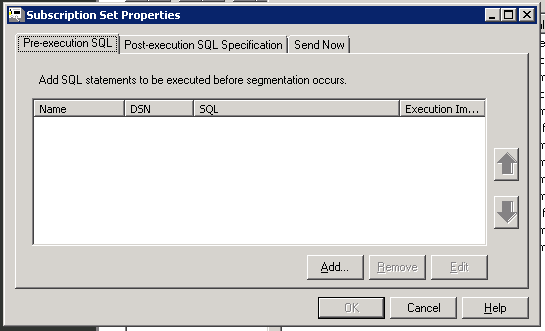
Users can specify whether the successful execution of the SQL statement is optional or required. This affects what happens if the attempted execution of the SQL statement returns an error:
Since a common use of pre-SQL is to generate a "snapshot" of the data in a database that is used for a subscription set or service content, the successful completion of these SQL statements is critical to proper service execution behavior. This setting ensures that inappropriate behavior, such as duplicated messages or lost data, does not occur in the event of an error in the database.
Users can select whether the data returned by these SQL statements controls whether or not the service executes. This is achieved by selecting a check box to stop service execution if the SQL statement returns an empty result set. If this is not selected, any results returned by a SQL statement are ignored. If a SQL statement returns no data, it is handled in the same manner as a statement that returns an error when the check box is selected.
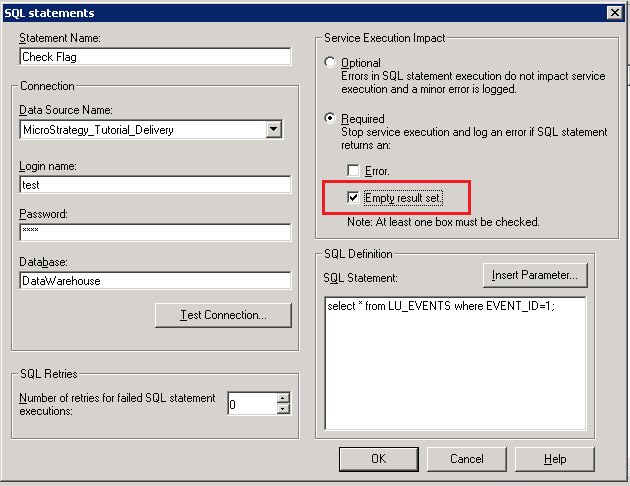
The pre- and post-SQL statements can contain multiple statements that can be executed against multiple databases. A SQL statement definition contains the following information:
The SQL statements can also be personalized to contain information about the service being executed by using macros.
