EducationSoftwareStrategy.com
StrategyCommunity

Knowledge Base

Product

Community

Knowledge Base

TopicsBrowse ArticlesDeveloper Zone

Product

Download SoftwareProduct DocumentationSecurity Hub

Education

Tutorial VideosSolution GalleryEducation courses

Community

GuidelinesGrandmastersEvents
x_social-icon_white.svglinkedin_social-icon_white.svg
Strategy logoCommunity

© Strategy Inc. All Rights Reserved.

LegalTerms of UsePrivacy Policy
  1. Home
  2. Topics

10.521: Advanced SDK for Customizing Mobile Applications


Stefan Zepeda

Salesforce Solutions Architect • Strategy


Customize a MicroStrategy Mobile app for organizational identity, image, and messaging. Learn techniques for customizing app response and behavior. Augment the potential of MicroStrategy Mobile by synchronizing changes to apps across devices, for example to support a Command Center or Operations Center. Provides advanced customization techniques including coding examples.

Description 


When using SQL Server as the data source during data import, if the selected table contains brackets ([ or ]) in the table name, the default query will be the following: 


Select [new]
from [dbo].[[NEW]]
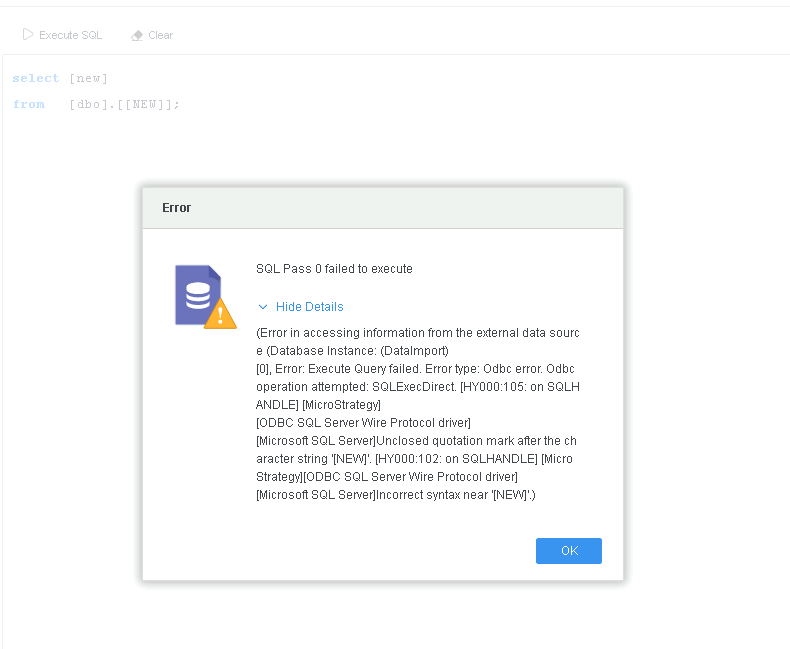
The query fails with the follow error: 
 
(Error in accessing information from the external data source (Database Instance: (DataImport)[0], Error: Execute Query failed. Error type: Odbc error. Odbc operation attempted: SQLExecDirect. [HY000:105: on SQLHANDLE] [Strategy][ODBC SQL Server Wire Protocol driver][Microsoft SQL Server]Unclosed quotation mark after the character string '[NEW]'. [HY000:102: on SQLHANDLE] [Strategy][ODBC SQL Server Wire Protocol driver][Microsoft SQL Server]Incorrect syntax near '[NEW]'.)

ka04W000001IrHAQA0_0EM4W0000038AJz.jpeg

Why is this happening? 


The bracket character "[ ]" is used as a quoting delimiter. It is not suggested that you include brackets in the table name.
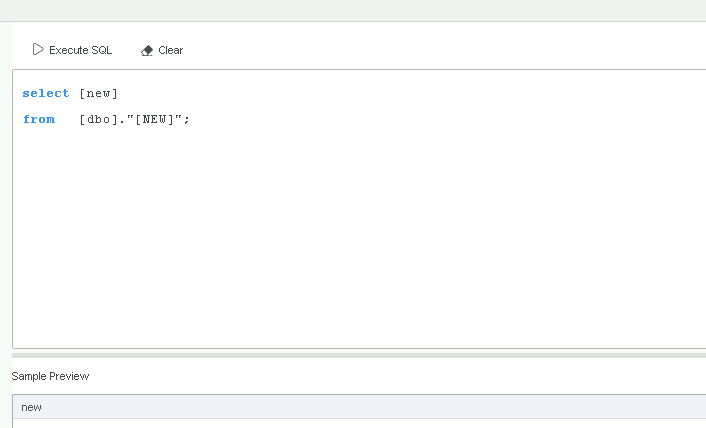
If you want to query a table which contains brackets in the table name, refer to the following workaround. 

Workaround

  • Change the query to the following, using quotations (") to replace the brackets ([ ]).
    
    Select [new]
    from [dbo]."[NEW]"

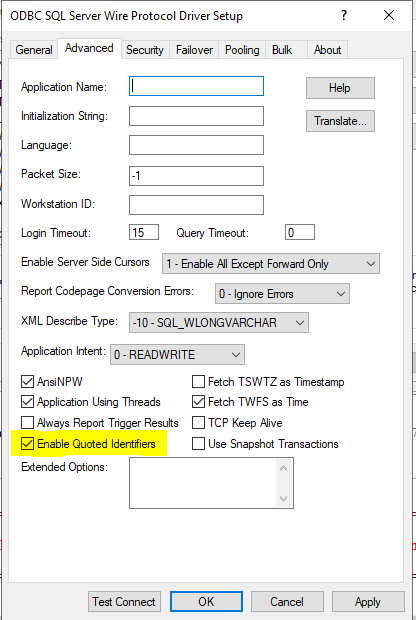
  • Enable Quoted Identifiers when using a DSN or DSN-less connection. The query will succeed.
ka04W000001IrHAQA0_0EM4W0000038ALM.jpeg

How to Enable Quoted Identifiers

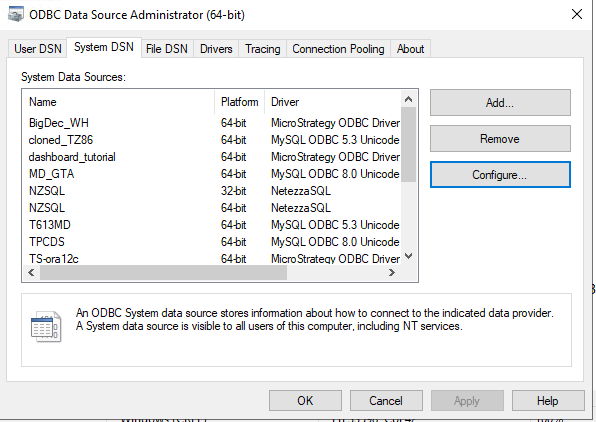
Windows ODBC DSN

  • Open ODBC Data Source Administrator.
ka04W000001IrHAQA0_0EM4W0000038AMe.jpeg
  • Click Configure.
  • Go to the Advanced tab and select the Enable Quoted Identifier checkbox.
ka04W000001IrHAQA0_0EM4W0000038AMj.jpeg

Linux ODBC DSN

  1. Edit the configure file
    ODBC.ini.
  2. Change the
    EnableQuotedIdentifiers
    value to
    1
    .
    
    [WH_T26.AzureSQLDataWarehouse]
    
    Description=Strategy ODBC Driver for SQL Server Wire Protocol
    Driver=installpath\MYsqls64.so
    
    Database=
    
    HostName=
    
    PortNumber=1433
    
    DoubleToStringPrecision=17
    
    EncryptionMethod=1
    
    ValidateServerCertificate=0
    
    EnableQuotedIdentifiers=1

ODBC DSN-less Connection


Add

EnableQuotedIdentifiers=1
in the Connection String to enable the setting. For example:

DRIVER={Strategy ODBC Driver for SQL Server Wire Protocol}; hostname=; Port=1433; Database=; EncryptionMethod=1; ValidateServerCertificate=0;EnableQuotedIdentifiers=1; 

JDBC Driver


Add

EnableQuotedIdentifiers=1
in the Connection String to enable the setting. For example:

JDBC;DRIVER={com.Strategy.jdbc.sqlserver.SQLServerDriver};URL={jdbc:Strategy:sqlserver://dbcert.database.windows.net:1433;DatabaseName=;User=;PASSWORD=;fetchTWFSasTime=TRUE; EnableQuotedIdentifiers=true;}


Comment

0 comments

Details

Knowledge Article

Published:

April 27, 2017

Last Updated:

April 27, 2017