EducationSoftwareStrategy.com
StrategyCommunity

Knowledge Base

Product

Community

Knowledge Base

TopicsBrowse ArticlesDeveloper Zone

Product

Download SoftwareProduct DocumentationSecurity Hub

Education

Tutorial VideosSolution GalleryEducation courses

Community

GuidelinesGrandmastersEvents
x_social-icon_white.svglinkedin_social-icon_white.svg
Strategy logoCommunity

© Strategy Inc. All Rights Reserved.

LegalTerms of UsePrivacy Policy
  1. Home
  2. Topics

KB441653: A Filter created from Command Manager with the expressions IsNotNull or IsNull is created with an incorrect definition


Joe Vitale

Manager, Cloud Support • MicroStrategy


A Filter created from Command Manager with the expressions IsNotNull or IsNull is created with an incorrect definition
 
[PROBLEM DESCRIPTION]
When creating a Filter with the expression “Company Code@ID Is Not Null” in Developer, the Filter definition is generated as such:

ka044000000kPQlAAM_0EM44000000QlxD.png

 
However when I create the Filter through Command Manager using the following command:
CREATE FILTER "TEST" FOLDER "\Project Objects\MD Security Filters" IN PROJECT "Strategy Tutorial" EXPRESSION "IsNotNull([Company Code]@ID)";
 
The Security Filter definition is created incorrectly and subsequently produces errors when used:
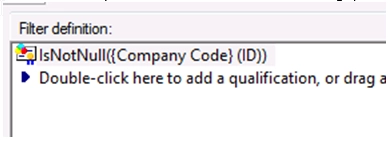
ka044000000kPQlAAM_0EM44000000QlxI.png

 
[STEP TO REPRODUCE]

  1. Create a Filter in Command Manager using the command: CREATE FILTER “IsNotNull” IN FOLDER “\Public Objects\Reports” EXPRESSION “IsNotNull(Region@ID)” ON PROJECT “Strategy Tutorial”;


  1. Create a simple report with Region attribute and Revenue metric in Strategy Tutorial.


  1. Add the “IsNotNull” filter from step 1 to the report filter.\


  1. Execute the report and the report will fail.


[CAUSE]
This is an identified defect in Strategy versions 10.4 Hotfix 3-7 as well as 10.11.
 
[ACTION]
Strategy Technology is currently scoping a fix for this issue in a later release.
 
[WORKAROUND]
When using the IsNotNull or IsNull expressions, the filter will need to be created in Developer.
 
  KB441653


Comment

0 comments

Details

Knowledge Article

Published:

September 7, 2018

Last Updated:

December 19, 2018