EducationSoftwareStrategy.com
StrategyCommunity

Knowledge Base

Product

Community

Knowledge Base

TopicsBrowse ArticlesDeveloper Zone

Product

Download SoftwareProduct DocumentationSecurity Hub

Education

Tutorial VideosSolution GalleryEducation courses

Community

GuidelinesGrandmastersEvents
x_social-icon_white.svglinkedin_social-icon_white.svg
Strategy logoCommunity

© Strategy Inc. All Rights Reserved.

LegalTerms of UsePrivacy Policy
  1. Home
  2. Topics

KB438433: "A potentially dangerous Request.Path value was detected from the client (&)." error occurs when trying to export a Report or Document from MicroStrategy Web 10.4 HF4 or 10.8


Community Admin

• Strategy


This technical note describes an issue when exporting to PDF, Excel with formatting, Excel with plain text a Report or Document that contains special characters on the name, such as ‘&'

SUMMARY
This technical note describes an issue when exporting to PDF, Excel with formatting, Excel with plain text a Report or Document that contains special characters on the name, such as ‘&’
SYMPTOM
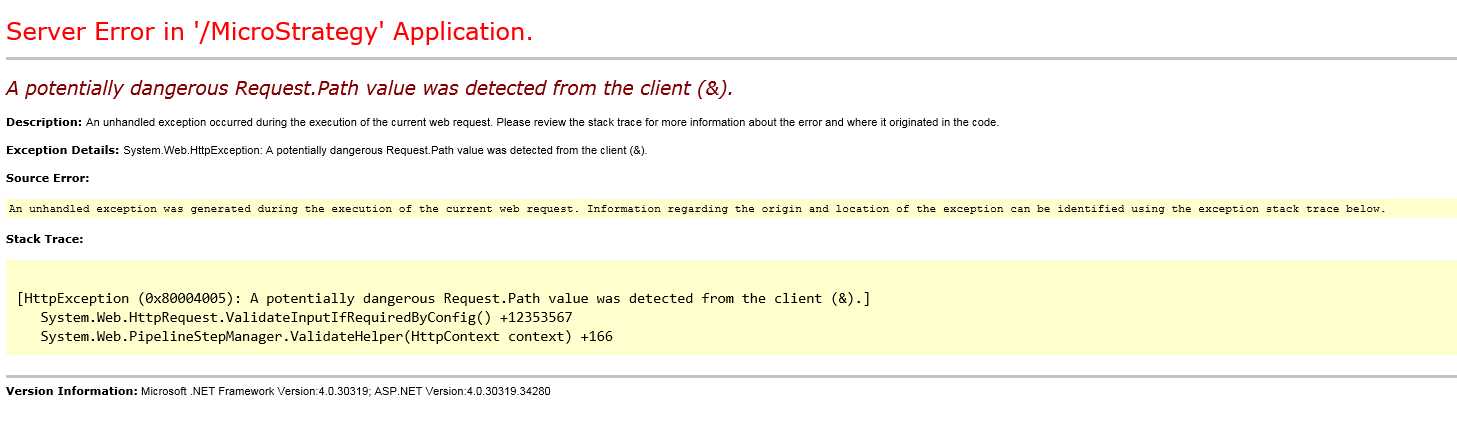
When trying to export to PDF, Excel a report or document that contains a special character on the name, such as an ampersand ‘&’, the following error occurs in Strategy Web 10.4 HF 4 or 10.8. 
ka04W000000ObjMQAS_0EM440000002cQu.png


Serve Error in '/ Strategy' Application.
A potentially dangerous Request.Path value was detected from the client (&).

This issue is specific to Microsoft IIS and does not occur with other application servers. The special characters affected are:

<,>,*,%,&,:,\\,?


STEPS TO REPRODUCE:
Follow these steps to reproduce the issue:

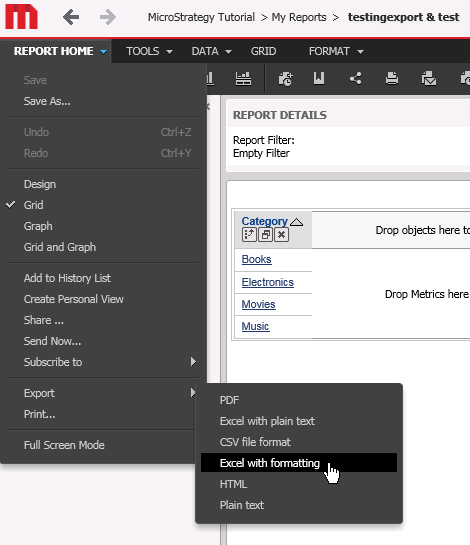
  • Create a Report or Document named: "Test & Test", this includes the special character "&."
  • Run the report or document.
  • Export it to Excel, as shown below, and the error will occur.
ka04W000000ObjMQAS_0EM440000002cQf.png

CAUSE:
This is an identified defect in Strategy Web 10.4 HF4 and 10.8. The reason this occurs only in the ASP version of Strategy Web, is that in ASP.Net 4 and above, special characters are considered invalid character.
ACTION:
This issue has been addressed in Strategy Web 10.4 HF 5 and 10.9 . Upgrade to either of these two versions to take advantage of this fix.
WORKAROUND:
In order for prevent the issue from occurring in Strategy Web 10.4 or 10.8, perform the following modification to the web.config file.
Note: Following best practice, make a copy of the file before modifying it.

  1. Locate the following line:
    
    <system.web>
       <httpRuntime requestValidationMode="2.0" maxRequestLength="1048576" />
        ....
        ....
    </system.web>

     
  2. Add a new attribute to the httpRuntime requestPathInvalidCharacters.  This attribute by default contains the following list of invalid characters:
    
    <httpRuntime requestValidationMode="2.0" maxRequestLength="1048576" requestPathInvalidCharacters="<,>,*,%,&,:,\\,?" />

    Note: The characters shown above have been XML encoded for usability.
    Now that the new attribute has been added, the administrator can choose to remove any special character that is required to prevent it from being an "invalid" character. 
    For example, to remove the ampersand, remove it from the list as shown below:
    
    <httpRuntime requestValidationMode="2.0" maxRequestLength="1048576" requestPathInvalidCharacters="<,>,*,%,:,\\,?" />

    Notice that & has been removed from the Invalid Characters list.


For more information on the requestPathInvalidCharacters parameter, refer to the following Microsoft article.
THIRD PARTY SOFTWARE INSTALLATION WARNING:
The third-party product(s) discussed in this technical note is manufactured by vendors independent of Strategy. Strategy makes no warranty, express, implied or otherwise, regarding this product, including its performance or reliability.
The Strategy Internal Reference Number for this issue is: KB438433. 38433 KB438433


Comment

0 comments

Details

Knowledge Article

Published:

February 6, 2018

Last Updated:

November 9, 2018