Starting with the release of Strategy ONE (March 2024), dossiers are also known as dashboards.
In Strategy 2020, Library Web does not support Norwegian and therefore, it does not have the desired date and number format for Norwegian. The expected format should be:
To solve this problem, in Strategy 2021, we made some enhancements which allows you to add the plugin and the string translation files to the appropriate folders inside the Library Web deployment to add Norwegian locale in Library Web.
The plugin contains the following files:
Strategy.xml
locales.xml
fomat_config.xml
The following string translation files need to be prepared:
MessagesBundle_nb.properties
nb_NO.js
The
Strategy.xmlfile in the plugin is used to specify Library Web settings. The following are sample scripts for Norwegian:
<parameter name="localesFile" value="/plugins/AddingNorwegianLanguage/WEB-INF/xml/locales.xml" />
<parameter name="serverFormatterFile" value="/plugins/AddingNorwegianLanguage/WEB-INF/xml/format_config.xml" />
Strategy.xmlfile registers the files in the plugin so that the Library Server loads the files in the given location. "
AddingNorwegianLanguage" in the script is the plugin name.
locales.xmlfile, each
<locale />tag represents the supported locale in Library Web. The following is a sample script for Norwegian:
<locale locale-id="1044" language="nb" country="NO" desc="Norwegian (DNB)" desc-id="" char-set="UTF-8" char-set-excel="UnicodeLittle" codepage="65001" codepage-excel="1252" />
format_config.xmlfile in the plugin is used to define the date number format. The following is a sample script for Norwegian:
<locale language="nb" country="NO">
		<list-separator>;</list-separator>
		<data-type name="integer">
			<out>###0</out>
			<in># ##0</in>
			<in>### ### ##0</in>
                        <!-- display node for this data type currently not in use -->
			<display>###0</display>
		</data-type>
		<data-type name="number">
			<out>###0,##########</out>
			<in># ##0,###</in>
                        <!-- display node for this data type currently not in use -->
			<display>###0,##########</display>
		</data-type>
		<data-type name="date">
			<out>dd.MM.yyyy</out>
			<in>d.M.yy</in>
			<in>d.M.yyyy</in>
			<in>yyyy-M-d</in>
			<display>dd.MM.yy</display>
		</data-type>
		<data-type name="time">
			<out>HH:mm:ss</out>
			<in>H:m</in>
			<in>H:m:s</in>
			<in>H:m:s z</in>
                        <display>HH:mm:ss</display>
		</data-type>
	</locale>
MessagesBundle_nb.propertiesand
nb_NO.jsfiles are used for the text string translations. Each language has its own
MessagesBundlesand
.jsfiles identified by a unique suffix.
messagesbundlefile is located in the
<LibraryWeb_Deployment>/WEB-INF/classes/resourcefolder. You need to translate it to Norwegian and save it as
MessagesBundle_nb.properties.
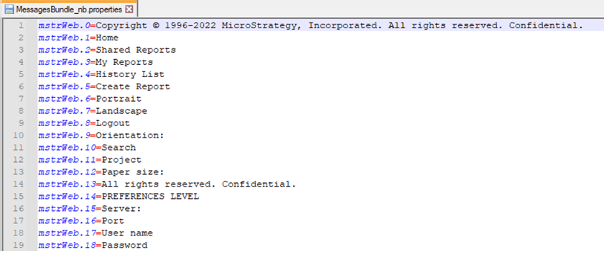
The English
.jsfile is loacted in the
<LibraryWeb_Deployment>/DossierReact/dist/messagesfolder. This also needs to be translated to Norwegian and saves as
nb_NO.js.

To add the Norwegian locale to Library Web, perform the following steps:
<LibraryWeb_deployment>\plugins) and add the plugin folder, '
AddingNorwegianLanguage,' with the three files:
Strategy.xml
locales.xml
format_config.xml
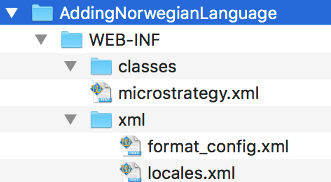
MessagesBundle_tr.propertiesto the
<LibraryWeb_Deployment>WEB-INF/classes/resourcesfolder.
nb_NO.jsto the
<LibraryWeb_Deployment>DossierReact>
dist>messagesfolder.
