EducationSoftwareStrategy.com
StrategyCommunity

Knowledge Base

Product

Community

Knowledge Base

TopicsBrowse ArticlesDeveloper Zone

Product

Download SoftwareProduct DocumentationSecurity Hub

Education

Tutorial VideosSolution GalleryEducation courses

Community

GuidelinesGrandmastersEvents
x_social-icon_white.svglinkedin_social-icon_white.svg
Strategy logoCommunity

© Strategy Inc. All Rights Reserved.

LegalTerms of UsePrivacy Policy
  1. Home
  2. Topics

KB486187: Adobe Analytics Connector not working for users without administrator privileges or “Bypass all objects security access check” privilege


Mateusz Rusinowski

Senior Support Engineer • MicroStrategy


This article describes how to resolve issues with Adobe Analytics connector not available for users without administrative privileges or "Bypass all objects security access checks".

For some non-administator users the Adobe Analytics connector is not available in Strategy Web. When trying to configure it the following error is displayed: 

 

ka04W000000rZMlQAM_0EM4W0000096iMK.png


CAUSE: 
 
Adobe Analytics connector requires access to Database Instances folder, because the connector itself acts as a Database instance. The error message is displayed because the user does not have correct access rights to the Database instance. 
    
SOLUTION: 
 
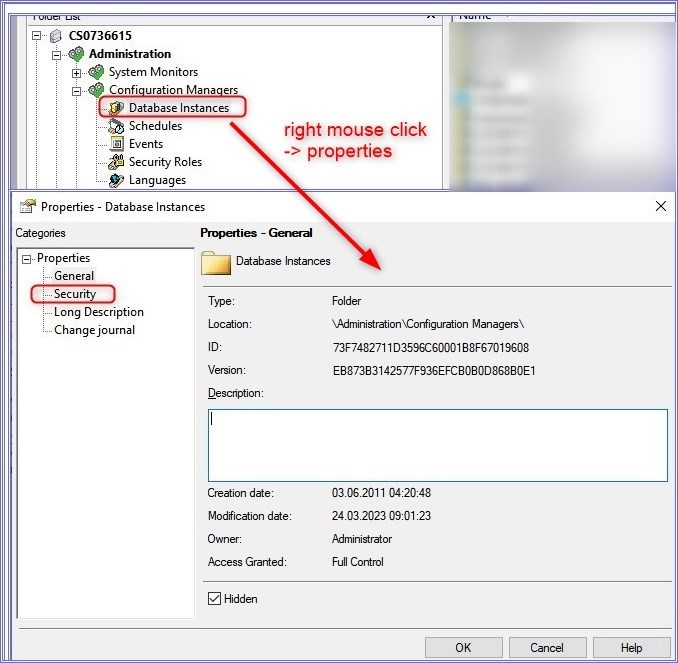
1. In Developer open Administration->Configuration Managers-> Database Instances 
2. Right click Database Instances and open properties:
 

ka04W000000rZMlQAM_0EM4W0000096iML.jpeg

  
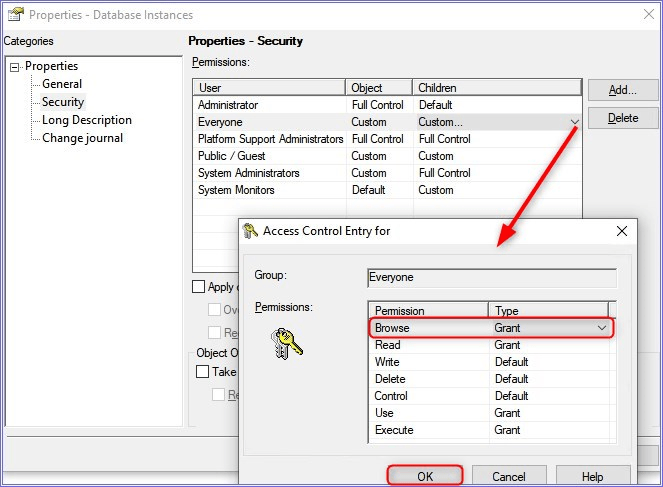
3. Go to Security Tab 
4. For user group Everyone under "Children" select Custom, and grant Browse permissions 
ka04W000000rZMlQAM_0EM4W0000096iMM.png


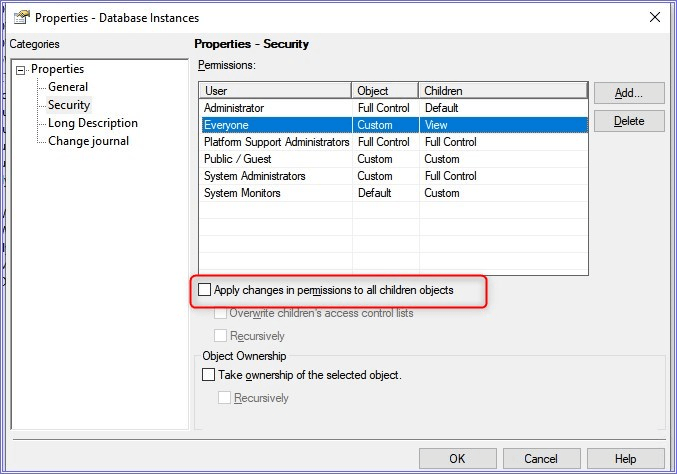
5. Check the checkbox "Apply changes in permissions to all children objects" and click ok. 
ka04W000000rZMlQAM_0EM4W0000096iMN.png


6. After this change, the users from Everyone group should be able to see the connector. 
  
PLEASE NOTE: It may require to clear browser caches to see the changes. 


Comment

0 comments

Details

Knowledge Article

Published:

November 17, 2023

Last Updated:

November 17, 2023