SYMPTOMS:
When updating schema in 2 or 3 tier, users receive an error message from Strategy Developer as seen in the screenshot below:

Error(s) occurred while loading schema: DSSSQLEngine: Schema loading error: [DFCSCHEMA] Population Exception: The object shown in the following hierarchy no longer exists in schema: -Link-Attribute:(unexpected) Table GUID: 2E50B92F44167F6B4A7C258D59613A98
Message from GetErrorInfo : Login failure. Error(s) occurred while loading schema: 1.

2. Create an expression which would contain a metric in its syntax. For example, in Strategy Tutorial select column MONTH_ID from LU_MONTH. To include a metric into the syntax, we are using this sample case statement:
Case(([MONTH_ID] < Revenue), "Y", "N")
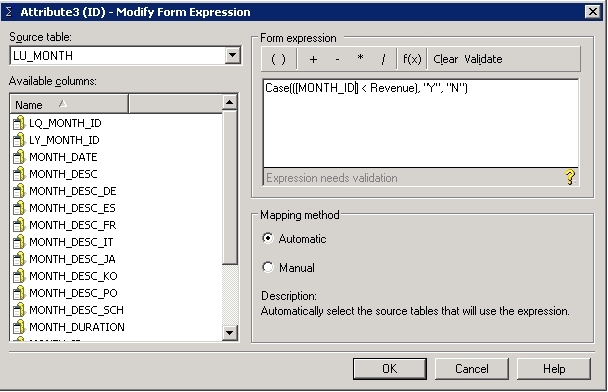
3. Validate the syntax and and verify column or metric name if multiple objects with the same name have been found and make sure that syntax has been validated.
4. Click OK to save expression and OK to save attribute form. Save the attribute and close attribute editor.
5. Update the schema in Strategy Developer to observe the error message from SYMPTOM section.
CAUSE:
This is a known limitation of Strategy Developer. The error message happens because the attribute expression contains a metric. Having metrics inside an attribute definition is not valid.
ACTION:
Remove such references to metrics from the attribute expression. Later releases of Developer may remove the ability to add metrics inside the attribute editor to prevent such issues.
WORKAROUND:
Although using metric in attribute definition is invalid, there are certain instances/requirements when aggregated metric values under particular filtering or level conditions may need to be used as an attribute in the report. Using Derived Elements should allow you to meet such requirements. To read more about Derived Elements in Strategy use the following URL
https://www2.microstrategy.com/producthelp/10.7/BasicReporting/WebHelp/Lang_1033/Content/BasicReporting/Derived_elements.htm
This issue has been logged as KB ID: KB440195
