EducationSoftwareStrategy.com
StrategyCommunity

Knowledge Base

Product

Community

Knowledge Base

TopicsBrowse ArticlesDeveloper Zone

Product

Download SoftwareProduct DocumentationSecurity Hub

Education

Tutorial VideosSolution GalleryEducation courses

Community

GuidelinesGrandmastersEvents
x_social-icon_white.svglinkedin_social-icon_white.svg
Strategy logoCommunity

© Strategy Inc. All Rights Reserved.

LegalTerms of UsePrivacy Policy
  1. Home
  2. Topics

KB486234: After updating MicroStrategy to 2021 U10 or Above Collaboration does not start when TLS is enabled


Gustavo Sulbaran

Product Specialist • MicroStrategy


This article indicates the situation in which the user has a valid configuration pre-U10 but just after upgrading to 2021 U10 or above TLS enabled collaboration cannot be started.

PREREQUISITE:
Before starting with this article, it is assumed the user with the issue also has:
 

  1. Collaboration is able to start with TLS disabled.
  2. Steps given in the Collaboration diagnostics area from LINK do not show particular issues
  3. The same Certificate files work properly for the web server.
  4. No other environment (prod, dev, uat, other) with U10 or above works, meaning they also have the same issue.

 
ISSUE:
The user had a properly configured an environment “pre Strategy Update 10”, later; an update is performed (to 10 or above) and seems like everything works fine, needless to say; when checking the status of collaboration it seems as is down 
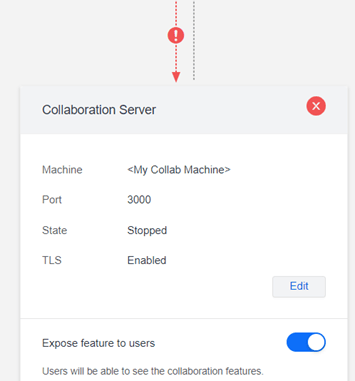
ka0PW0000000APBYA2_0EMPW000002W5oD.jpeg

As the administrator goes ahead and decide to validate the status of collaboration server, he realizes that the service state is “stopped.” and every attempt to start it fails.
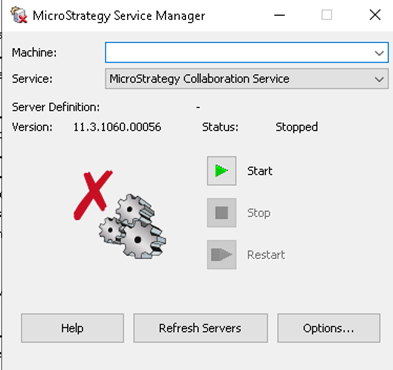
ka0PW0000000APBYA2_0EMPW000002W386.jpeg

Needless to say if the user removes the TLS configuration from config.json and tries again he realizes that the service is able to start.
CAUSE:
This issue is most likely due to the use of pbeWithSHA1And40BitRC2-CBC in the PKCS#12 file, in particular, because of RC2.
 
This is important because Collaboration runs under Node.js, starting in Node.js v17 RC2 was considered legacy and currently the Update 10 of Strategy possess the Node.js v18 meaning that such files won’t work, thus making the start of the service fail and explaining why disabling it makes it work.
ACTION:
To fix this then the administrator should consider protecting the PKCS#12 files using a different cipher.


Comment

0 comments

Details

Knowledge Article

Published:

December 15, 2023

Last Updated:

December 15, 2023