After upgrading to Strategy 2019 Update 1, starting the Strategy PDF Exporter service in Service Manager causes an error to appear.
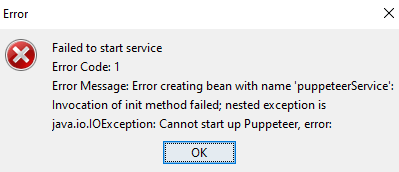
The error reads:
Failed to start service
Error Code: 1
Error Message: Error creating bean with name 'puppeteerService':
Invocation of init method failed; nested exception is java.io.IOException: Cannot start up Puppeteer, error:
In the the NewExportEngine.log, the error message reads:
Exception in method: void com.Strategy.nee.PdfExporterApplication.main(String[]) with arguments: [[Ljava.lang.String;@14f232c4] org.springframework.beans.factory.BeanCreationException: Error creating bean with name 'puppeteerService': Invocation of init method failed; nested exception is java.io.IOException: Cannot start up Puppeteer, error:
at org.springframework.beans.factory.annotation.InitDestroyAnnotationBeanPostProcessor.
postProcessBeforeInitialization(InitDestroyAnnotationBeanPostProcessor.java:139)…
This error may result if Node.js failed to upgrade while upgrading to Strategy Update 1. You can confirm this is the case by checking your install log.
If you see an error message that says something like, "Fail to copy node.exe to C:\Program Files (x86)\Common Files\Strategy\nodejs” generated, check that you have the correct Node.js version.
To check if you have the correct Node.js version, perform the steps below:
If your version is not v8.x.x, first try repairing the installation. If this does not resolve the issue, you will need to perform a workaround.
The easiest workaround is to manually install and configure the correct version of Node.js. To install and configure:
