In order to get the best performance from your Redshift Database, you must ensure that database tables have the correct Column Encoding applied. Compression is a column-level operation that reduces the size of data when it is stored.
By default, Amazon Redshift stores data in its raw, uncompressed format. You can apply a compression type, or encoding, to the columns in a table manually when you create the table, or you can use the COPY command to analyze and apply compression automatically – Recommended (use COMPUPDATE ON option set in the COPY command. The copy command chooses the best compression to use for the columns that it is loading data to). Run the following two queries to analyze compression encoding against all tables and identify the tables that are missing encoding.
SELECT database, schema || '.' || "table" AS "table", encoded, size
FROM tables
WHERE encoded='N'
ORDER BY 2;
SELECT trim(n.nspname || '.' || c.relname) AS "table",trim(a.attname) AS "column",format_type(a.atttypid, a.atttypmod) AS "type",format_encoding(a.attencodingtype::integer) AS "encoding", a.attsortkeyord AS "sortkey"
FROM names n, classes c, attributes a
WHERE n.oid = c.relnamespace AND c.oid = a.attrelid AND a.attnum > 0 AND NOT a.attisdropped and n.nspname NOT IN ('schema','catalogs','table') AND format_encoding (a.attencodingtype::integer) = 'none' AND c.relkind='r' AND a.attsortkeyord != 1 ORDER BY n.nspname, c.relname, a.attnum;Analyze compression table_name;
Analyze compression table_name COMPROWS 100000;
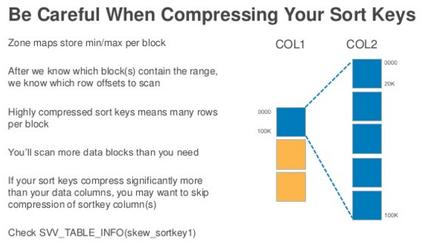
For column compression, you can also consider using the Amazon Redshift Column Encoding Utility.
(https://github.com/awslabs/amazon-redshift-utils/tree/master/src/ColumnEncodingUtility)
