EducationSoftwareStrategy.com
StrategyCommunity

Knowledge Base

Product

Community

Knowledge Base

TopicsBrowse ArticlesDeveloper Zone

Product

Download SoftwareProduct DocumentationSecurity Hub

Education

Tutorial VideosSolution GalleryEducation courses

Community

GuidelinesGrandmastersEvents
x_social-icon_white.svglinkedin_social-icon_white.svg
Strategy logoCommunity

© Strategy Inc. All Rights Reserved.

LegalTerms of UsePrivacy Policy
  1. Home
  2. Topics

Amazon's Alexa: Key Analytics Applications That Deliver Voice-activated Reporting


Diego Patterson

Account Executive • MicroStrategy


Alexa, the personal assistant developed by Amazon, delivers voice interaction capabilities that can be integrated with MicroStrategy.Learn about the applications you can deploy to deliver voice-controlled data analytics.

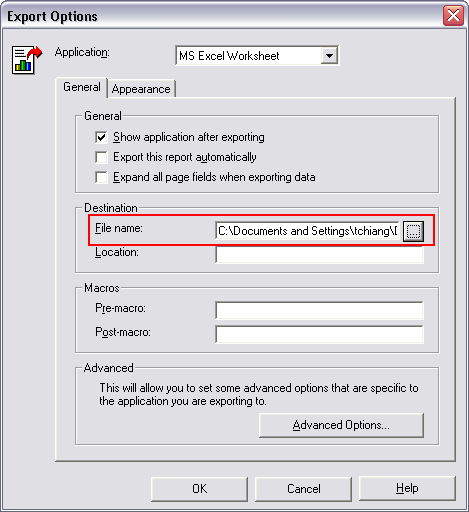
When users export an Excel document in Strategy Developer 9.x and higher, the export engine first creates a temporary file and then saves it to the destination specified in the export option:
 

ka02R000000kXXwQAM_0EM440000002E9K.gif

 
Temporary files are created under the system temp folder on the machine where Excel documents are exported in Strategy Developer. To find the exact location of the temp folder:
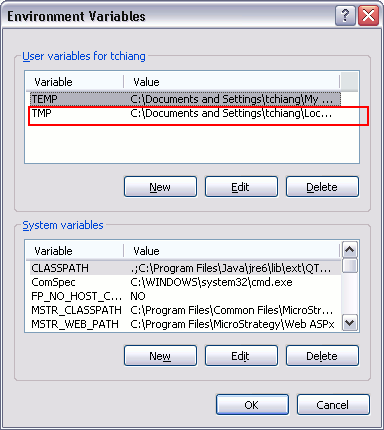
  • Right mouse click on "My Computer" and select "Properties"
  • Go to "Advanced" tab and click on "Environment Variables"
  • Under "User variables for ", "TMP" variable shows the temp folder used by Strategy export engine.
     
ka02R000000kXXwQAM_0EM440000002E9R.gif

 
The user can modify the default location of the TMP variable. However, other third party applications may also use this variable. It is the user's responsibility, if any problems occur outside Strategy's products after the user changes the TMP variable.


Comment

0 comments

Details

Knowledge Article

Published:

May 23, 2017

Last Updated:

May 23, 2017