EducationSoftwareStrategy.com
StrategyCommunity

Knowledge Base

Product

Community

Knowledge Base

TopicsBrowse ArticlesDeveloper Zone

Product

Download SoftwareProduct DocumentationSecurity Hub

Education

Tutorial VideosSolution GalleryEducation courses

Community

GuidelinesGrandmastersEvents
x_social-icon_white.svglinkedin_social-icon_white.svg
Strategy logoCommunity

© Strategy Inc. All Rights Reserved.

LegalTerms of UsePrivacy Policy
  1. Home
  2. Topics

KB483962: An error appears when refreshing data created from the SharePoint Files Connector


Community Admin

• Strategy


This article explains why you may get an error when refreshing data imported from the SharePoint connector. This article also provides a solution to this error.

Description


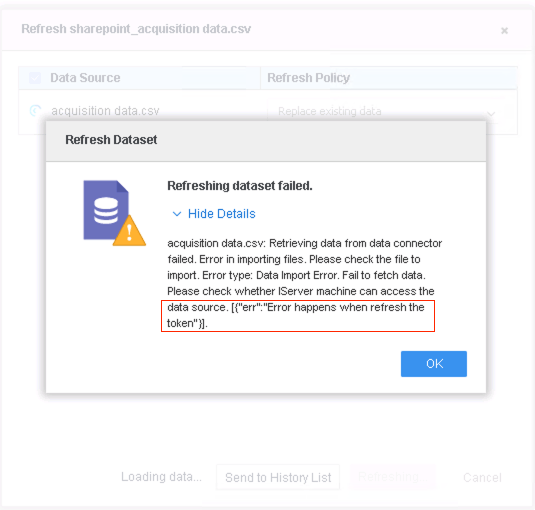
When republishing a dataset obtained from the SharePoint connector, the following error appears:
"Refreshing dataset failed. acquisition data.csv: Retrieving data from data connector failed. Error in importing files. Please check the file to import. Error type: Data Import Error. Fail to fetch data. Please check whether IServer machine can access the data source. [{"err"."Error happens when refresh the token"}]"
ka04W000001IwudQAC_0EM2R000000nOU9.jpeg

Why is this happening?


When you refresh a dataset, the access token and refresh token are used directly to obtain data form SharePoint. The error indicates that you cannot fetch the file because the tokens are expired.
Additionally, when your cube is created from an SDK connector, the OAuth 2.0 authorization flow is not planned temporarily. 

Solution


To update the access token and the refresh token, you must manually edit the cube and republish or refresh it.
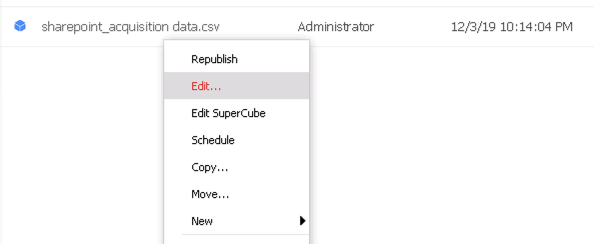
  • Right-click your cube and click Edit.
ka04W000001IwudQAC_0EM2R000000nOUn.jpeg
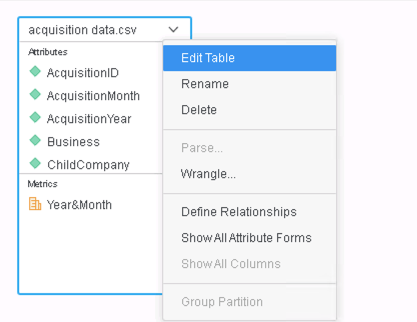
  • On the table, click the drop-down and click Edit Table.
ka04W000001IwudQAC_0EM2R000000nOV2.jpeg
  • Click Submit without making any modifications on the connector page.
ka04W000001IwudQAC_0EM2R000000nOV7.jpeg
  • Click Update Dataset.
  • Click Finish.
ka04W000001IwudQAC_0EM2R000000nOVH.jpeg
  • Right-click your cube again and click Republish. The cube is successfully republished.
ka04W000001IwudQAC_0EM2R000000nOVM.jpeg

For more information about token lifetimes, see the SharePoint Online Documentation. For more information on the SharePoint connector, see the article SharePoint.


Comment

0 comments

Details

Knowledge Article

Published:

January 8, 2020

Last Updated:

January 8, 2020