EducationSoftwareStrategy.com
StrategyCommunity

Knowledge Base

Product

Community

Knowledge Base

TopicsBrowse ArticlesDeveloper Zone

Product

Download SoftwareProduct DocumentationSecurity Hub

Education

Tutorial VideosSolution GalleryEducation courses

Community

GuidelinesGrandmastersEvents
x_social-icon_white.svglinkedin_social-icon_white.svg
Strategy logoCommunity

© Strategy Inc. All Rights Reserved.

LegalTerms of UsePrivacy Policy
  1. Home
  2. Topics

KB483935: An error appears when republishing a cube created in a dossier by another user


Juliana Schoettler

Product Manager, Senior • MicroStrategy


This article explains why you may see the error, Unable to publish the cube. com.microstrategy.webapi.MSTRWebAPIException: (You do not have access privileges to create objects of type ‘Report Definition’.)” while republishing a cube created in a dossier by another user.

Starting with the release of Strategy ONE (March 2024), dossiers are also known as dashboards.

Description


The following error appears when trying to republish a cube created by a different user within a dossier.
".com.Strategy.webapi.MSTRWebAPIException: (you do not have access privileges to create objects of type 'Report Definition'.)"

ka0PW0000001Jb6YAE_0EM2R000000nHJ9.jpeg

Steps to Reproduce

  1. Create a new dossier.
  2. Import a dataset into the dossier. This create a cube in the dossier.
  3. Log out and log back in as a different user.
  4. Open the same dossier you created in step 1.
  5. Right-click the cube and select republish. Notice the error appears.

Why is this happening?


Datasets created in a dossier are managed by the system and are not freestanding cubes. This means that the cubes must be republished in the dossier by a user with the permissions to the cube.

Solution


You can confirm if a user does not have the necessary permissions to the Intelligent cube by temporarily granting them Bypass All Object Level Security Checks.
If this resolves the error, you can grant permissions to system managed cubes in Developer using the following steps:

  • Open Strategy Developer.
  • From the menu bar, choose Tools > Search for Objects.
  • Select the Object Types tab.
ka0PW0000001Jb6YAE_0EM2R000000nHK2.jpeg
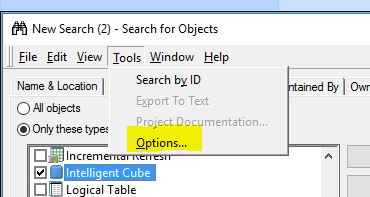
  • In the Search for Objects window, select Tools > Options.
ka0PW0000001Jb6YAE_0EM2R000000nHK7.jpeg
  • Select the Display Managed Objects checkbox.
  • Select the Display Managed Objects Only checkbox.
ka0PW0000001Jb6YAE_0EM2R000000nHKC.jpeg
  • Click OK.
  • Right-click the Intelligent Cube and select Properties. 
  • Go to Properties > Security. 
ka0PW0000001Jb6YAE_0EM2R000000nHKM.jpeg
  • Grant permissions to users as needed.

Comment

0 comments

Details

Knowledge Article

Published:

December 23, 2019

Last Updated:

March 21, 2024