EducationSoftwareStrategy.com
StrategyCommunity

Knowledge Base

Product

Community

Knowledge Base

TopicsBrowse ArticlesDeveloper Zone

Product

Download SoftwareProduct DocumentationSecurity Hub

Education

Tutorial VideosSolution GalleryEducation courses

Community

GuidelinesGrandmastersEvents
x_social-icon_white.svglinkedin_social-icon_white.svg
Strategy logoCommunity

© Strategy Inc. All Rights Reserved.

LegalTerms of UsePrivacy Policy
  1. Home
  2. Topics
  3. Analysing pictures' EXIF data

Analysing pictures' EXIF data


Robert Prochowicz

Manager, Sales Engineering • MicroStrategy


Digital pictures contain Exchangeable Image File Format (EXIF) data like camera type, camera orientation, exposure time, geographical location and many more. This data can be extracted, aggregated and analyzed. A combination of Python script + MicroStrategy Dossier is available for download.

Starting with the release of Strategy ONE (March 2024), dossiers are also known as dashboards.
Digital pictures contain Exchangeable Image File Format (EXIF) data like camera type, camera orientation, exposure time, geographical location and many more. This data can be extracted, aggregated and analyzed. A Python script has been used to crawl through folder structure, analyse every picture it can find and save that data in a CSV file. Next, a Strategy Desktop has been used to analyse all identified pictures. There were over 40k pictures and there were a few interesting insights from it.
An article about this dossier will be published on MicroStrategy Blog
Some screenshots from dossier:
Visualization of device orientation EXIF data
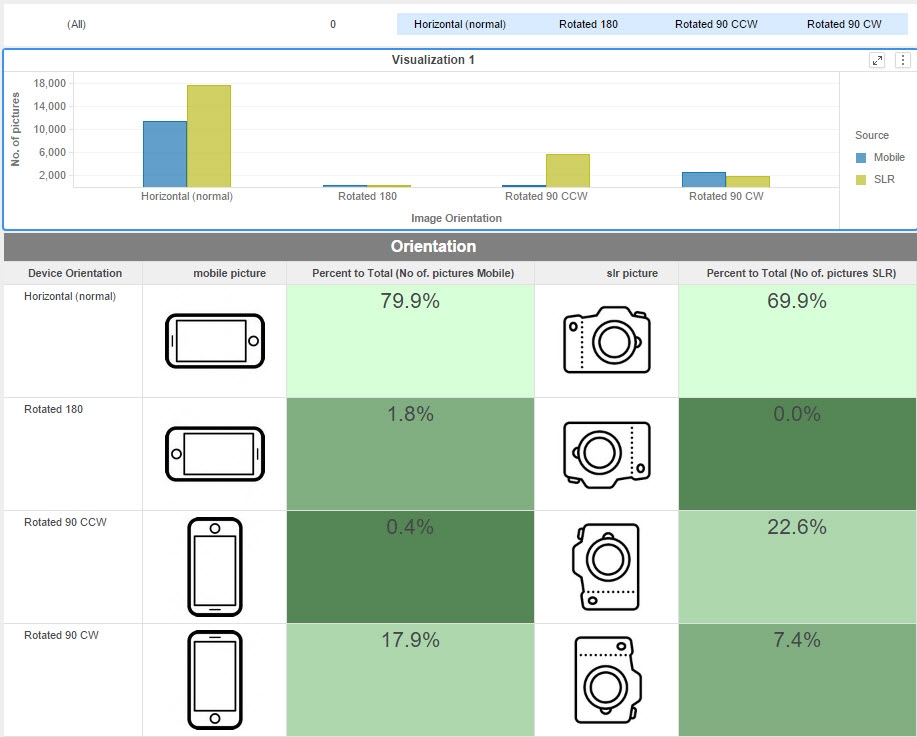
ka0PW0000001JQTYA2_0EM44000000Wfdb.jpeg

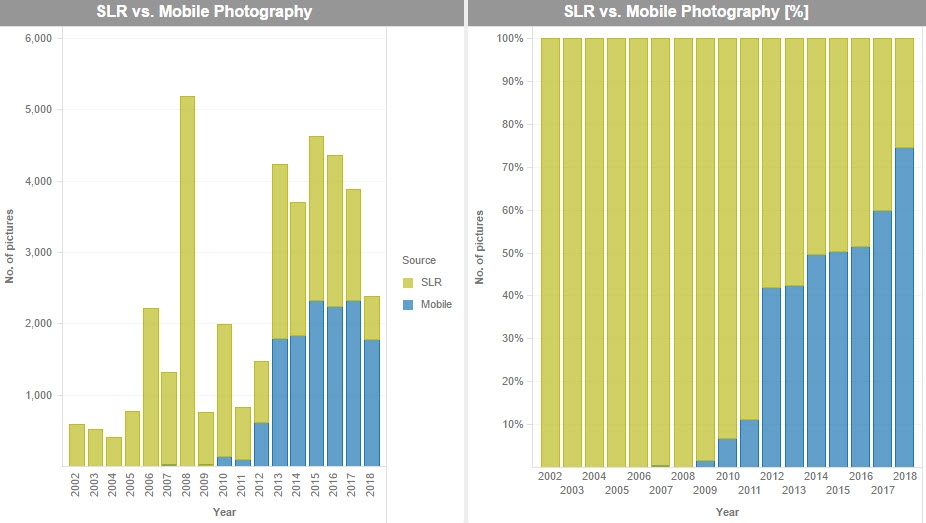
SLR vs. Mobile Photography bar chart

ka0PW0000001JQTYA2_0EM44000000Wfdq.jpeg

Pictures on a map + possibility to open fulls size pictures in system browser

ka0PW0000001JQTYA2_0EM44000000Wfdv.jpeg

Statistics of "selfies" and Flash usage
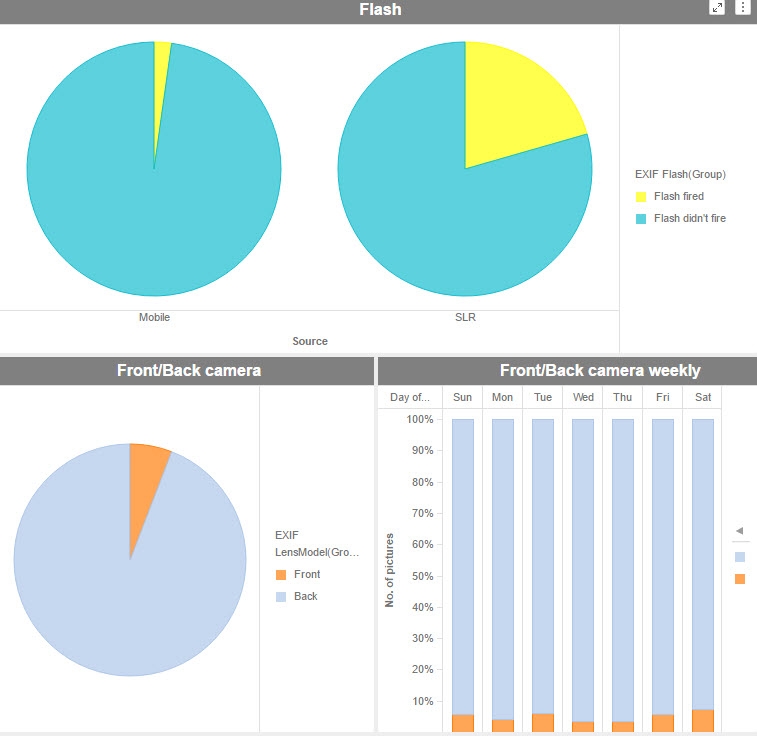
ka0PW0000001JQTYA2_0EM44000000Wfe5.jpeg

It's possible to analyse dominant colors of each picture - below: filtering only blue pictures

ka0PW0000001JQTYA2_0EM44000000WfeA.jpeg

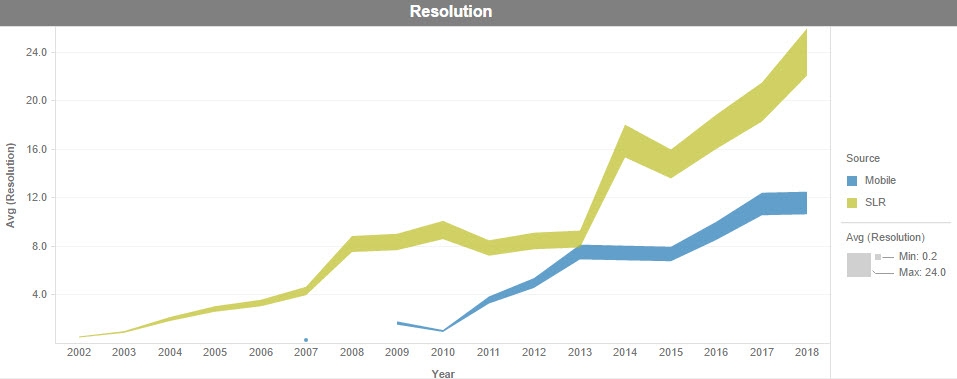
Trends in pictures resolution

ka0PW0000001JQTYA2_0EM44000000WfeF.jpeg

Customizing Python script

  • Install Python libraries: exifread and PIL
  • Place this script in the top folder containing your images. The folder can contain subfolders.
  • This script reads EXIF data of all pictures and saves it to a CSV file for further analysis.
  • You can run it several times in different folders and then append outcome CSV files. Just remember to modify the variable 'SAMPLE_ID' for each location of pictures. 'SAMPLE ID' is important later in MSTR Dossier. Most visualizations are filtered by this filed.
  • Variable 'analyze_color' - change to False if you don't want to analyze colors of pictures - the program will run 20-30x faster (in my case 7 minutes with 'analyze_color' = False and 3,5h wtih 'analyze_color' = True)
  • This script has been tested on Windows PC and on Mac. On Mac you need to install Pillow library (a fork of PIL).
  • The script saves only data from a few EXIF tags. If you are interested in others that I've skipped, just add them to 'tags_list' list.
  • I did not add much try/except tests. In case of some unexpected situations and exceptions you would need to modify the script. For example exifread library is able to analyse RAW files like .CR2. PIL library (used to read width and height) can't do that and will throw an exception.

Customizing Dossier

  • Dossier contains a CSV file with a few sample rows. Replace it with your own CSV file.
  • Dossier can be used on any computer, but displaying pictures thumbnails will work only if the dossier is saved on the same computer as pictures.
  • SAMPLE ID column in CSV file (Source attribute in dossier) is an important one. I've used it to distinguish between photos taken with a mobile device from pictures comming from SLR camera. If you don't have different data in SAMPLE ID column. Just use 'Camera Model' attribute for filtering.

Comment

0 comments

Details

Example

Published:

August 3, 2018

Last Updated:

March 21, 2024