SYMPTOM:
During the installation of Strategy Intelligence Server application in a Windows Server with the Strategy Messaging feature selected the error "Apache Kafka has stopped working - Please close the program" is encountered. Similar errors will occur for Apache ZooKeeper, Strategy Intelligence Server Log Consumer and the PDFExport Service.
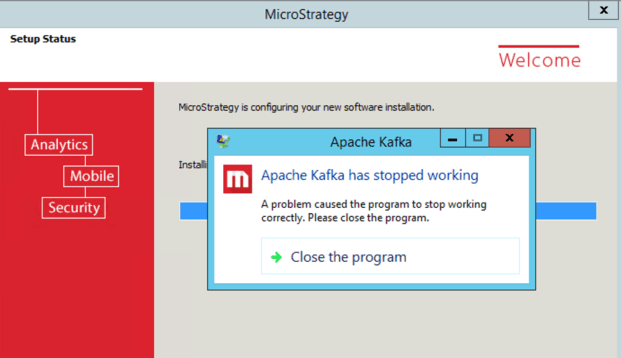
When troubleshooting this issue the following event can be seen in the Windows Event Viewer:
Faulting application name: kafka.exe, version: 10.11.51.56, time stamp: 0x59685dd7
Faulting module name: MSVCP140.dll, version: 6.3.9600.19101, time stamp: 0x5b5017ac
Exception code: 0xc0000135
Fault offset: 0x00000000000ecf30
Faulting process id: 0x2ca0
Faulting application start time: 0x01d44a0085d8515c
Faulting application path: D:\Program Files (x86)\MicroStrategy\Messaging Services\Kafka\kafka_2.11-0.10.1.0\kafka.exe
Faulting module path: MSVCP140.dll
Report Id: c3a3dc35-b5f3-11e8-8128-f403434db010
Faulting package full name:
Faulting package-relative application ID:
Again similar errors will be seen for executables ZooKeeper.exe, MSTRPDFExportService.exe and MSRIntelligenceServerLogConsumer.exe.
CAUSE:
A potential cause for this issue is missing library MSVCP140.dll from the Microsoft Visual C ++ Redistributable for Visual Studio 2015 package on the Windows Server.
ACTION:
This issue can be resolved by manually executing the Visual C ++ Redistributable for Visual Studio 2015 package installation provided by the Strategy installation package in the Utilities folder:
\Installations\Utilities\3rdParty\vcredist
Package:

Once these packages have been installed, start the Strategy product installation by running Setup.exe.
KB441703
