EducationSoftwareStrategy.com
StrategyCommunity

Knowledge Base

Product

Community

Knowledge Base

TopicsBrowse ArticlesDeveloper Zone

Product

Download SoftwareProduct DocumentationSecurity Hub

Education

Tutorial VideosSolution GalleryEducation courses

Community

GuidelinesGrandmastersEvents
x_social-icon_white.svglinkedin_social-icon_white.svg
Strategy logoCommunity

© Strategy Inc. All Rights Reserved.

LegalTerms of UsePrivacy Policy
  1. Home
  2. Topics

KB485455: Attribute elements from Report filter or Grid visualization incorrectly display the element from other attributes in dossier in MicroStrategy 2020 and above


Danfeng Zhan

Principal Product Specialist • Strategy


This article narrates two scenarios of linked attributes elements shows list from another attribute in dossier due to a defect in MicroStrategy 2021. A workaround is available in the current document. A solution/code fix for this issue is not available in current releases but is being reviewed for a future MicroStrategy release.

Starting with the release of Strategy ONE (March 2024), dossiers are also known as dashboards.

Symptom


In Strategy 2021 Update 5, it is noticed in a dossier attribute (linked attribute) element from report filter or grid visualization incorrectly display the elements from other attributes. 

Scenario 1


There are two attributes named ‘Hospital’ and ‘Doctor’, and both are linked attributes to other datasets. There is another attribute named ‘Relative Time Frame’. 
Below steps expose the issue: 

  1. Insert a new chapter.
  2. Add ‘Relative Time Frame’ to filter panel.
  3. Add ‘Hospital’ to filter panel, use selector ‘Relative Time Frame’ target to ‘Hospital’. 
  4. Now the element list becomes the ones of attribute ‘Doctor’. 

Scenario 2


There are two attributes named ‘Department’ and ‘Sales Department’ come from two datasets, and they are linked to each other. There is another attribute named ‘Employee”. 
Below steps expose the issue: 

  1. Insert a new chapter.
  2. Add a Grid visualization.
  3. Add ‘Employee’ and ‘Sales Department’ to the grid.
  4. Now the ‘Employee’ element list displays the ones of attribute ‘Sales Department’. 


The query incorrect shows Sales Department is traced as Employee. 


Tables Accessed:    

Table1    [F_min.xlsxF3394B1CB93D4AFCA2693E1DF0D6C946]:    Sales Department,     Sales_number, RowNumber - min.xlsx,     FACT_TABLE    

select    ([Sales Department]@[Sales Department]) as ([Employee]@[EmployeeName],[Employee]@[EmployeeName]),
[[F_min.xlsxF3394B1CB93D4AFCA2693E1DF0D6C946].Sales_number] as [Sales_number]
from    min.xlsx    
with Table Join Tree:     [F_min.xlsxF3394B1CB93D4AFCA2693E1DF0D6C946]    
to    Ex3_tempcube1

Cause


This is a known issue with Strategy 2021. 
Attribute link info with GUID_NULL is being added to the dossier during execution makes back-end logic incorrectly figures out that these attributes are in the same group. 
 

Action


Strategy will continue to investigate and post updates as soon as they are available.
 

Workaround

  1. Create a new blank dossier.
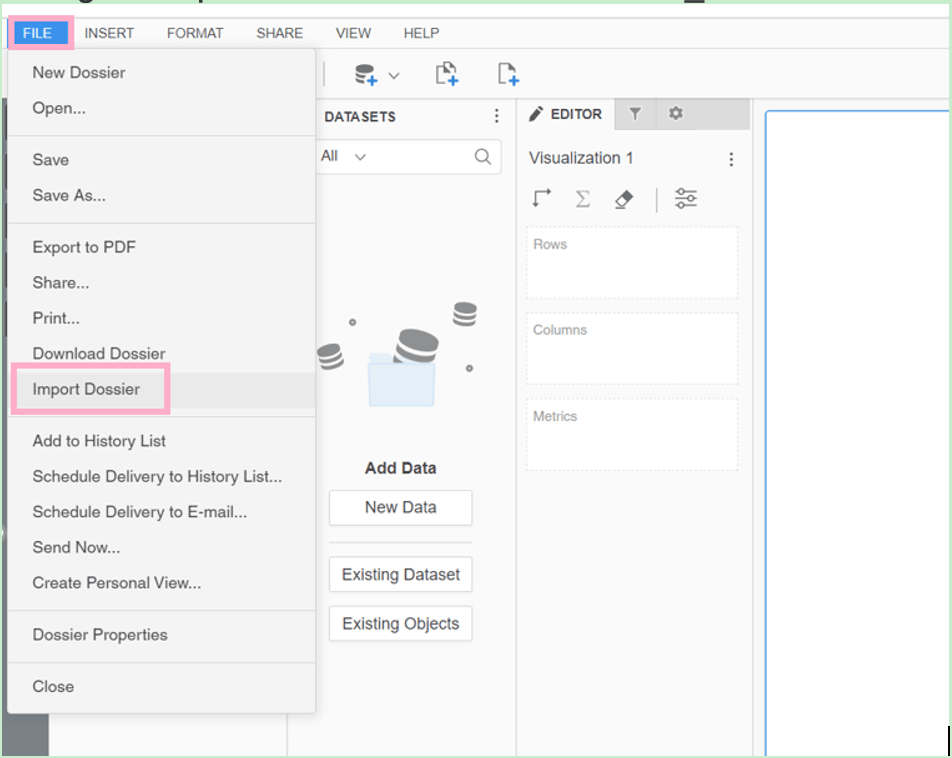
  2. Import issue dossier into the new blank dossier via File menu>Import Dossier as show below; during the import the attribute links with GUID_NULL will not be added into the new dossier.
ka0PW0000001JhVYAU_0EM4W000004ZFWF.jpeg
  1. Save the new dossier, this new dossier should be fine without the issue.


Comment

0 comments

Details

Knowledge Article

Published:

April 13, 2022

Last Updated:

March 21, 2024