Workload Management (WLM) is necessary to optimize access to shared resources for concurrently executing queries.
The goals of a functional workload management are to:
Both Strategy and Teradata provide WLM
From Strategy, it allows prioritizing workload in many ways:
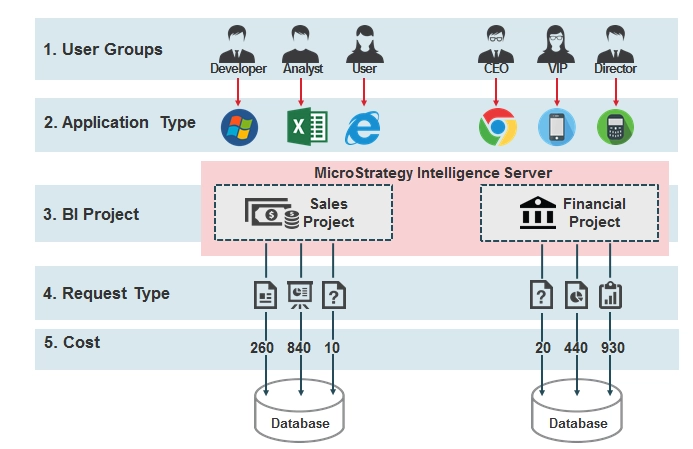
Teradata leverages Query bands to do Workload management. Query Bands provide a way to “tag” each SQL statement with Strategy-specific information such as the report name, project name, job ID, user, priority, etc. VLDB Pre/Post Statements can be used to pass the query band information, allowing Teradata system administrators to assign specific resource usage and priority settings based on run-time attributes of the originating Strategy environment. Additionally, Query Band information is used post-runtime to facilitate analysis, MSTR report identification, and tuning.
The following provides a recommendation to facilitate consistency of Query Band names to allow Enterprise-wide collection and analysis of Query Bands across all applications:
Variable | MicroStrategy Meaning | "Reserved" Query Band |
!d | Date from Intelligence Server | StartTime (combine with !t) |
!t | Timestamp from Intelligence Server | StartTime (combine with !d) |
!u | MicroStrategy user name | ClientUser |
!p | Project name | Source |
!z | Project ID (16-digit hex ID) |
|
!o | Report name | Action |
!r | Report ID (16-digit hex ID) |
|
!j | Intelligence Server job ID | JobID |
!s | User Session ID (16-digit hex ID) |
|
From the Strategy perspective, users can set these Query Bands under the following VLDB sections:
VLDB Category | VLDB Property Setting | Value |
Pre/Post Statements | Report Pre Statement | Teradata Reserved Query Band names SET QUERY_BAND ='ApplicationName=MicroStrategy; ClientUser=!u;Source=!p;Action=!o;StartTime=!dT!t; JobID=!j;sess_id=!s;proj_id=!z;report_guid=!r;' FOR SESSION; |
Pre/Post Statements | Cleanup Post Statement | SET QUERY_BAND = NONE FOR SESSION; |
This will result in the following SQL for report requests and element requests.
SET QUERY_BAND ='ApplicationName=Strategy;Version=9.0.1;ClientUser=!u;Source=!p;Action=!o; StartTime=!dT!t; JobID=!j;Importance=!i;sess_id=!s;proj_id=!z;report_guid=!r;' FOR SESSION;
create volatile table ZZSP00, no fallback, no log(YEAR_ID INTEGER, SUBCAT_ID INTEGER, WJXBFS1 FLOAT) primary index (YEAR_ID, SUBCAT_ID) on commit preserve rows;
insert into ZZSP00 select a13.YEAR_ID YEAR_ID, a12.SUBCAT_ID SUBCAT_ID,…
SET QUERY_BAND NONE FOR SESSION;
VLDB Category | VLDB Property Setting | Value |
Pre/Post Statements | Element Browsing Pre Statement | Teradata reserved Query Band names: SET QUERY_BAND = ‘Source=!p;; SQLTYPE=ELEMENTBROWSE;; ClientUser=!u;;JobID=!j;;’ FOR SESSION;; |
Pre/Post Statements | Element Browsing Pre Statement | SET QUERY_BAND = NONE FOR SESSION;; |
This will result in the following SQL for element browse requests (instead of the SQL shown in the previous example):
SET QUERY_BAND = ‘Source=!p;SQLTYPE=ELEMENTBROWSE;ClientUser=msaylor;JobID=2379; Importance=999;’ FOR SESSION;
select a13.YEAR_ID YEAR_ID, from LU_YEAR
SET QUERY_BAND NONE FOR SESSION;
