Connectivity
To fully leverage Teradata for analytical SQL requests, the Teradata DSN configuration should be modified from its default values as follows:
· Maximum Response Buffer Size - should be increased to an acceptable value
· Enable Read Ahead - for interleaved fetches should be enabled (selected)
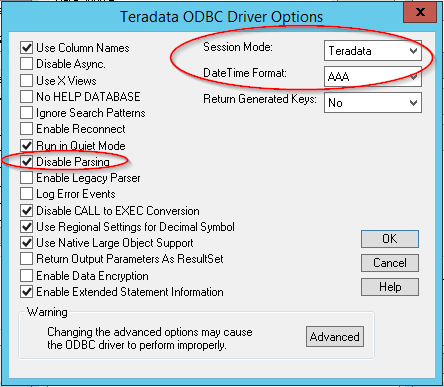
Additionally, when using Teradata as Strategy Metadata, the Teradata ODBC driver options should be set as follows
· Session Mode = Teradata
· DateTime Format = AAA
· Disable Parsing = enabled (selected)
Data Modeling
Third Normal Form and Dimensional Modeling
Teradata suggests the use of fully normalized physical schemas (specifically, Third Normal Form or 3NF). The merits of this approach are discussed in the Teradata User Documentation (http://www.info.Teradata.com), but the primary motivation is that a fully normalized schema provides the greatest flexibility in answering analytical questions in an enterprise environment while providing the highest level of consistency and maintainability. Further, Teradata’s unique technical characteristics allow it to provide high query performance that other RDBMS products may not be able to provide without using denormalization as a performance optimization technique.
Dimensional modeling is a logical modeling technique that is popular in the BI community. Sometimes Teradata’s recommendation to use a normalized schema is misinterpreted as a mutually exclusive alternative to dimensional modeling. This is unfortunate, because a dimensional model does not imply denormalization. Many dimensional modeling practitioners assume it is necessary to denormalize in order to achieve acceptable query performance and consequently introduce denormalization by default in to their models. In reality, it is entirely possible to have dimensional models that are also normalized. The classic snowflake schema is a perfect example. One of the main advantages of normalized dimensional models is that they explicitly represent the hierarchical structure of dimensions, enabling modelers and analysts to visualize data structures and relationships and to better comprehend complex data models. In addition, normalization eliminates data redundancy, minimizes maintenance effort and enables enforcement of referential integrity.
Strategy Preferences
Strategy is mostly agnostic towards the use of denormalization. The Strategy SQL Engine is designed to work along the full spectrum of data model topologies, supporting virtually any type of star, snowflake, or hybrid physical design and allowing physical designers to select the approach that provides the best performance characteristics for the specific database platform. In the case of Teradata systems, denormalization techniques are often unnecessary. The Strategy SQL Engine does not require a pure dimensional model and has built-in support for many constructs that are typical in Entity-Relationship (ER) schemas such as compound keys, many-to-many relationships, fact extensions and joint attribute relationships. There are certain data modeling constructs specific to ER models that are difficult to model for the SQL Engine. Some tips for handling these cases are provided in this document.
Based on extensive field experience with large-scale BI systems, Strategy sees the practical benefits of dimensional modeling in terms of presenting a simpler view to end users than what is possible with a generic ER model. The concept of a cube of facts, accessible by varying levels of independent dimensions, is proven as an intuitive paradigm for formulating business questions. In short, 3NF ER models are good for flexibility, but can be difficult to understand by business users. Dimensional models typically are easier for end users to understand and map more closely to the way business users think about their business.
Semantic Layer Database Considerations
Semantic layer physical database design should adhere to the following for best performance and indexing opportunities:
Best of Both Worlds
When using Strategy and Teradata, the best approach is to define a layer of application views in Teradata. This layer is commonly referred to as a semantic layer. Strategy applications are then defined entirely in terms of the views, rather than the physical tables themselves. This provides the best of both worlds by implementing a 3NF physical schema and using the views to present a more dimensional model to Strategy. The physical model is resilient to updates and changes in the enterprise and provides acceptable query performance. The business model presented to end users through Strategy is more intuitive because it is based on an application model with more dimensional characteristics. A good reference document is the Teradata white paper Data Model Overview: Modeling for the Enterprise While Serving the Individual.
Using Database Views
Many practical Strategy-Teradata implementations do use a set of database views on top of the physical tables in Teradata. Strategy applications are then defined entirely in terms of the views, rather than the physical tables themselves. This additional layer of abstraction provides flexibility for the Strategy Architect, who can tune the Strategy model by making changes to the views rather than physical changes to the underlying tables. Often the first set of views in this layer is a set of Base Views on the tables that simply select all of the data from the base tables using the LOCKING FOR ACCESS modifier. On top of the base views, customers can create a second layer of application views that are used to facilitate or simplify the application.
Note the following guidelines:
SQL Global Optimization
This setting can substantially reduce the number of SQL passes generated by Strategy. In Strategy, SQL Global Optimization reduces the total number of SQL passes with the following optimizations:
The default setting for Teradata is to enable SQL Global Optimization at its highest level. If your Database Instance is configured as an earlier version of Teradata, you may have to enable this setting manually. For more information, see the System Administration Guide.
Set Operator Optimization
This setting is used to combine multiple subqueries into a single subquery using set operators (i.e. UNION, INTERSECT, EXCEPT). The default setting for Teradata 12 is to enable Set Operator Optimization.
If your Database Instance is configured with an earlier version of Teradata, you must manually enable this setting. The following is an example SQL command for enabling the setting.
select a13.CATEGORY_ID CATEGORY_ID,
max(a14.CATEGORY_DESC) CATEGORY_DESC,
sum(a11.TOT_UNIT_SALES) WJXBFS1
from ITEM_EMP_SLS a11
join LU_ITEM a12
on (a11.ITEM_ID = a12.ITEM_ID)
join LU_SUBCATEG a13
on (a12.SUBCAT_ID = a13.SUBCAT_ID)
join LU_CATEGORY a14
on (a13.CATEGORY_ID = a14.CATEGORY_ID)
where (a11.EMP_ID)
in (((select r11.EMP_ID
from ITEM_EMP_SLS r11
where r11.ITEM_ID = 37)
except (select r11.EMP_ID
from ITEM_EMP_SLS r11
where r11.ITEM_ID = 217)))
group by a13.CATEGORY_ID
Bulk Inserts
Teradata can optimize performance of INSERT INTO… SELECT statements. If the target table is empty, the only transient journal entry made for the transaction are to note that the table was empty and data will be written in 32K blocks at a time to the target table. In certain cases, such as when using application partitioning, the SQL Engine will perform multiple inserts into the same temporary table. On the first insert into the table, the table is empty, and the operation is performed quickly. However, on the second insert into the table, single row inserts (rather than 32K blocks) are performed and the transient journal is updates for each row. However, by placing a semicolon in front of subsequent inserts into the same temporary tables, all inserts into the same table are done as if the table was empty and there is only one entry into the transient journal. This syntax is generated by default for Teradata, using the Bulk Insert String VLDB setting.
Sub Query Type
There are many cases in which the SQL Engine generates subqueries (i.e. query blocks in the WHERE clause):
The default setting for Sub Query Type for Teradata is Option 6 – “Use temporary table, falling back to IN for correlated subquery”. This setting instructs the SQL Engine to generate an intermediate pass instead of generating a subquery in the WHERE clause.
select a11.ITEM_ID ITEM_ID,
max(a12.ITEM_NAME) ITEM_NAME,
sum(a11.TOT_DOLLAR_SALES) TOT_DOLLAR_SALES
from ITEM_MNTH_SLS a11
join (
select distinct r11.ITEM_ID ITEM_ID
from ITEM_MNTH_SLS r11
where r11.MONTH_ID in (200012) ) pa1
on (a11.ITEM_ID = pa1.ITEM_ID)
join LU_ITEM a12
on (a11.ITEM_ID = a12.ITEM_ID)
where a11.MONTH_ID in (200012)
group by a11.ITEM_ID
Some reports may perform better with Option 3 – “WHERE (col1, col2) IN (Select s1.col1, s1.col2)...”. This setting instructs the SQL Engine to generate a subquery in the WHERE clause using the IN operator.
Reports that include a filter with an “AND NOT set qualification” (e.g. AND NOT relationship filter) could benefit from using temp tables to resolve the subquery. However, such reports will probably benefit more from using the Set Operator Optimization discussed below. The other settings are not likely to be advantageous with Teradata.
Note: Options 0, 1, 2, 4, and 5 are not likely to be advantageous with Teradata.
