Starting with the release of Strategy ONE (March 2024), dossiers are also known as dashboards.
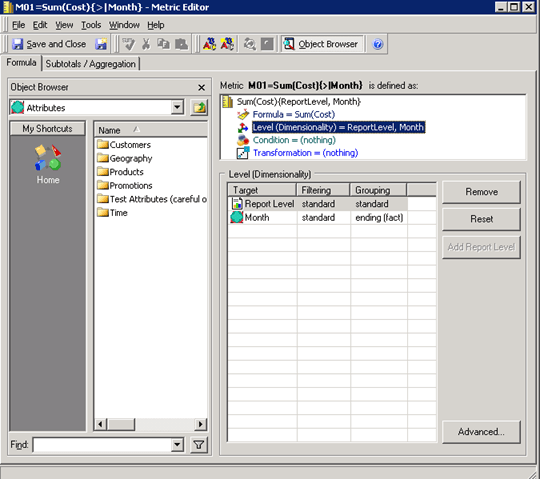
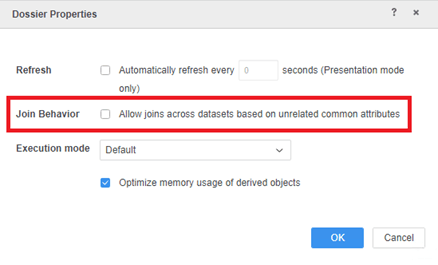
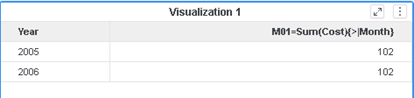
In Strategy 10.11, 10.4.7, and later versions, the engine performs double aggregation due to the optimization done in DE181833. This optimization causes non-distributive metrics to return incorrect data when the following conditions are met:
The following example uses the Strategy Tutorial Warehouse that is shipped with Strategy products.
*********   Visualization Summary Start  **********
Time Spent: 0.032 sec(s)
Query Execution Start Time: 2/28/2020 2:46:15 PM
Query Execution End Time: 2/28/2020 2:46:15 PM

Note: The total 'Time Spent' above may be greater than the summation of the individual step execution times below.
There are preparation tasks for each step that are not individually measured.
*********   Visualization Summary End    **********


************   Individual Step Start   ************
Number of Rows Returned: 576
Time Spent: 0.018 sec(s)
Query Execution Start Time: 2/28/2020 2:46:15 PM
Query Execution End Time: 2/28/2020 2:46:15 PM

Tables Accessed:
Table3	[F_MAIN_INDEX]:	Category, Month, Subcategory, 	M01=Sum(Cost){>|Month}, Cost, 	FACT_TABLE

select	[Month]@[MONTH_ID],
	[Subcategory]@[SUBCAT_ID],
	First<SortBy=([[Month]]Desc)>([[F_MAIN_INDEX].M01=Sum(Cost){>|Month}])@{[Subcategory],[Year]} as [M01=Sum(Cost){>|Month}]
from	C03=Month,Cat,Subcat,Cost,M01
with Table Join Tree: 	[F_MAIN_INDEX]
to	Ex1_tempcube0
************   Individual Step End     ************


************   Individual Step Start   ************
Number of Rows Returned: 24
Time Spent: 0.000 sec(s)
Query Execution Start Time: 2/28/2020 2:46:15 PM
Query Execution End Time: 2/28/2020 2:46:15 PM

Tables Accessed:
Table1	[L_MONTH]:	Month, 		LOOKUP_TABLE
Table2	[F_MAIN_INDEX]:	Year, Month, 	Profit, 	FACT_TABLE

select	[Year]@[YEAR_ID],
	[Month]@[MONTH_ID]
from	C02=Year,Month,Profit
with Table Join Tree: 	[F_MAIN_INDEX]
to	RELATION1-
************   Individual Step End     ************


************   Individual Step Start   ************
Number of Rows Returned: 576
Time Spent: 0.001 sec(s)
Query Execution Start Time: 2/28/2020 2:46:15 PM
Query Execution End Time: 2/28/2020 2:46:15 PM

select	*
from	Left Outer Join(
	                Ex1_tempcube0,
	                RELATION1-
	               ) on Month
to	Ex1_tempcube1
************   Individual Step End     ************


************   Individual Step Start   ************
Time Spent: 0.000 sec(s)
Query Execution Start Time: 2/28/2020 2:46:15 PM
Query Execution End Time: 2/28/2020 2:46:15 PM

Drop	Ex1_tempcube0
************   Individual Step End     ************


************   Individual Step Start   ************
Number of Rows Returned: 2
Time Spent: 0.006 sec(s)
Query Execution Start Time: 2/28/2020 2:46:15 PM
Query Execution End Time: 2/28/2020 2:46:15 PM

select	[Year]@[YEAR_ID],
	sum(First<SortBy([[Month]]Desc)>([M01=Sum(Cost){>|Month}]))@{[Year]}
from	Ex1_tempcube1
************   Individual Step End     ************


************   Individual Step Start   ************
Time Spent: 0.000 sec(s)
Query Execution Start Time: 2/28/2020 2:46:15 PM
Query Execution End Time: 2/28/2020 2:46:15 PM

Drop	Ex1_tempcube1
************   Individual Step End     ************
This is a known regression issue starting in Strategy 10.11 and 10.4.7. To improve performance, an optimization was done to do the subset before extension for Intelligent Cubes. This optimization causes the double aggregation for non-distributive metrics.
This issue has been addressed in Strategy 2020 Update 1. To get the fix, enable the project level setting, "Data Engine Version," to 2019 or above. This property can only be enabled through Workstation. For more details on enabling the setting, see Change Data Engine Version.
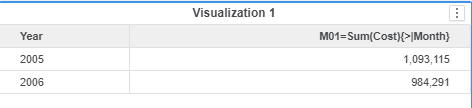
After the fix, the engine will not do subset before extension for non-distributive metrics against the Intelligent Cube. The data and Query Detail for the dossier will show as below:
*********   Visualization Summary Start  **********
Time Spent: 0.012 sec(s)
Query Execution Start Time: 2/28/2020 2:55:18 PM
Query Execution End Time: 2/28/2020 2:55:18 PM

Note: The total 'Time Spent' above may be greater than the summation of the individual step execution times below.
There are preparation tasks for each step that are not individually measured.
*********   Visualization Summary End    **********


************   Individual Step Start   ************
Number of Rows Returned: 576
Time Spent: 0.001 sec(s)
Query Execution Start Time: 2/28/2020 2:55:18 PM
Query Execution End Time: 2/28/2020 2:55:18 PM

Tables Accessed:
Table0	[L_CATEGORY]:	Category, 		LOOKUP_TABLE
Table1	[L_MONTH]:	Month, 		LOOKUP_TABLE
Table2	[L_SUBCATEGORY]:	Subcategory, 		LOOKUP_TABLE
Table3	[F_MAIN_INDEX]:	Category, Month, Subcategory, 	M01=Sum(Cost){>|Month}, Cost, 	FACT_TABLE

select	[Category]@[CATEGORY_ID],
	[Category]@[CATEGORY_DESC],
	[Month]@[MONTH_ID],
	[Month]@[MONTH_DESC],
	[Subcategory]@[SUBCAT_ID],
	[Subcategory]@[SUBCAT_DESC],
	[[F_MAIN_INDEX].M01=Sum(Cost){>|Month}] as [M01=Sum(Cost){>|Month}]
from	C03=Month,Cat,Subcat,Cost,M01
with Table Join Tree: 	[F_MAIN_INDEX]
to	Ex1_tempcube0
************   Individual Step End     ************


************   Individual Step Start   ************
Number of Rows Returned: 24
Time Spent: 0.000 sec(s)
Query Execution Start Time: 2/28/2020 2:55:18 PM
Query Execution End Time: 2/28/2020 2:55:18 PM

Tables Accessed:
Table1	[L_MONTH]:	Month, 		LOOKUP_TABLE
Table2	[F_MAIN_INDEX]:	Year, Month, 	Profit, 	FACT_TABLE

select	[Year]@[YEAR_ID],
	[Month]@[MONTH_ID]
from	C02=Year,Month,Profit
with Table Join Tree: 	[F_MAIN_INDEX]
to	RELATION1-
************   Individual Step End     ************


************   Individual Step Start   ************
Number of Rows Returned: 576
Time Spent: 0.001 sec(s)
Query Execution Start Time: 2/28/2020 2:55:18 PM
Query Execution End Time: 2/28/2020 2:55:18 PM

select	*
from	Left Outer Join(
	                Ex1_tempcube0,
	                RELATION1-
	               ) on Month
to	Ex1_tempcube1
************   Individual Step End     ************


************   Individual Step Start   ************
Time Spent: 0.000 sec(s)
Query Execution Start Time: 2/28/2020 2:55:18 PM
Query Execution End Time: 2/28/2020 2:55:18 PM

Drop	Ex1_tempcube0
************   Individual Step End     ************


************   Individual Step Start   ************
Number of Rows Returned: 2
Time Spent: 0.003 sec(s)
Query Execution Start Time: 2/28/2020 2:55:18 PM
Query Execution End Time: 2/28/2020 2:55:18 PM

select	[Year]@[YEAR_ID],
	sum(First<SortBy=([[Month]]Desc}>([M01=Sum(Cost){>|Month}])@{[Subcategory],[Year]})@{[Year]}
from	Ex1_tempcube1
************   Individual Step End     ************


************   Individual Step Start   ************
Time Spent: 0.000 sec(s)
Query Execution Start Time: 2/28/2020 2:55:18 PM
Query Execution End Time: 2/28/2020 2:55:18 PM

Drop	Ex1_tempcube1
************   Individual Step End     ************
Regression starting from Strategy 10.11/10.4.7 caused by optimization done in DE81833.
Strategy Internal Reference Number for this technical note is KB484088 and DE152648.
