EducationSoftwareStrategy.com
StrategyCommunity

Knowledge Base

Product

Community

Knowledge Base

TopicsBrowse ArticlesDeveloper Zone

Product

Download SoftwareProduct DocumentationSecurity Hub

Education

Tutorial VideosSolution GalleryEducation courses

Community

GuidelinesGrandmastersEvents
x_social-icon_white.svglinkedin_social-icon_white.svg
Strategy logoCommunity

© Strategy Inc. All Rights Reserved.

LegalTerms of UsePrivacy Policy
  1. Home
  2. Topics

Can the Filter Panel be pinned by default in MicroStrategy Library 2019


Community Admin

• Strategy


A user wants to have the Filter Panel pinned by default when viewing dossiers in MicroStrategy Library 2019 Update 1. There is no setting to pin the Filter panel by default, but this information is stored at the browser level and the filter panel will be pinned in that browser upon opening a dossier.

Starting with the release of Strategy ONE (March 2024), dossiers are also known as dashboards.
The following behavior is by default:        
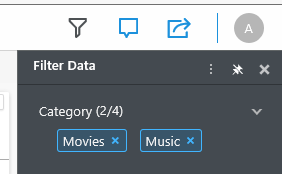
  1. Open a dossier in Library.
  2. Open the Filter Panel.
  3. Click on pin icon.
ka0PW0000001JZoYAM_0EM2R000000m9nT.png


  1. Close the dossier and reopen.

The Filter Panel is still pinned. However, the filter panel will not be pinned in another browser or in the same browser in incognito mode as the Filter panel pin status is stored in at the browser level.
       
       
ACTION:
In dossiers pin Filter Panel in desired browser to have it appeared pinned by “default” every time dossiers get opened.


Comment

0 comments

Details

Knowledge Article

Published:

September 25, 2019

Last Updated:

March 21, 2024