Note: If you are using Strategy 2021 Update 7 or newer, use the following procedures to configure SameSite cookies, instead of the procedures in this article.
Upon the release of Chrome Web Browser version 80 (Chrome v80) in February, Google aggressively enforced cross-site security. Google is early in its new security actions compared to other vendors.
The new security enforcement altered the logic for browser-to-server cookie transmission, which affected any enterprise software product that supports HTTP. This includes not only enterprise software, but major infrastructures software components such as proxies, web application servers, load balancers, application firewalls, and other network and application components. As such, software vendors now have to make numerous accommodations in a compressed timeframe to support the new Chrome version.
Chrome v80 rolled out on February 17, 2020. This new version introduced two significant changes that modified the behavior of the SameSite cookie:
Changing the default value of the SameSite attribute restricts how the browser can send the cookie. The restriction only allows cookies to be sent by the browser for the same domain or those sites which are considered to be "top-level" navigation.
The second change allows cookies set to "None," which was the previous default, to only be transmitted if HTTPS is enabled.
Strategy is working diligently to provide product updates and guidance to support customers using the newest Chrome version. These changes were first introduced in Strategy 2019 Update 5 and Strategy 2020 Update 1 to resolve issues caused by the SameSite cookie updates. It's recommended that customers upgrade to the latest available release and apply the solutions below for Strategy Web JSP/ASP and Strategy Library.
Customers are strongly encouraged to test their Strategy deployments with the Chrome v80 Beta browser. Additionally, Strategy will be working closely with customers that leverage the Strategy Cloud Platform to support an automated update process.
Strategy has determined that this change affects embedded deployments of Strategy Web and Strategy Library when they are deployed in a domain other than the one displayed in the user's address bar.
Embedded deployments include all instances where the Strategy product is accessed via an iframe or when it is not considered a part of the browser's top-level navigation (i.e. is not the link in the address bar of the browser).
In affected deployments, cookie incompatibility could prevent users from authenticating into Strategy.
SAML configured with SP initiated POST Binding is known to be affected if the Strategy application servers are in a different domain from the SAML authentication Identity Provider domain. SAML with GET/Redirect Binding is not affected.
In Strategy 2019 and above, you can resolve the cross-domain compatibility issues by opting into the current SameSite default value. The following instructions provide steps to opt-in for the JSP version of Strategy and for the ASP version of Strategy.
Embedded developments of Strategy 2019 and Strategy Web 2020 that are affected by the cross-domain issues above have the following options available to opt into the current default value of SameSite in Strategy Web.
Note: If the options identified below do not resolve the issues related to the Chrome v80 change, please contact Strategy Technical Support so they can evaluate your specific deployment environment.
Prerequisite: The application server must support the SameSite cookie changes. Ensure you are running Tomcat Web Server version 9.0.30 or later or version 8.5.50 or later with HTTPS configured.
Strategy 2021 Update 6 and older
C:\Program Files (x86)\Common Files\MicroStrategy\Tomcat\apache-tomcat-9.0.31\webapps\MicroStrategy\META-INF\context.xml
<Context> <CookieProcessor sameSiteCookies="None"/> </Context>
C:\Program Files (x86)\Common Files\MicroStrategy\Tomcat\apache-tomcat-9.0.31\webapps\MicroStrategy\WEB-INF\xml\sys_defaults.xml
alwaysSecureCookievalue to
1. If the
alwaysSecureCookieparameters is not found, skip this step.
Strategy 2021 Update 7 and newer
See Configure SameSite Cookies for MicroStrategy Web and MicroStrategy Mobile for more information.
Note: If you want to continue modifying the files manually or via script follow steps 1-5 above. In addition, comment out the following parameters from
sys_defaults.xmlunder
Strategy/WEB-INF/xmland restart the web server.
<!--<pr des="Cookie attribute SameSite" dt="string" n="sameSite" scp="server" v="UNSET" />
Prerequisite: The application server must support the SameSite cookie changes. Please upgrade the .NET Framework to v4.8 and make sure that the latest updates have been applied. See KB articles that support SameSite in .NET Framework on the Microsoft Docs site for more information.
Strategy 2021 Update 5.2 and older
C:\Program Files (x86)\MicroStrategy\Web ASPx\web.config
<sessionState />tag, add
cookieSameSite="None"
<httpCookies />tag, add
sameSite="None"
Strategy 2021 Update 6 and newer
Follow the same instructions for Update 5.2 and older, as shown above.
Prerequisite: Upgrade Tomcat to 9.0.30 (and up) or 8.5.50 (and up).
Strategy 2021 Update 6 and older
C:\Program Files (x86)\Common Files\MicroStrategy\Tomcat\apache-tomcat-9.0.30\webapps\MicroStrategyLibrary\META-INF\context.xml
<Context> <CookieProcessor sameSiteCookies="None"/> </Context>
cookieProcessorFilterdeclaration highlighted below in
C:\Program Files (x86)\Common Files\MicroStrategy\Tomcat\apache-tomcat-9.0.30\webapps\MicroStrategyLibrary\WEB-INF\web.xml.
	<init-param>
		<param-name>sameSite</param-name>
		<!-- UNSET, STRICT, LAX, NONE -->
		<param-value>NONE</param-value>
	</init-param>
Strategy 2021 Update 7 and newer
See Configure SameSite Cookies for Library for more information.
Note: If you want to continue modifying the files manually or via script follow steps 1 to 6 above. In addition, comment out the following parameters from
configDefaults.propertiesunder
StrategyLibrary/WEB-INF/classes/configand restart the web server.
#cookie.att.secure = false
Prerequisite: You already have an Apache HTTP Server configured as a reverse proxy in front of Strategy Web and Library.
Add the following to Apache's configuration file (usually httpd.conf):
<IfModule headers_module>...</IfModule>tags:
Header edit Set-Cookie ^(.*)$ $1;SameSite=None
Header edit Set-Cookie ^(.*)$ $1;Secure
Sample httpd.conf:
LoadModule headers_module modules/mod_headers.so
...
<IfModule headers_module>
  ...
  Header edit Set-Cookie ^(.*)$ $1;SameSite=None
  Header edit Set-Cookie ^(.*)$ $1;Secure
</IfModule>
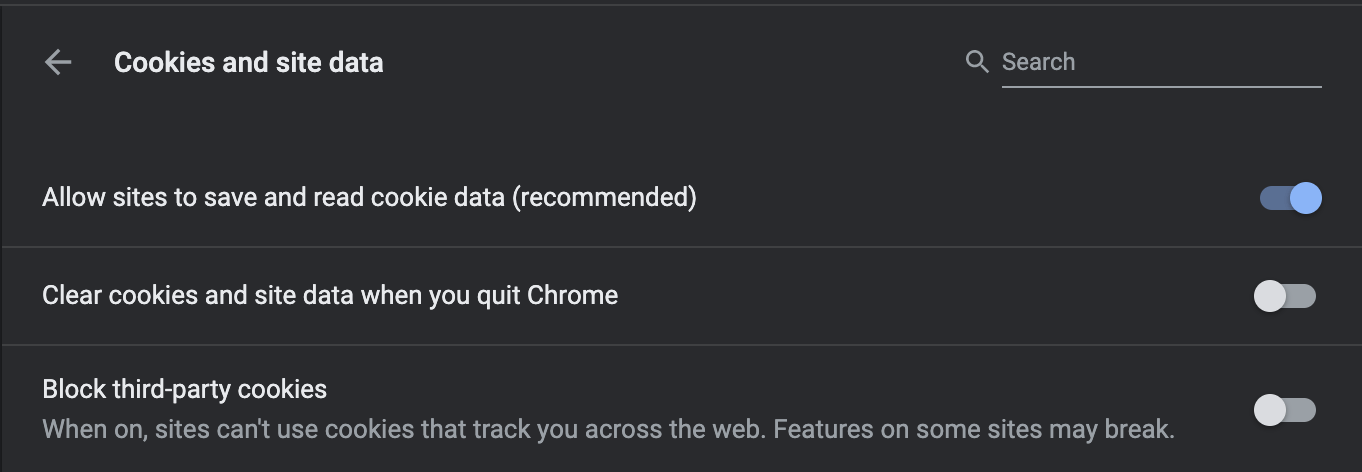
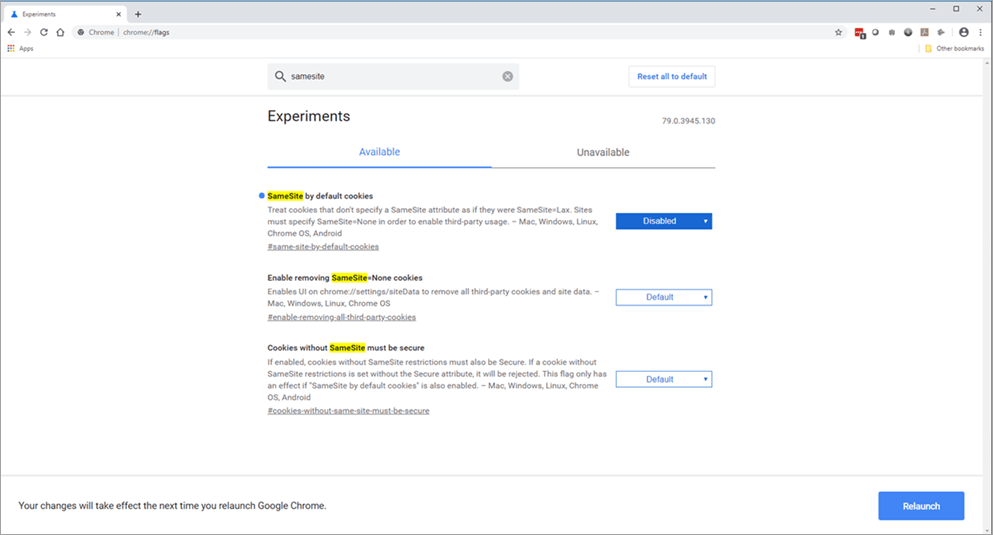
Yes, you can disable the Chrome 80 SameSite behavior in your browser. Disabling this will revert the behavior of the Chrome Browser to the current defaults.
Note: The flag #same-site-by-default-cookies has been removed from chrome://flags as of Chrome 91, and the behavior is now enabled by default. Please see SameSite Updates from Google for more details.
Chrome://flagsin the address bar.
To assist Strategy Cloud customers, Strategy will facilitate implementation of the recommended Strategy Web options.
Older versions of Safari use default settings that are not compatible with the SameSite cookie changes. Please ensure that you are running the latest Safari browser version for your operating system and the latest version of the operating system for your computer.
The list below provides links to articles that explain how other key vendors may be impacted by Chrome v80.
