EducationSoftwareStrategy.com
StrategyCommunity

Knowledge Base

Product

Community

Knowledge Base

TopicsBrowse ArticlesDeveloper Zone

Product

Download SoftwareProduct DocumentationSecurity Hub

Education

Tutorial VideosSolution GalleryEducation courses

Community

GuidelinesGrandmastersEvents
x_social-icon_white.svglinkedin_social-icon_white.svg
Strategy logoCommunity

© Strategy Inc. All Rights Reserved.

LegalTerms of UsePrivacy Policy
  1. Home
  2. Topics

Circular Tree Map


Darren Holmblad (TPO)

Director, Product Owner • Microstrategy, Inc.


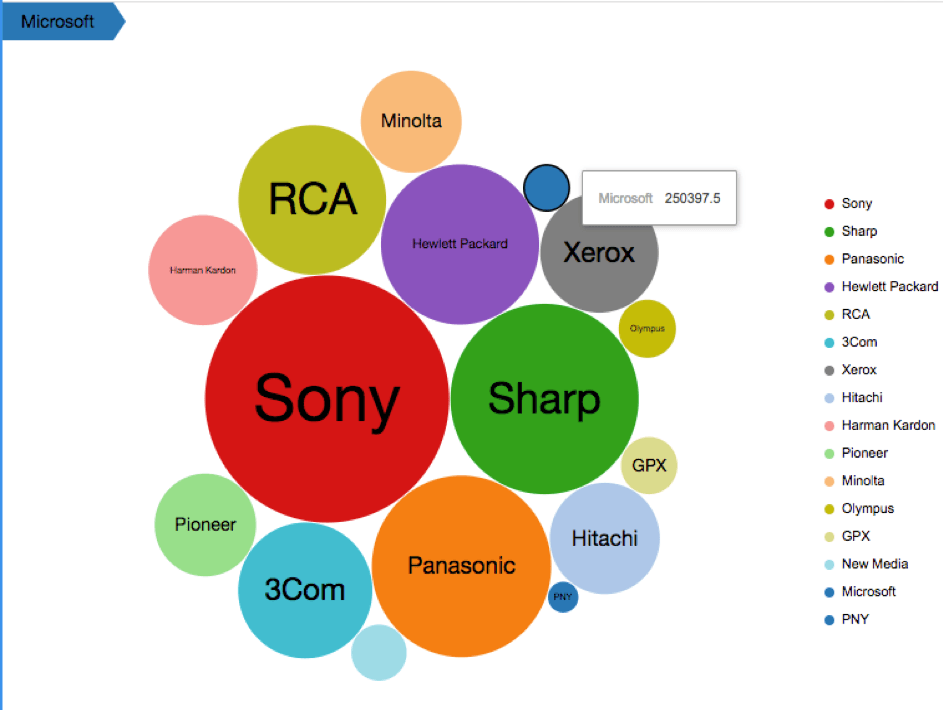
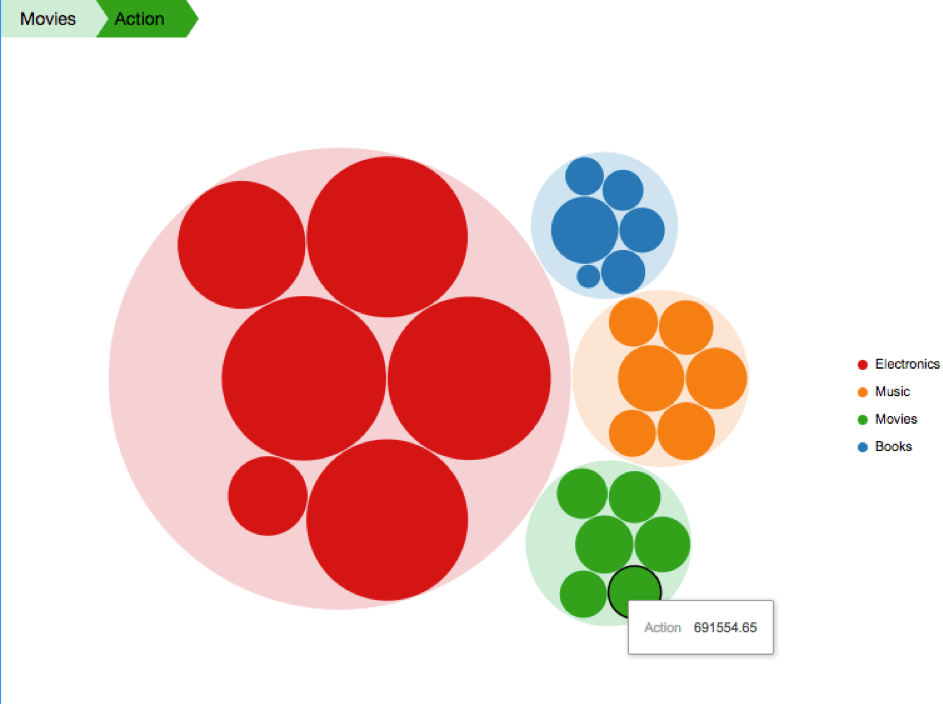
Visualize hierarchical data as nested circles of different sizes and colors, using the Circular Tree Map visualization. Each circle represents a level in the data hierarchy, with the color of the circle corresponding to an attribute and the size determined by a metric value. With this visualization, users can quickly and easily spot patterns for even large datasets - for example, identifying which store provides the most profit.
New Features & Functionality
The Circular Tree Map
With Strategy, you will have a variety of different choices for visualizations. Many times, users choose custom visualizations. Visualize hierarchical data as nested circles of different sizes and colors, using the Circular Tree Map visualization. Each circle represents a level in the data hierarchy, with the color of the circle corresponding to an attribute and the size determined by a metric value. With this visualization, users can quickly and easily spot patterns for even large datasets - for example, identifying which store provides the most profit.

ka0PW0000000kE9YAI_0EM44000000RYsx.png

Visualization Features
 

  • Each branch in the tree is represented by a circle.
  • Each sub-branch is shown as a smaller circle within its parent circle.
  • The root attribute is grouped by color.
  • The size of the circle corresponds to the metric value of the branch.
  • The legend can be enabled/disabled using the visualization custom properties.

 
Requirements
Object requirements:

  • Attributes: 1 - 5
  • Metrics: 1

Minimum Strategy Version: 10.4
Current visualization Version: 1.0
Publisher: Strategy 
Strategy Features 

  • Supports using a visualization as a selector
  • Supports custom drop zones
  • Supports custom properties   (10.3 and later)
  • Supports color palette
  • Supports exporting to PDF  (10.6 and later)

Additional Features
 

  • Supports the ability to change fonts to match the Dashboard default fonts

Installation Instructions
To install this visualization: 
 

  1.  Download the .zip file below and deploy it in Strategy Desktop or Strategy Web.
  2.  Extract the CircularTreeMap.zip and copy the CircularTreeMap directory within the chosen environment's plugins folder Ex: (<Strategy Installation Path>/plugins/).
  3. Restart the chosen Strategy platform to complete the installation.

After you have installed the visualization, you can open a working demo of this visualization by downloading the .mstr file below and doing the following:
 

  • To open the demo visualization in Strategy Desktop, double click the .mstr file.
  • To open the demo visualization in Strategy Web, choose Create > Upload Strategy File > View Dashboard.

Using the visualization in Strategy 10.4
This visualization is fully supported in Strategy 10.5 and higher, and partially supported in Strategy 10.4. To use this visualization in Strategy 10.4, you must remove the following lines of code from CircularTreeMap.js file.
(Remove lines 22 to 24):
noConflictLibraries: [
                mstrmojo.CustomVisBase.ENUM_EXTERNAL_LIBS.D3
],
If these lines are not removed, they will cause a compilation error because this object is not defined in the 10.4 API.
ka0PW0000000kE9YAI_0EM44000000RYt2.png


Comment

0 comments

Details

Example

Published:

December 20, 2018

Last Updated:

February 14, 2024