EducationSoftwareStrategy.com
StrategyCommunity

Knowledge Base

Product

Community

Knowledge Base

TopicsBrowse ArticlesDeveloper Zone

Product

Download SoftwareProduct DocumentationSecurity Hub

Education

Tutorial VideosSolution GalleryEducation courses

Community

GuidelinesGrandmastersEvents
x_social-icon_white.svglinkedin_social-icon_white.svg
Strategy logoCommunity

© Strategy Inc. All Rights Reserved.

LegalTerms of UsePrivacy Policy
  1. Home
  2. Topics

KB484790: Cloud-based Live Connect dossiers display an error when saved in the environment


Ling Jing

Product Owner, Principal • MicroStrategy


This article addresses the error returned when a cloud-based dossiers fails to execute after uploading the dossier to the server. This article also provides a workaround to avoid this error.

Starting with the release of Strategy ONE (March 2024), dossiers are also known as dashboards.

Description


When a cloud-based dossier fails to execute after uploading the local dossier to the server, you may receive the following error message:
CITY_CTR_SLS LU_CALL_CTR (2 tables)_0: (QueryEngine encountered error: Connect failed. Error type: Odbc error. Odbc operation attempted: SQLDriverConnect. [28000:20032: on SQLHANDLE] [Strategy][DSI] (20032) Required setting 'RefreshToken_Enc' is not present in the connection settings.. ).
 
This error is experienced with the following gateways:
  • Google BigQuery
  • Eloqua
  • Service Now
  • Shopify
  • Hubspot
  • Square
  • Marketo
  • Paypal
  • Concur

Steps to reproduce

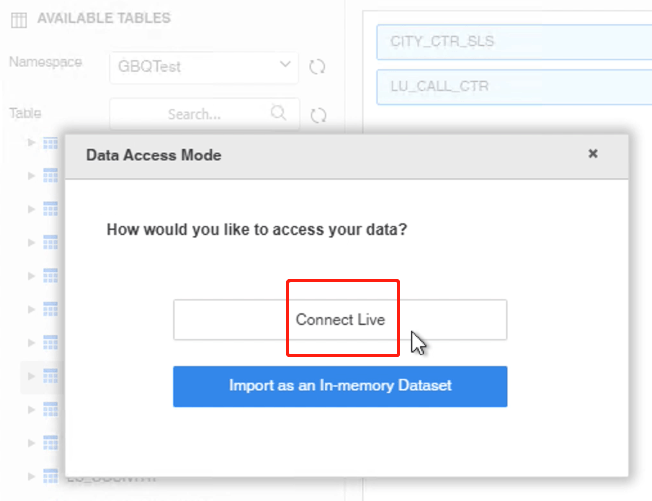
  • Connect it to an environment via Workstation.
  • Create a live dossier for the above mentioned gateways with a connection string filled in with credentials (tokens).
ka0PW0000001JepYAE_0EM4W000001KFZW.jpeg
  • Save this live dossier to the environment.
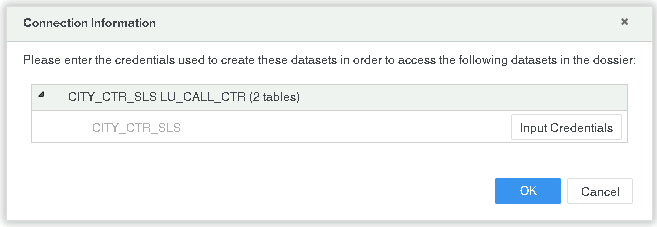
  • No data is returned for the uploaded dossier. The error shows up, or the Credential Input dialog pops up.
    Error message:
    CITY_CTR_SLS LU_CALL_CTR (2 tables)_0: (QueryEngine encountered error: Connect failed. Error type: Odbc error. Odbc operation attempted: SQLDriverConnect. [28000:20032: on SQLHANDLE] [Strategy][DSI] (20032) Required setting 'RefreshToken_Enc' is not present in the connection settings.. )
    Credential Input dialog:
ka0PW0000001JepYAE_0EM4W000001KFZb.jpeg

Workaround

  • Find and execute the newly uploaded dossier in the environment.
  • Click Edit Dataset and Edit Table.
ka0PW0000001JepYAE_0EM4W000001KFZg.jpeg
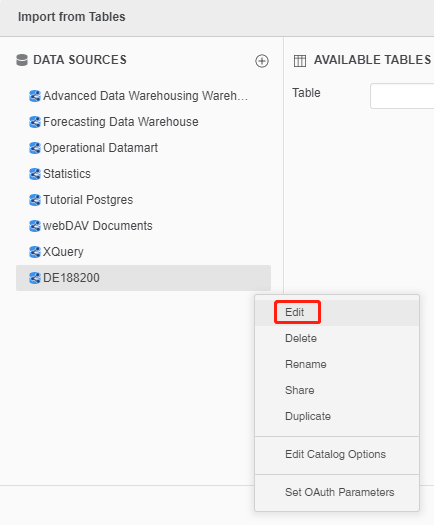
  • Edit the data source.
ka0PW0000001JepYAE_0EM4W000001KFZl.jpeg
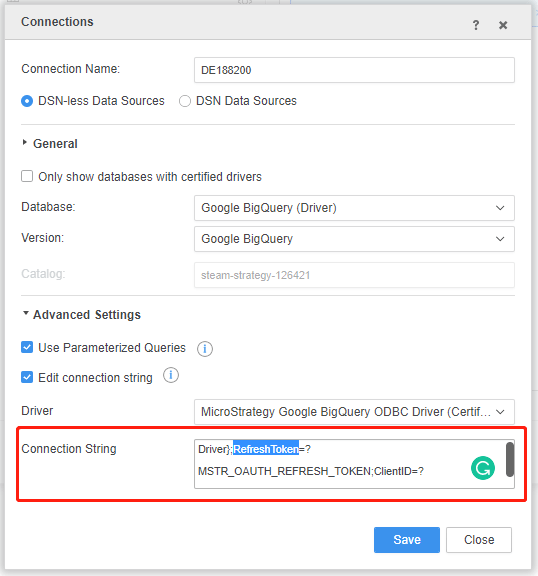
  • Re-enter the
    RefreshToken
    in the Connection String field.
ka0PW0000001JepYAE_0EM4W000001KFZq.jpeg
  • Click Save.
    The dossier should work as expected.

Comment

0 comments

Details

Knowledge Article

Published:

December 26, 2020

Last Updated:

March 21, 2024