EducationSoftwareStrategy.com
StrategyCommunity

Knowledge Base

Product

Community

Knowledge Base

TopicsBrowse ArticlesDeveloper Zone

Product

Download SoftwareProduct DocumentationSecurity Hub

Education

Tutorial VideosSolution GalleryEducation courses

Community

GuidelinesGrandmastersEvents
x_social-icon_white.svglinkedin_social-icon_white.svg
Strategy logoCommunity

© Strategy Inc. All Rights Reserved.

LegalTerms of UsePrivacy Policy
  1. Home
  2. Topics

Cloudera and Microstrategy Federal Government Customer Success Story


Nigel Collins

Technical Support Intern • Strategy


MicroStrategy was chosen to design, architect, and deploy a customized enterprise data management and analytics solution. This customer, an agency of the U.S. Federal Government (The Agency), oversees a complex network of military systems around the world.

SYMPTOM
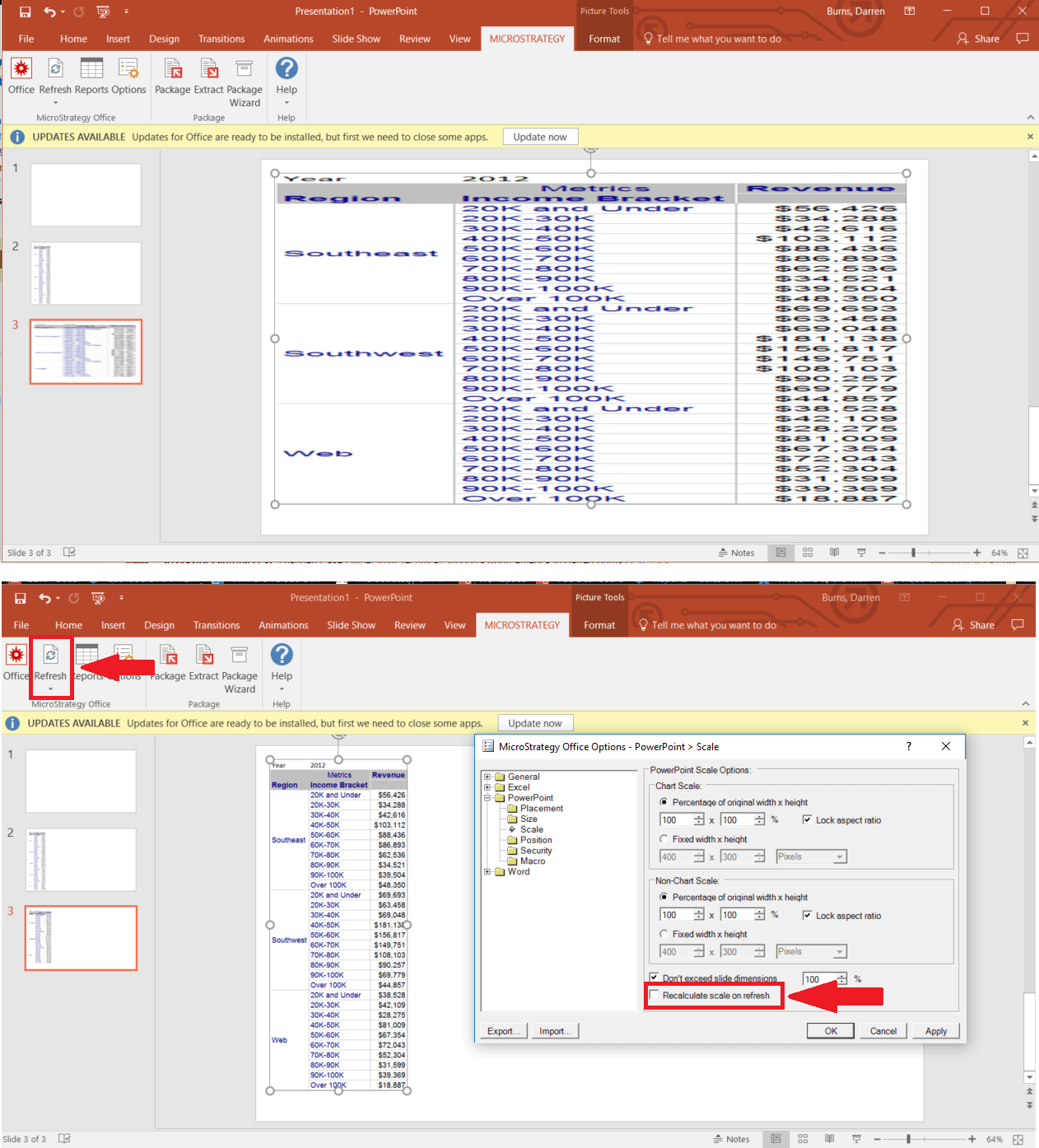
In Strategy Office 10.x, users can run reports into Microsoft PowerPoint, and once the report is in the slide, they can resize the grid, and change its position. However, after making these adjustments, if the user then refreshes the PowerPoint presentation, the report will return to the original scaling and position settings before the changes were made. The adjustments do not persist after being changed and clicking refresh.
ka044000000kOvkAAE_0EM44000000A5pN.png

STEPS TO REPRODUCE
Follow these steps to reproduce the issue in a Strategy Tutorial Project.

  1. In Microsoft PowerPoint using Strategy Office 10.x, connect to Project – Strategy Tutorial
    1. Shared Reports > Subject Areas > Customer Analysis > Customer Income Analysis Report
  2. Click on Strategy Office – Options
  3. Under the 'PowerPoint' section, check/uncheck the following settings
    1. Position > Check/Uncheck Recalculate Position on Refresh
    2. Scale > Check/Uncheck Recalculate Scale on Refresh
  4. Resize and Expand document
  5. Click Refresh
  6. Notice that the grid does not adhere to changes made in options for scale and position

CAUSE
This is an identified defect in Strategy Office 10.x where the adjustments to the size of a document or report do not update successfully upon the refresh of a document or report executed in Microsoft PowerPoint using Strategy Office 10.x
This is the result of the adjustments to the Office settings not persisting after being changed.
ACTION
Currently, this issue is still being reviewed for feasibility by the Strategy Technology team and it is not scoped for any upcoming scheduled Strategy release.
WORKAROUND
Instead of adjusting these options in the Office Settings,

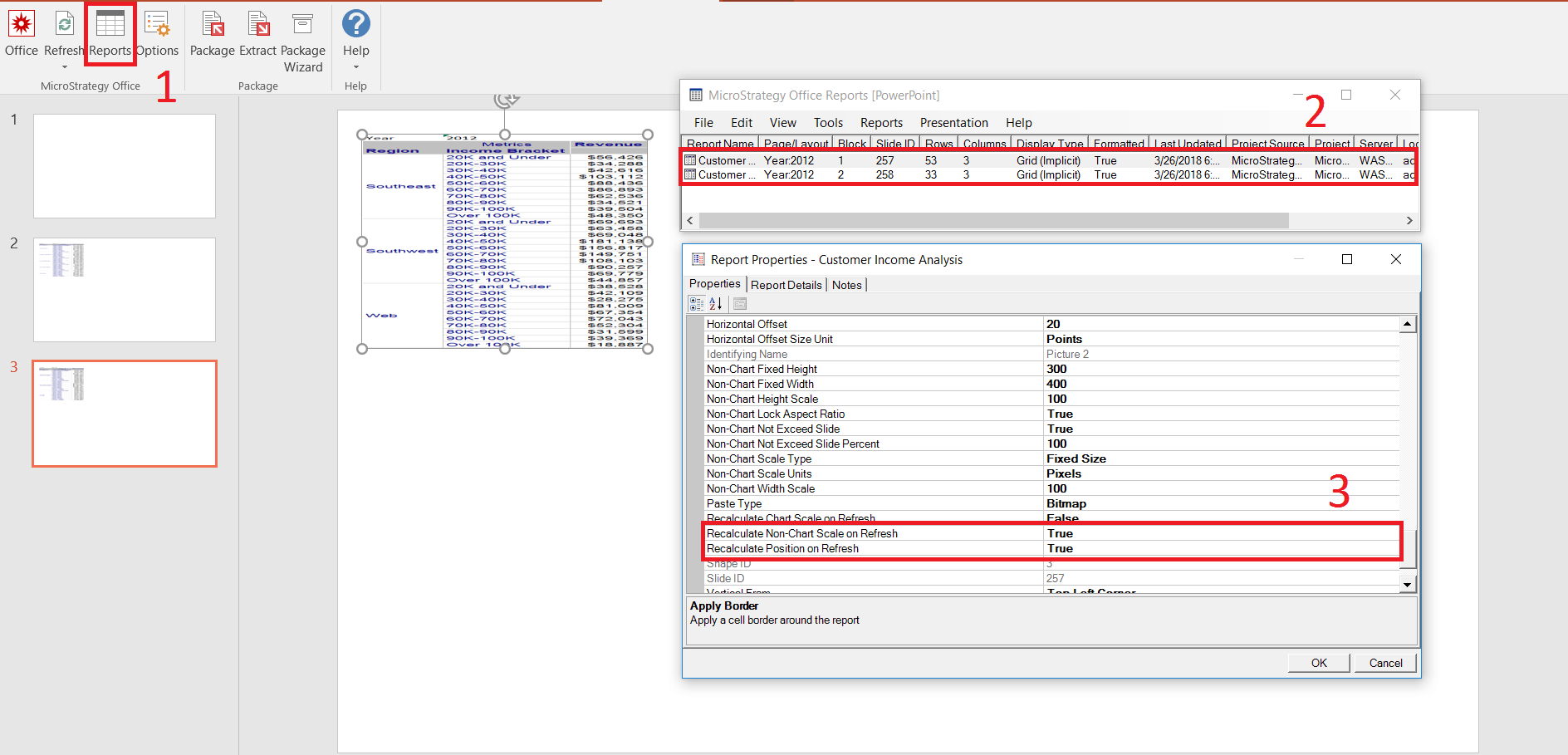
  1. Select Reports
  2. Right click on the Document in the reports viewer and select properties
  3. Scroll down to section 9 “PowerPoint Placement Settings” and find “Recalculate XXXX on Refresh”


Make the adjustments to these settings in this Report Properties window, and the grid will update accordingly on Refresh.
ka044000000kOvkAAE_0EM44000000A5pS.png

THIRD PARTY SOFTWARE INSTALLATION WARNING:
The third-party product(s) discussed in this technical note is manufactured by vendors independent of Strategy. Strategy makes no warranty, express, implied or otherwise, regarding this product, including its performance or reliability.
Article Reference Number: KB440342


Comment

0 comments

Details

Knowledge Article

Published:

June 5, 2017

Last Updated:

June 5, 2017