EducationSoftwareStrategy.com
StrategyCommunity

Knowledge Base

Product

Community

Knowledge Base

TopicsBrowse ArticlesDeveloper Zone

Product

Download SoftwareProduct DocumentationSecurity Hub

Education

Tutorial VideosSolution GalleryEducation courses

Community

GuidelinesGrandmastersEvents
x_social-icon_white.svglinkedin_social-icon_white.svg
Strategy logoCommunity

© Strategy Inc. All Rights Reserved.

LegalTerms of UsePrivacy Policy
  1. Home
  2. Topics

KB484863: How to configure Azure AD authentication with MicroStrategy SQL Server ODBC driver


Ivy Lin

Quality Engineer, Senior • MicroStrategy


This article introduces how to connect Azure SQL Database and Azure Synapse SQL via Azure AD authentication with Data Direct SQL Server Driver.

Description 


Strategy supports Azure Active Directory authentication (Azure AD). Azure AD authentication is an alternative to SQL Server Authentication that allows administrators to centrally manage user permissions to Azure SQL Database data stores. When Azure AD authentication is enabled, all communications to the service are encrypted.
 

Dependencies

  • Azure AD authentication is supported by shipped Data Direct SQL Server driver
  • All connections depends on MYcurl64.dll/libMYcurl64.so

Configure Azure Active Directory authentication


To configure the driver to use Azure AD authentication, perform the following steps.
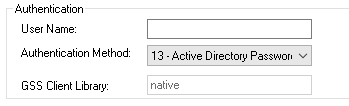
  • Set the Authentication Method option to 13 - Active Directory Password. 
ka04W000001IvWQQA0_0EM4W000001KkmW.jpeg
  • Set the Trust Store connection option to specify the absolute path of the digital certificate file for the root CA certificates. The driver requires these certificates to maintain a secure connection. 
    Note: For testing purposes, you can disable the truststore requirement by setting the Validate Server Certificate to 0 (disabled). Disabling the Validate Server Certificate option leaves your connection vulnerable to man-in-the-middle attacks; therefore, it is not recommended for extended use.
  • Set the Host Name In Certificate option to specify the host name for SSL certificate validation. For example,
    *.database.windows.net.
  • Set the User Name option to specify your Active Directory username using the
    userid@domain.com
    format.
  • Set the Password option to specify your Active Directory password.
  • Specify values for minimum required options for establishing a connection:
    • Set the Host Name option to specify either the IP address in IPv4 or IPv6 format, or the server name for your Azure server. For example,
      your_server.database.windows.net.
    • Set the Port Number option to specify the TCP port of the primary database server that is listening for connections to the database.
    • Set Database option to specify the name of the database to which you want to connect.
    • If using data sources, set the Data Source Name to specify the name of your data source.

For example, the following is a DSN-less connection string with only the required options for making a connection using Azure AD authentication:


DRIVER={Strategy ODBC Driver for SQL Server Wire Protocol};AM=13;DB=SQLSdb1;
HOST=myserver.database.windows.net;HNIC=*.database.windows;PORT=1433;
TS=\<truststore_path>\ca-bundle.crt;VSC=1;UID=test@domain.com;PWD=secret;

 
The following example demonstrates a data source definition in the
odbc.ini
file with only the required options for making a connection using Azure AD authentication:

[SQLServer Wire Protocol]
Driver=ODBCHOME/lib/mysqls64.so
Description=Strategy ODBC Driver for SQL Server Wire Protocol
AuthenticationMethod=13
Database=SQLSdb1
HostName=myserver.database.windows.net
HostNameInCertificate=*.database.windows
LogonID=test@domain.com
Password=secret
PortNumber=1433
TrustStore=/<truststore_path>/ca-bundle.crt
ValidateServerCertificate=1 

Note: Azure AD authentication is by default supported in Strategy 2021 Update 2 and higher only due to:

  • MYcurl64.dll/libMYcurl64.so shipped in Strategy 2021 Update 2 only
  • Known driver issues are fixed in driver hot fixes 7.1.6.0477/8.02.0331 and above


If you want to manage Azure AD connection on other release, please reach out to local sales or a support engineer.


Comment

0 comments

Details

Knowledge Article

Published:

February 2, 2021

Last Updated:

April 28, 2021