EducationSoftwareStrategy.com
StrategyCommunity

Knowledge Base

Product

Community

Knowledge Base

TopicsBrowse ArticlesDeveloper Zone

Product

Download SoftwareProduct DocumentationSecurity Hub

Education

Tutorial VideosSolution GalleryEducation courses

Community

GuidelinesGrandmastersEvents
x_social-icon_white.svglinkedin_social-icon_white.svg
Strategy logoCommunity

© Strategy Inc. All Rights Reserved.

LegalTerms of UsePrivacy Policy
  1. Home
  2. Topics

Connection Errors Using MongoBI with JDBC MySQL 8.x Driver on MicroStrategy 2019 Mac Desktop or WorkStation


Rui Du

Quality Engineer, Principal • MicroStrategy


This article describes an issue that may occur when trying to connect MongoBI with JDBC driver on MicroStrategy 2019 Mac Desktop/WorkStation.

Starting with the release of Strategy ONE (March 2024), dossiers are also known as dashboards.

Symptom


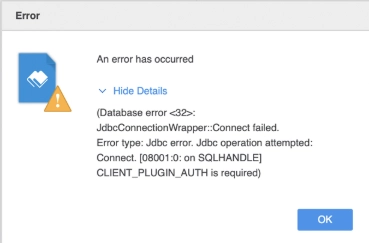
When a user tries to connect to MongoBI with JDBC driver on Mac Desktop/WorkStation, a CLIENT_PLUGIN_AUTH is required error message appears.
ka0PW0000001JXJYA2_0EM2R000000hNIN.jpeg

Cause


The MySQL 8.x JDBC driver is not compatible with MongoBI because only MySQL 5.x JDBC is currently supported. 

Action


Add the MySQL 5.x JDBC driver and restart the application to ensure that the update can take effect.
Workaround

  • Download the MySQL JDBC driver Connector/J and save the driver to a folder on your local machine.
  • Open Desktop or WorkStation.
  • Create a new dossier.
  • Click New Data > MongoBI > Select Tables. 
  • Click + to add a new data source.
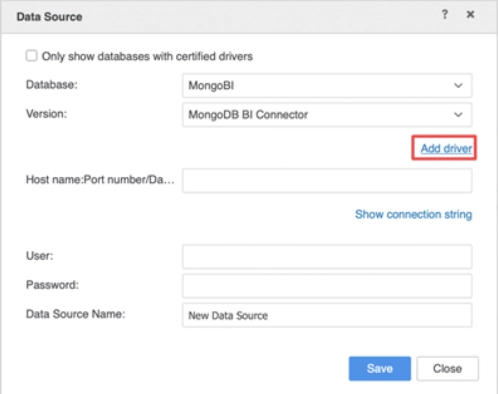
  • Select Add Driver from the Data Source dialog and navigate to the driver saved on your machine.
ka0PW0000001JXJYA2_0EM2R000000hNIS.jpeg
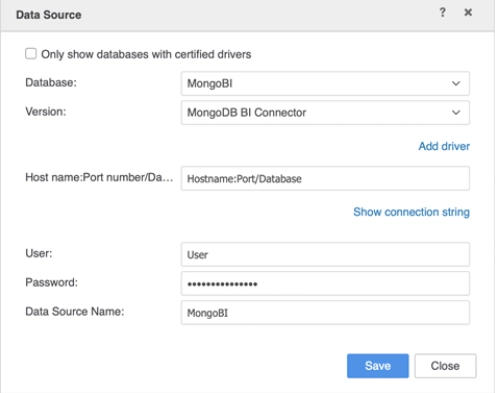
  • Enter the Host name:Port number/Database Name.
ka0PW0000001JXJYA2_0EM2R000000hNIX.jpeg
  • Click Save.
  • Restart your Desktop or WorkSstation.


Comment

0 comments

Details

Knowledge Article

Published:

June 21, 2019

Last Updated:

March 21, 2024