EducationSoftwareStrategy.com
StrategyCommunity

Knowledge Base

Product

Community

Knowledge Base

TopicsBrowse ArticlesDeveloper Zone

Product

Download SoftwareProduct DocumentationSecurity Hub

Education

Tutorial VideosSolution GalleryEducation courses

Community

GuidelinesGrandmastersEvents
x_social-icon_white.svglinkedin_social-icon_white.svg
Strategy logoCommunity

© Strategy Inc. All Rights Reserved.

LegalTerms of UsePrivacy Policy
  1. Home
  2. Topics

KB483949: Cross-tab manipulation in a MicroStrategy Report


Community Admin

• Strategy


This article explains some important aspects of a cross-tab layout that should be considered when using them in your report.

When designing a report's structure, you can use a tabular layout or a cross-tab layout. A tabular layout is the default layout and it is useful for simple lists of information. A cross-tab layout is useful for multi-dimensional analysis and is generated by adding attributes to the column.
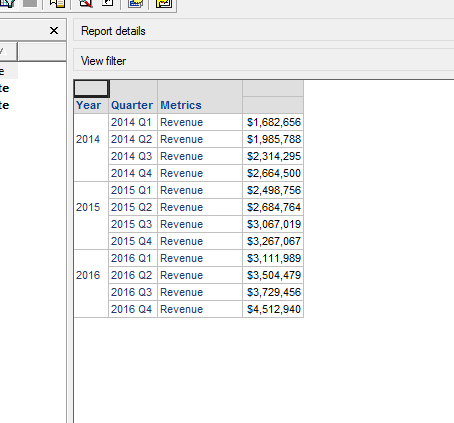
Tabular Layout

ka04W000001IwuwQAC_0EM2R000000nL6J.jpeg

Cross-Tab Layout

ka04W000001IwuwQAC_0EM2R000000nL6O.jpeg

There are some important aspects of a cross-tab layout that should be noted when using them in your report.

  • You cannot perform calculations on a cross-tab layout. To perform calculations on the grid, you must use a tabular grid layout.
     
  • When attributes are distributed among rows and columns, the cross-tab layout determines which column a metric value should go into. If the data set does not contain a particular combination of elements for a row-column pair of attributes, cross-tabulation must produce a null value at the intersection of those attribute elements. This null value is different from a database null. For more information, see KB5391.
     
  • You have the option to modify the content that appears in the null value that appears in the cross-tab table. In Developer, there are two settings under Report Data Options: one allows you to enter a value to display in the report when there is an empty value in the data retrieved from the warehouse, and the other setting allows you to enter a value to display in the report when there is an empty value in the data as a result of  the cross-tabulation process. For more information, see KB14560.


For more information on report designing, see Designing a Report's Structure.


Comment

0 comments

Details

Knowledge Article

Published:

January 2, 2020

Last Updated:

January 2, 2020