EducationSoftwareStrategy.com
StrategyCommunity

Knowledge Base

Product

Community

Knowledge Base

TopicsBrowse ArticlesDeveloper Zone

Product

Download SoftwareProduct DocumentationSecurity Hub

Education

Tutorial VideosSolution GalleryEducation courses

Community

GuidelinesGrandmastersEvents
x_social-icon_white.svglinkedin_social-icon_white.svg
Strategy logoCommunity

© Strategy Inc. All Rights Reserved.

LegalTerms of UsePrivacy Policy
  1. Home
  2. Topics

Custom Color Palette set to default is not used as the default one in Dossier MicroStrategy Web 2019


Community Admin

• Strategy


This issue has been classified as a defect by MicroStrategy. The impact is limited to MicroStrategy Web 2019.

SYMPTOM:
Users create a custom palette in Strategy Web 2019 and set it as a default one. When a new Dossier is created, the Categorical palette is selected by default instead of the custom one in Strategy Web 2019.
 
STEPS TO REPRODUCE
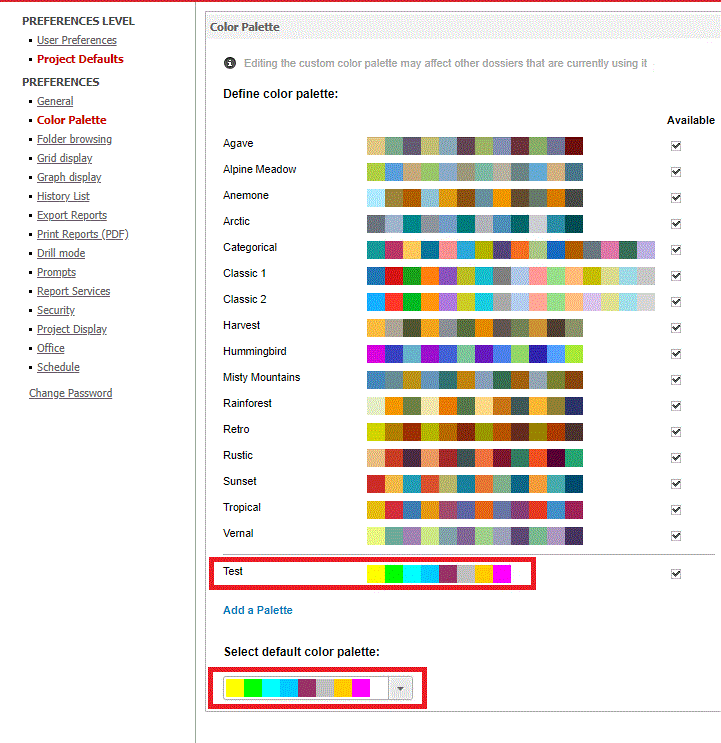
  1. Open Preferences in Strategy Tutorial Project
  2. Under Project Defaults and Color Palette, create a new custom palette and set as the default
ka04W000000OcqxQAC_0EM44000000Riev.gif

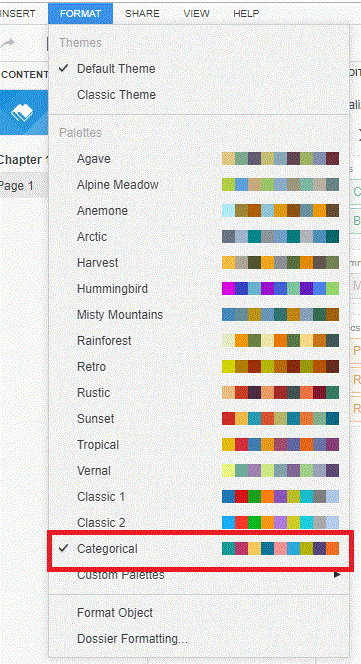
        3. Create a Dossier and notice that under “Format” menu Categorical palette is still set as a default. The default Custom palette is not applied in Dossier as shown on the picture below:
ka04W000000OcqxQAC_0EM44000000Rif5.gif

Note: The new custom palette is available under Custom Palettes. Users are able to select it manually. 
CAUSE:
This is an identified defect in Strategy Web.
ACTION
This issue has been addressed in Strategy Web 2019 Update 1. Upgrade to this version to take advantage of this fix.
 
The Strategy Internal Reference Number for this issue is   KB442592


Comment

0 comments

Details

Knowledge Article

Published:

March 25, 2019

Last Updated:

March 25, 2019