STEPS TO REPRODUCE
1. Create custom shape file as per steps 1, 2 and 3 from the below link:
https://www2.microstrategy.com/producthelp/10.10/WebUser/WebHelp/Lang_1033/Content/GIS_Topics/ESRI_RenderCustomShapes_SHP.htm
2. Run ESRI map in a document on Web and see the shapes render correctly
3. Run the same document from Mobile and notice that the map is displayed, however no custom shapes are visible
CAUSE
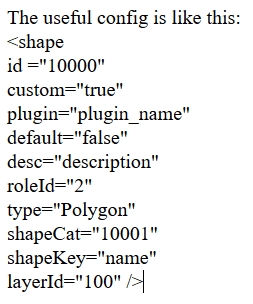
This is due to missing ShapeCat key in the code snippet used as an example in documentation provided in the reproduction steps.
WORKAROUND
For the WEB-INF\xml\config\mstrGeoShapesConfig.xml file, you need to add "shapeCat" info and the value should be unique.
Article Reference Number: KB440139
