Starting with the release of Strategy ONE (March 2024), dossiers are also known as dashboards.
*Note unless stated otherwise, Strategy has not reviewed uncertified code snippets on Community to ensure they follow Security best practices.
Maintaining enterprise software can be monotonous and boring sometimes. Browsing through multiple interfaces every day just to find this one button you need to click might also be a waste of time. What if you could gather all the relevant buttons and information in one simple, custom built interface? What if you could have all options that you really need in one place? That would save you time and make you more productive!
Well, you can use Strategy REST API to build custom interfaces that you can use for managing and maintaining Strategy Platform. Usually you would use JavaScript, but there are other tools available. In this example I've used Python and Flask framework to generate HTML pages as user interface. I've used Pythonanywhere.com service that has Python and Flask configured and ready to use.
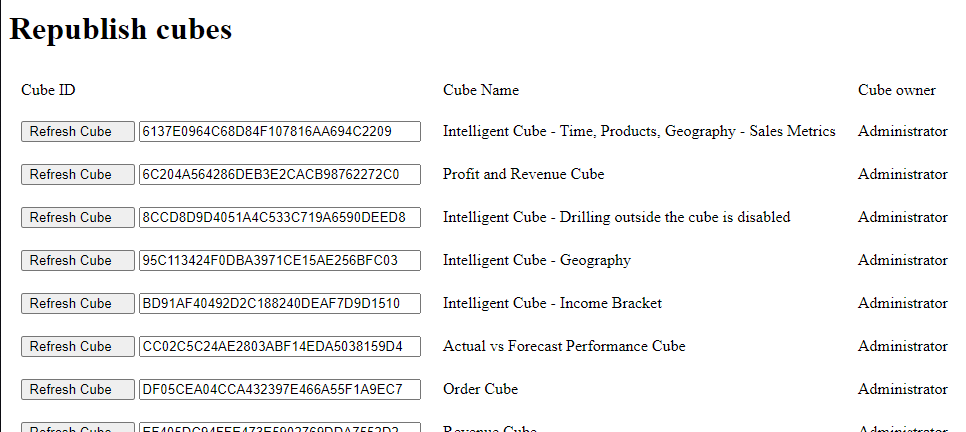
My first example allows refreshing Intelligent Cubes. There is a Python script that scans the whole project to find all cubes. The cubes are then displayed as a list on a Webpage.
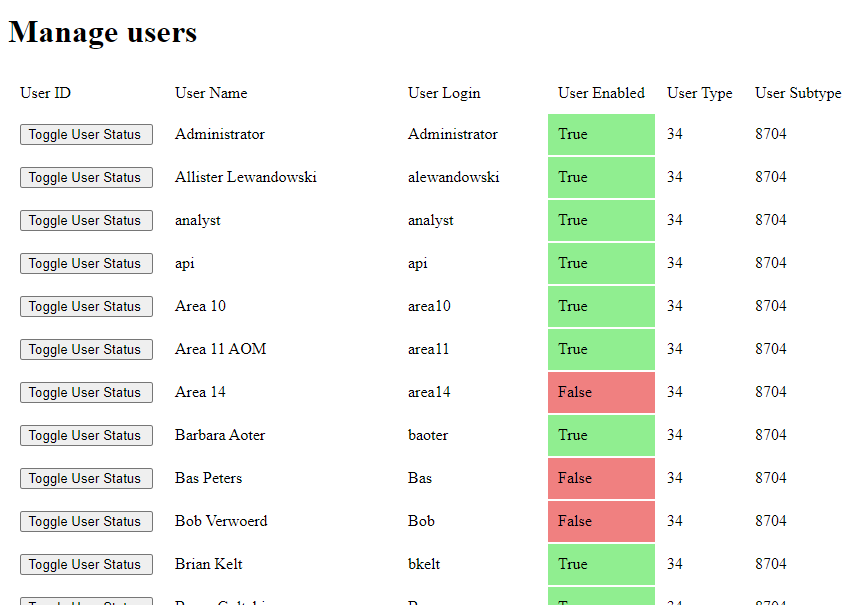
My second example allows enabling/disabling users. With one mouse click I can turn enabled user into disabled user.
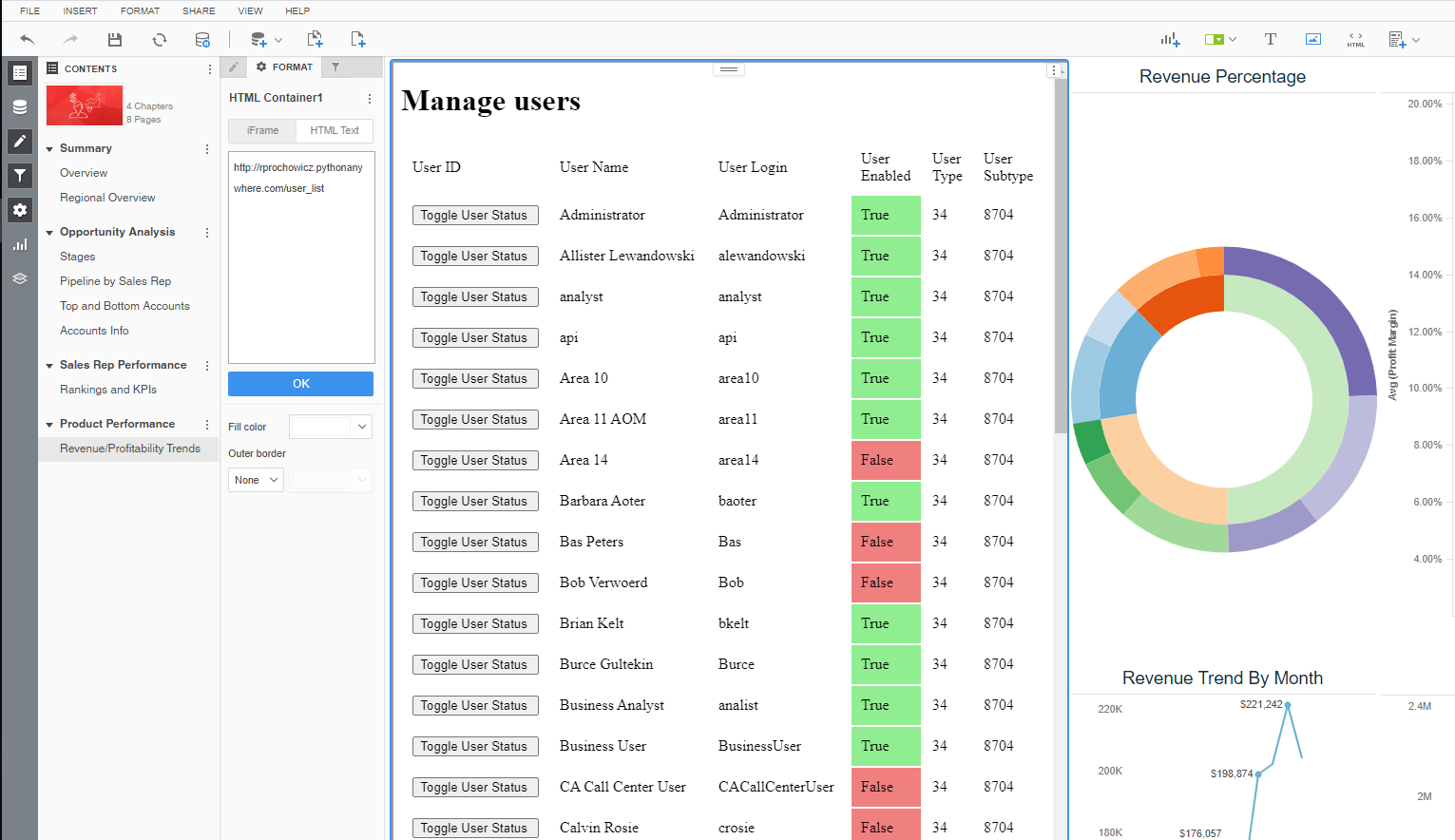
Those interfaces can be either used as standalone websites or can be displayed in HTML containers within dossiers.
Note - I've added color formatting in the code below (http://hilite.me/). Code copied from here might not work due to indentation issues and some problems with quotes (""). In that case, use attached file with sample code.
### Tested with MSTR 2020  -  Strategy REST API - refresh cubes
### Robert Prochowicz / 2020-07-31
### MSTR user must have this privilege to run it: Client - Reporter > Use Library Web
### For user management part MSTR user must have user management privileges assigned
### tutorial: https://www.tutorialspoint.com/flask/flask_quick_guide.htm

from flask import Flask, render_template, request
import requests
app = Flask(__name__)

### Parameters ###
AWS_No       = "175203"
api_login =    'mstr'
#api_password = 'XXXXX'
base_url =     'https://env-' +AWS_No+ '.customer.cloud.Strategy.com/MicroStrategyLibrary/api/'
project_id =   'B7CA92F04B9FAE8D941C3E9B7E0CD754'
#root_folder =  '34D4AEB7471A87EF240544B9415D8309'
root_folder =  'D3C7D461F69C4610AA6BAA5EF51F4125' #all reports folder
type_object =   3 #55 is document/dossier ; 3 is report/cube
certifiedStatus = 'ALL' #CERTIFIED_ONLY , ALL
get_ancestors = 'false'
limit_search =  -1
cube_id =       '08DA3BE44E57ED7B088B51A75D4A6896'

### PARAMS USERS ###
user_group = 'C82C6B1011D2894CC0009D9F29718E4F' #group everyone


#### FUNCTIONS ###
def login(base_url,api_login,api_password):
    #print("Getting token...")
    data_get = {'username': api_login,
                'password': api_password,
                'loginMode': 1}
    r = requests.post(base_url + 'auth/login', data=data_get)
    if r.ok:
        authToken = r.headers['X-MSTR-AuthToken']
        cookies = dict(r.cookies)
        return authToken, cookies
    else:
        print("HTTP %i - %s, Message %s" % (r.status_code, r.reason, r.text))

def logout(authToken, cookies):
    headers = set_headers(authToken,'short','')
    print("\nLogging out...")
    r = requests.post(base_url + "auth/logout", headers=headers, cookies=cookies)
    if r.ok:
        print("OK")
    else:
        print("HTTP %i - %s, Message %s" % (r.status_code, r.reason, r.text))


def set_headers(authToken,types,project_id):
    if types == "short":
        headers = {'X-MSTR-AuthToken': authToken, 'Content-Type': 'application/json'}
    else:
        headers = {'X-MSTR-AuthToken': authToken,
                   'Content-Type': 'application/json',#IMPORTANT!
                   'Accept': 'application/json',
                   'X-MSTR-ProjectID': project_id}
    return headers

# Cubes

def cube_refresh(base_url, authToken, cookies, cube_ids, project_id):
    headers = set_headers(authToken,'long',project_id)
    r = requests.post(base_url + "cubes/" + cube_ids, headers=headers, cookies=cookies)
    if r.ok:
        rr="cube refreshe started"
    else:
        rr="CUBE REFRESH ERROR"
    return rr

def quickSearch(base_url, auth_token, cookies, project_id, root_folder, type_object, certifiedStatus, get_ancestors, limit_search):
    headers = set_headers(auth_token,'long',project_id)
    search_url = (base_url  + "searches/results?" + "root=" + root_folder + "&type=" + str(type_object)
                  + "&getAncestors=" + get_ancestors + "&limit=" + str(limit_search) +
                  "&certifiedStatus=" + certifiedStatus)
    r = requests.get(search_url, headers=headers, cookies=cookies)
    if r.ok:
        return r.json()['result']
    else:
        print("HTTP %i - %s, Message %s" % (r.status_code, r.reason, r.text))

def parse_json_cubes(json):
    cubes_dict={}
    for cube in json:
        if cube['subtype'] == 776: # 776 is cube
            cubes_dict[cube['id']] = [cube['name'],cube['owner']['name']]
    return cubes_dict

### Users

def usergroupMembers(auth_token, uggroup, cookies):
    headers = set_headers(authToken,'short','')
    usergroup_url = (base_url  + "usergroups/" + uggroup + '/members?includeAccess=false')
    r = requests.get(usergroup_url, headers=headers, cookies=cookies)
    if r.ok:
        usergroup_members = r.json()
        return usergroup_members
    else:
        print("HTTP %i - %s, Message %s" % (r.status_code, r.reason, r.text))

def parse_json_users(json):
    users_dict={}
    for user in json:
        users_dict[user['id']] = [user['name'],user['username'],user['enabled'],user['type'],user['subtype']]
    return users_dict

def toggle_user(user_id,operation):
    operation_rev = {'true':'false', 'false':'true'} #this dict reverses False value into True
    operationList1 = '{"operationList": [{"op": "replace", "path": "/enabled", "value": '+operation_rev[operation]+'}]}'
    headers = set_headers(authToken,'short','')
    usermod_url = (base_url  + "users/" + user_id)
    r = requests.patch(usermod_url, headers=headers, cookies=cookies, data=operationList1)
    if r.ok:
        user_details = r.json()
    else:
        print("HTTP %i - %s, Message %s" % (r.status_code, r.reason, r.text))

### Website
@app.route('/') # this will display a list of cubes in a selected folder
def cube_list():
    search_result = quickSearch(base_url, authToken, cookies, project_id, root_folder, type_object, certifiedStatus, get_ancestors, limit_search)
    cubes_dict = parse_json_cubes(search_result)
    return render_template('cube_list.html', result = cubes_dict)

@app.route('/cube_refresh', methods=['POST']) # this will republish selected cube
def cube_refresher():
    cubeid = request.form['cubeid']
    cube_refresh(base_url, authToken, cookies, cubeid, project_id)
    return 'Refresh job for cube  %s  started<BR><BR><A HREF="http://rprochowicz.pythonanywhere.com/">Back</A>' % cubeid

@app.route('/user_list') # this will display all users
def user_lister():
    user_json = usergroupMembers(authToken, user_group, cookies)
    user_dict = parse_json_users(user_json)
    return render_template('user_list.html', result = user_dict)

@app.route('/user_refresh', methods=['POST']) # toggle user status
def user_refresher():
    response = request.form['userid']
    resp_split = response.split("@")
    toggle_user(resp_split[0],resp_split[1])
    user_json = usergroupMembers(authToken, user_group, cookies)
    user_dict = parse_json_users(user_json)
    return render_template('user_list.html', result = user_dict)
    #return 'User  %s  <BR>Changing user activation from %s to oposite<BR><BR><A HREF="http://rprochowicz.pythonanywhere.com/user_list">Back</A>' % (resp_split[0],resp_split[1])

#Main
authToken, cookies = login(base_url,api_login,api_password)
<!doctype html>
<html>
   <body>
       <H1>Republish cubes</H1>
      <table border = 0>
            <tr>
                <td style="padding:10px">Cube ID</td>
                <td style="padding:10px">Cube Name</td>
                <td style="padding:10px">Cube owner</td>
            </tr>
         {% for key, value in result.items() %}
            <tr>
               <th style="padding:10px">
                   <form action = "/cube_refresh" method = "POST">
                       <input type ='submit' value = 'Refresh Cube    '/>
                       <input type="text" id="fname" name="cubeid" size=35 value={{ key }}>
                   </form>
               </th>
               <!--<th> {{ key }} </th>-->
               <td style="padding:10px"> {{ value[0] }} </td>
               <td style="padding:10px"> {{ value[1] }} </td>
            </tr>
         {% endfor %}
      </table>
   </body>
</html>
<!doctype html>
<html>
   <body>
       <H1>Manage users</H1>
      <table border = 0>
            <tr>
                <td style="padding:10px">User ID</td>
                <td style="padding:10px">User Name</td>
                <td style="padding:10px">User Login</td>
                <td style="padding:10px">User Enabled</td>
                <td style="padding:10px">User Type</td>
                <td style="padding:10px">User Subtype</td>
            </tr>
         {% for key, value in result.items() %}
            <tr>
               <th style="padding:10px">
                   <form action = "/user_refresh" method = "POST">
                       <input type ='submit' value = 'Toggle User Status '/>
                       <input type="hidden" id="fname" name="userid" value={{ key+"@true" if value[2] == True else key+"@false" }}>
                   </form>
               </th>
               <!--<th> {{ key }} </th>-->
               <td style="padding:10px"> {{ value[0] }} </td>
               <td style="padding:10px"> {{ value[1] }} </td>
               {% if value[2] == True %}
                 <td style="padding:10px;background-color:lightgreen;"> {{ value[2] }} </td>
               {% else %}
                 <td style="padding:10px;background-color:LightCoral;"> {{ value[2] }} </td>
               {% endif %}
               <td style="padding:10px"> {{ value[3] }} </td>
               <td style="padding:10px"> {{ value[4] }} </td>
            </tr>
         {% endfor %}
      </table>
   </body>
</html>
