Starting with the release of MicroStrategy ONE (March 2024), dossiers are also known as dashboards.
Starting MicroStrategy 2019, there is a new project setting available that allows you to view/modify the Data Engine Version for selected projects.
This option allows you to choose the behavior of your engine's query generation, execution, and how it displays the results of application objects such as reports, documents, or dossiers. With the toggle of this setting, you can choose to use the latest Data Engine Version or remain on your current version as a default.
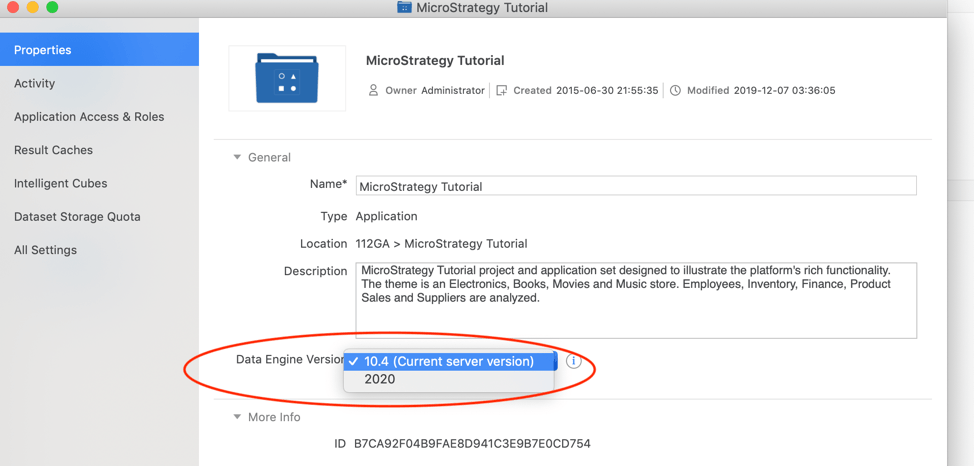
The latest Engine Version contains a culmination of all enhancements, fixes, and improvements made in the engine over the current and prior releases. MicroStrategy recommends using the latest Data Engine Version.
When you upgrade your MicroStrategy software version, you may not want any changes in your data or in the look and feel of your application objects. This is now feasible beginning in MicroStrategy 2019. When you upgrade your software, do not update the Data Engine Version to the latest version. Instead, leave the Data Engine Version as the previous version. This avoids any changes to your data or application objects, while still getting the security/stability benefits of an updated version of MicroStrategy.
New applications, or projects, created after an environment is updated to MicroStrategy 2019 or 2020 will use the latest Data Engine Version. For new development of applications or application objects, such as documents, dossiers, or reports, it is assumed that the latest data engine version is preferred.
Here are the Data Engine changes in different platform releases:
In releases prior to MicroStrategy 2019, the upgrade was a one stage process. After the update, you would wade through the Integrity Manager results to highlight any of the differences in data or in the query generation. If the changes were expected, the changes are immediately approved and certified. For unexpected changes, you can reject them immediately and log a defect with MicroStrategy's Support partners to have it changed back to the old behavior.
Reverting back to the old behavior is a challenging process, as the cause of the change has to be invested and then, based on the outcome, you need to deploy a workaround or wait until the defect was fixed. A single stage upgrade process is lengthy and can be expensive. As of MicroStrategy 2019, you are no longer required to go through a single stage process. Now, there is an option for a two stage process.
To provide a smoother upgrade process, MicroStrategy recommends using a two stage upgrade process:
At this time, the certified data in the application object is the same as before the software upgrade and you now have all the stability fixes, capability enhancements, and security fixes. This step is frictionless since there are no changes in queries, data, or the look and feel of the application objects that need recertification.
Note: There is an exception to this rule for data engine improvements related to your data's security. In those situations, the security related changes are automatically applied as part of the software upgrade.
With the new value, the data and query instructions of some reports, documents, and dossiers will change. The changes are clearly visible when using Integrity Manager to compare the application object's data with the data from Stage One. This way, only the subset of application objects impacted need to be closely scrutinized to re-certify the changes.
Once you have completed these two stages of the upgrade process, you can bring the production environment online for end users.
Prerequisite: You must have administrative privileges.
Starting MicroStrategy 2021 release, Data Engine Version can also be accessed in Developer under Project Configuration > Project definition > Advanced > Configure... > Analytical Engine > Data Engine Version.
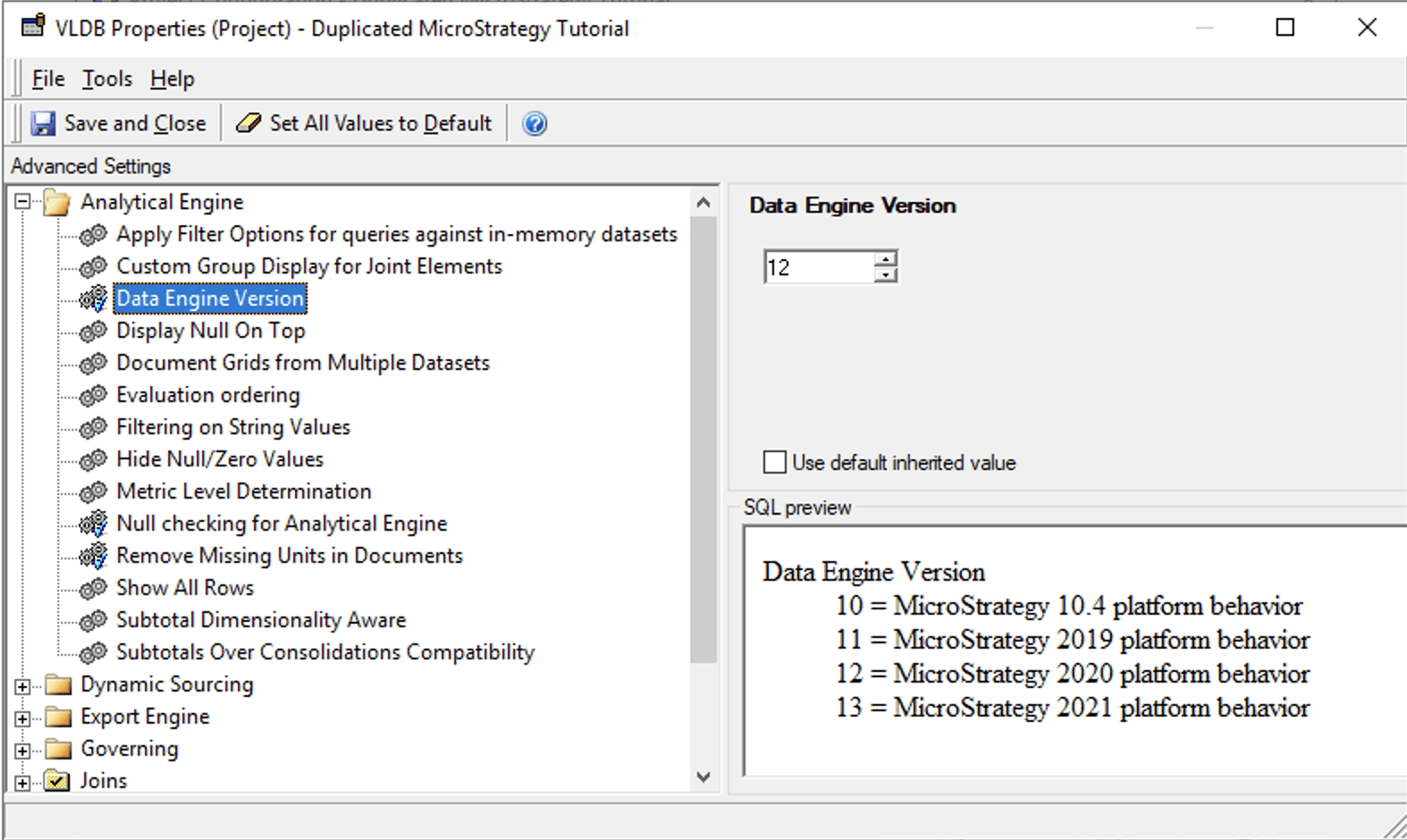
For older Developer versions, the steps to view/modify the data engine version are here.
There are a few recommended best practices when performing the two stage upgrade methodology:
It's recommended that you first start with the Development environment, then the User Acceptance Test (UAT), and finally the Production environment. This process should be performed on both Cloud and on-premise deployments.
Before performing a system upgrade, create a baseline of the reports you want to test. You can create this baseline by executing a single‑project integrity test. Then, after the upgrade, you can verify the upgrade process by executing a baseline‑versus‑project test of the baseline and the upgrade project.
Such as Upgrade Best Practices and Validate the Upgrade.
Take advantage of the Upgrade Analysis Dossier .
This dossier displays the full impact of upgrading the software. Results of the Integrity Manager tests are used to provide data for the dossier.
After you've updated, the administrator needs to change the data engine version to the latest version. As a result, the Upgrade Analysis Dossier will use the results from the Integrity Manager test before and after the data engine version change.
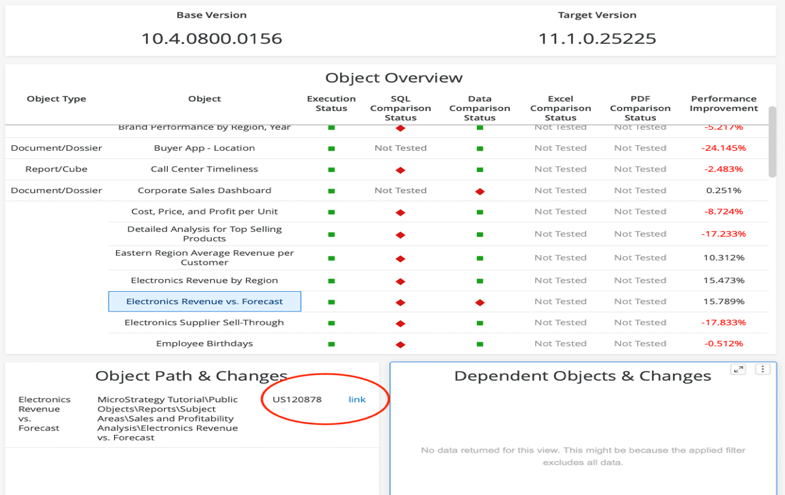
The Object Overview page shows a summary. At the top, Platform Administrators can see the full build version from the Intelligence Servers that were tested. The Object Overview master grid provides all of the objects that were tested along with their comparison status and performance improvement if multiple executions were done. For any object that has a difference, on highlighting the object name, the difference in the actual data, SQL, Excel and PDF is displayed in the detail visualizations.
In the image above, there is a red oval that shows the cause of the difference for object Electronics Revenue vs. Forecast. Once, there is an understanding of the changes, their cause and their application, you can choose to accept them. The environment would then be upgraded to the recommended and latest engine version. The rest of the upgrade process can continue after this step.
Starting MicroStrategy 2021 release, Integrity Manager can show you the KB articles links for changes you might see when you perform an upgrade. Each KB Article explains the Data Engine change in detail.
The detailed results and analysis is found under HTML Output view in Integrity Manager. This view is only available for comparison results.
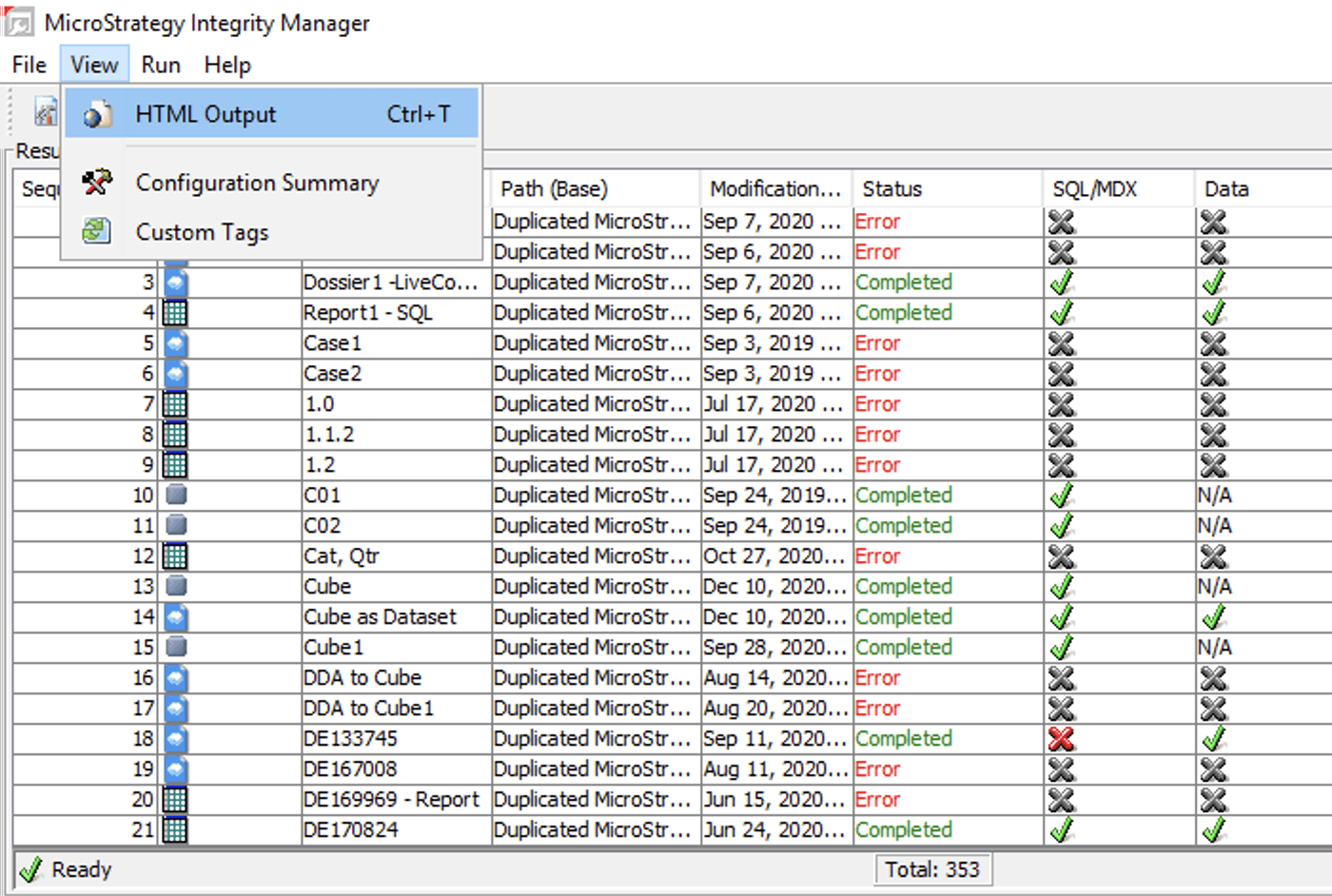
In HTML Output, customers can now get Results Summary and Details.
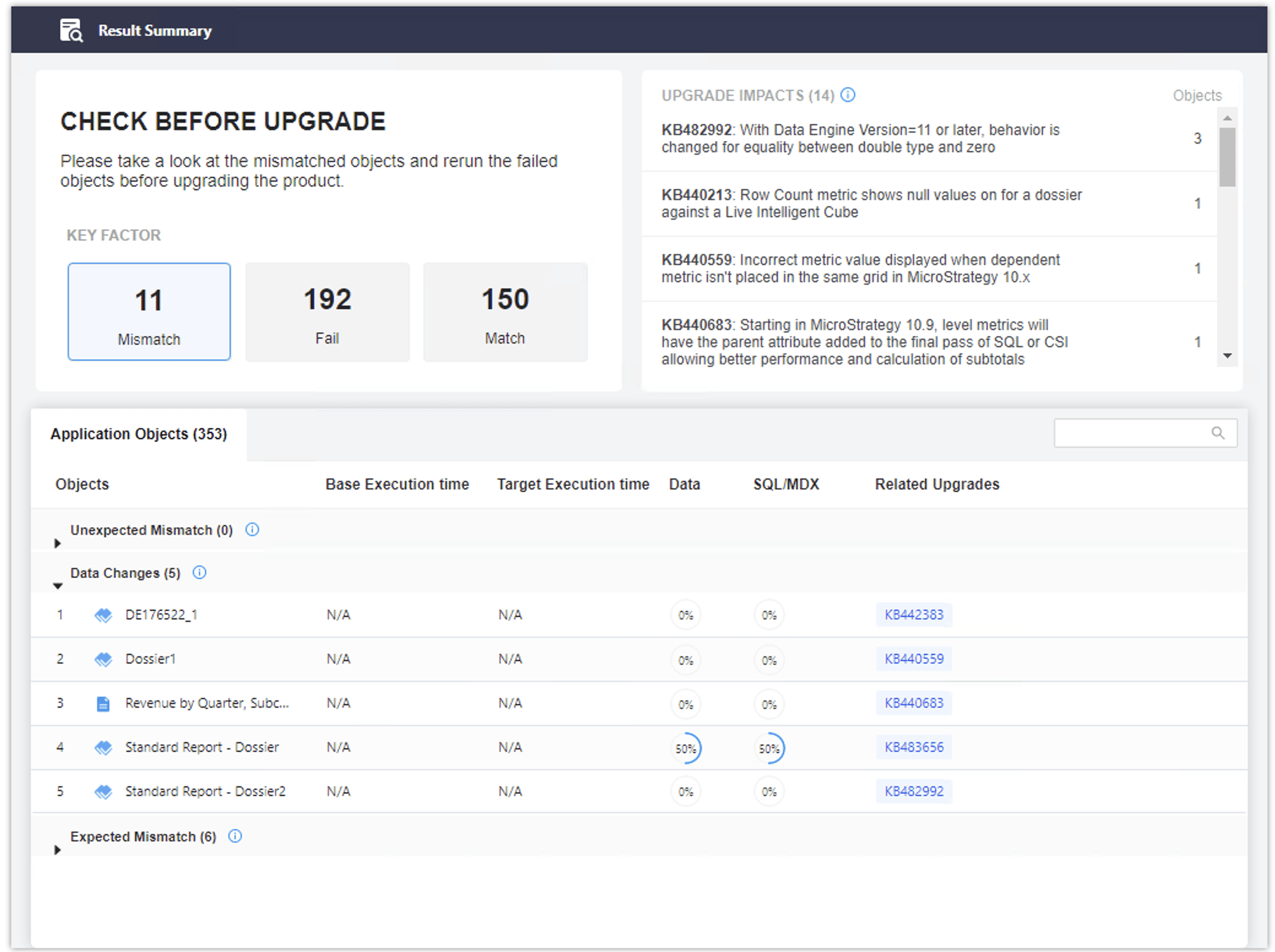
All the mismatches should have at least 1 KB article associated with it, which explains the intentional data engine change. Any mismatch without an associated KB article is grouped under "Unexpected Mismatch" and should be investigated separately. Please note that there may still be several expected mismatches that cannot be associated with a result in Integrity Manager and customers must look at the Data Engine changes for related Platform release understand the changes that cannot be observed in HTML Output view.
It's quite possible that customers may not compare all the objects in Integrity Manager and may experience different SQL/Data at a different time during validation. Starting MicroStrategy 2019, there is also an additional log called "Upgrade Impact" under "Engine" component, which can be used to gather upgrade related tags to identify what Data Engine Changes could have caused certain mismatches.
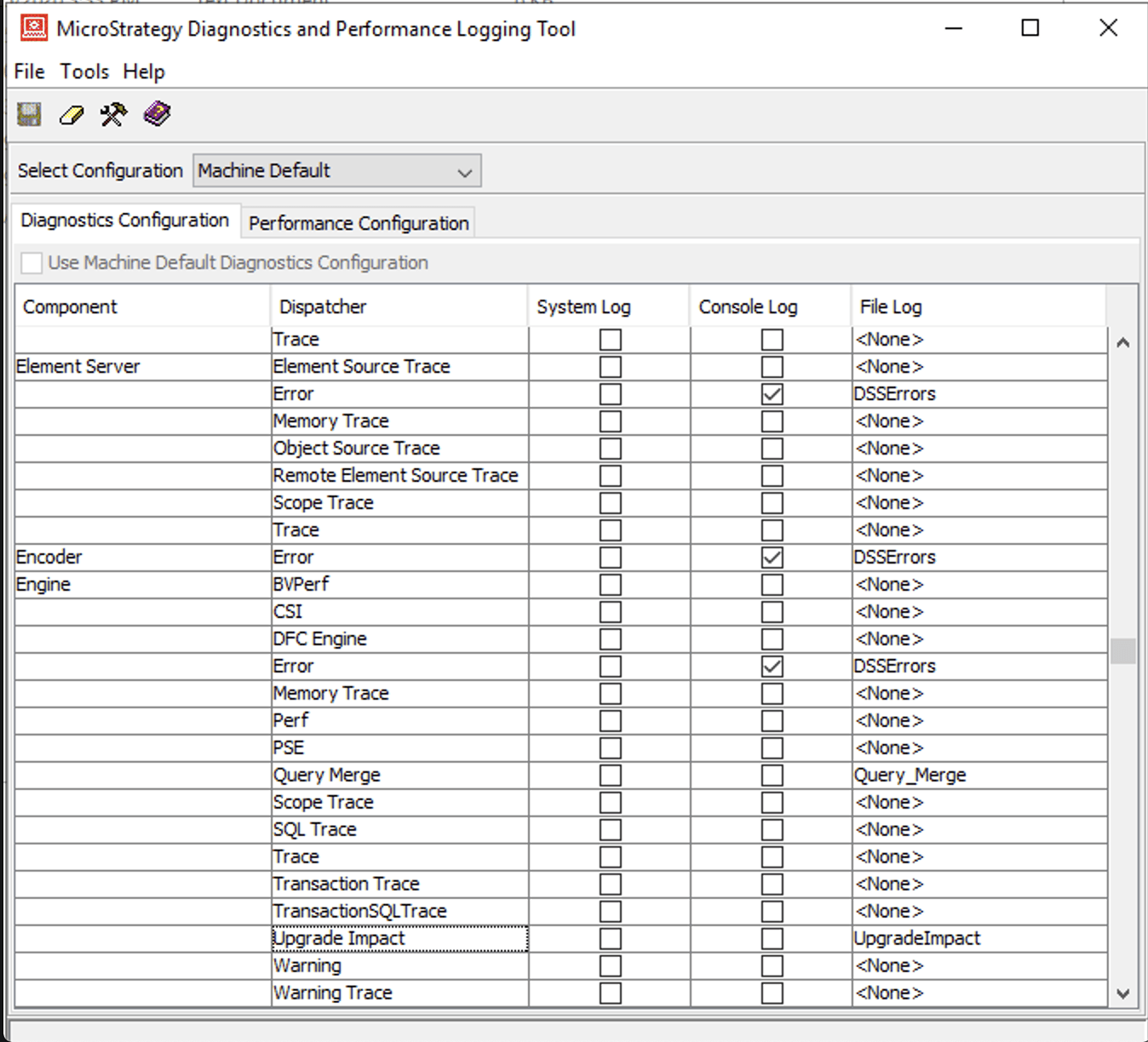
This is equivalent of getting the Data Engine links from the Integrity Manager. For ex: if you are not using the Integrity Manager comparison but found that one of the report is now producing different data then you cna enable the Engine > Upgrade Impact log (on Intelligence Server for 3 or 4 tier connection OR on Developer machine for 2 tier connection) and run the report in question and each line in the produced log file indicates an intended change in the Data Engine. You can copy the info from REFID section and search it on MicroStrategy Community Site to learn more about the Data Engine change.
Here is a sample log file content for a Dossier that produced 2 Data Engine tags:
2020-12-03 17:11:53.533-05:00 [HOST:tec-w-010959][SERVER:CastorServer][PID:9772][THR:204][Engine][Upgrade Impact][UID:54F3D26011D2896560009A8E67019608][SID:92540CB6892558964520A1F0DE85C7E2][OID:233AB831427BC101C91376B83BC85BE2] [ONAME:Compound Grid][TID:Unknown][TNAME:Chapter 1 > Page 1 > Column Set 1][REFID:DE145994]
2020-12-03 17:11:53.534-05:00 [HOST:tec-w-010959][SERVER:CastorServer][PID:9772][THR:204][Engine][Upgrade Impact][UID:54F3D26011D2896560009A8E67019608][SID:92540CB6892558964520A1F0DE85C7E2][OID:233AB831427BC101C91376B83BC85BE2] [ONAME:Compound Grid][TID:Unknown][TNAME:Chapter 1 > Page 1 > Column Set 1][REFID:DE79395][OID:233AB831427BC101C91376B83BC85BE2]: This is the object GUID.
[ONAME:Compound Grid]: This is the name of the object.
[TID:Unknown]: This is the GUID of the visualization.
[TNAME:Chapter 1 > Page 1 > Column Set 1]: This is the full path of the visualization, starting from Chpater to Visualization name.
[REFID:DE145994]: This is the Data Engine Tag that can be searched on MicroStrategy Community to learn more about Data Engine change that affects this object.
Please note that a complex document/dossier can produce many REFIDs as the object may trigger many Data Engine changes but it's possible that not all REFIDs are relevant to the Upgrade. Here is example to understand it better.
Let's say customer is upgrading from MicroStrategy 2019 to MicroStrategy 2020. In MicroStrategy 2019, customer is already using Data Engine Version 2019. After upgrading to MicroStrategy 2020 version, customer observe that the data is different. So, customer can pick 2 ways to understand the reason of different data.

which would display all the KB articles associated with this REFID.
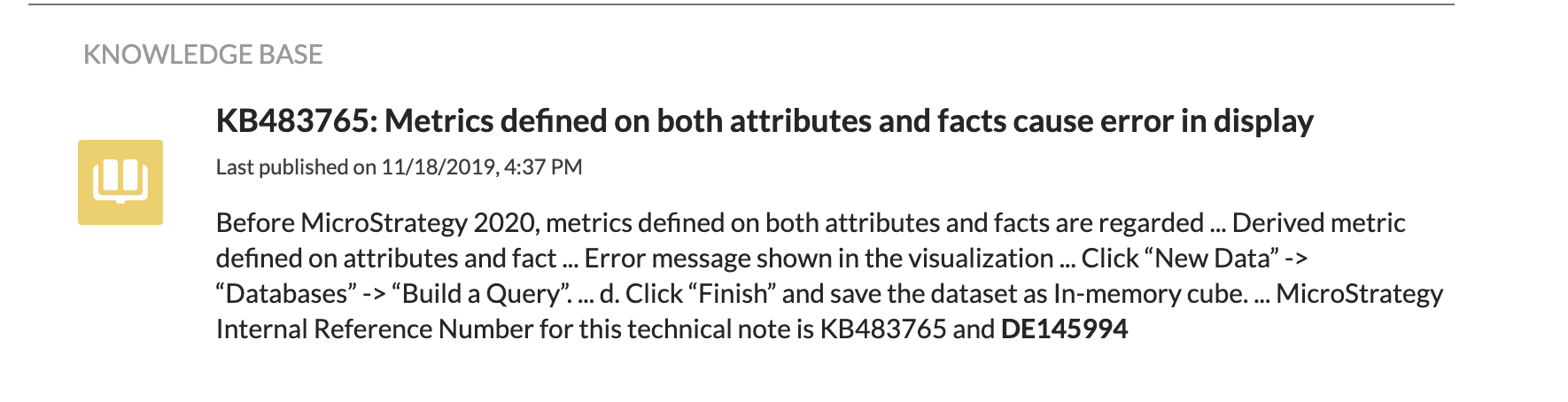
Changes in the analytics engine are made to address defects, deficiencies, customer requests, and enhancements. A few of the changes that are ubiquitous in nature and have an impact on all our customers are available with just the software upgrade. No special setting needs to be enabled to take advantage of them.
Many changes, which can result in upgrade pain, are available when the Data Engine Version setting is set to use the latest version. Attached to this article is a MicroStrategy file (.mstr file) that can be be opened with MicroStrategy Desktop or MicroStrategy Workstation to display a dossier. This dossier displays each of the changes made, the product releases of when it was made, and the motivation for the change.
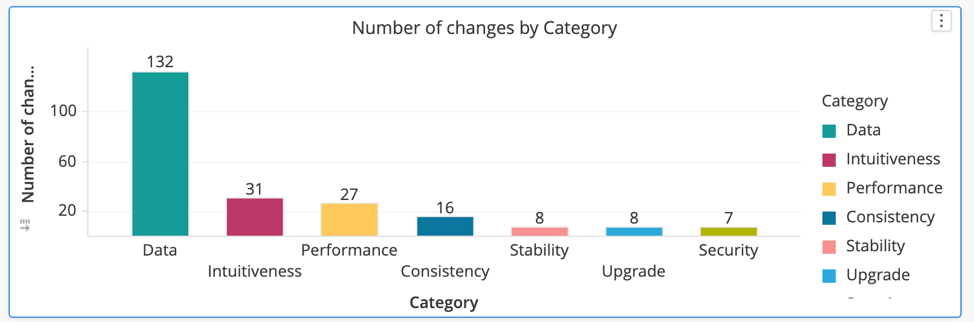
The image below is a summary of the information available in the dossier. The bar graph displays the number of changes made by category for all releases since MicroStrategy 2019.
Category | Description |
|---|---|
Data Improvements | Incomplete or no data i the grids and report, incorrect data because of evident bugs in the calculation or query generation logic. |
Intuitiveness/Consistency | Parity between different features/paradigms to give the same analytic results. |
Performance/Stability | The impact of the change is not data but the performance for the calculations.The code was changed to improve the stability of the system and that has side effects in the data calculation or the query generation logic. |
Upgrade | The mismatches observed in Integrity Manager comparison results due to the dynamic nature of query components such as CurrentDate(), Rand() functions, or Dynamic Dates or Macros used in documents or dossiers. |
Security | Defect fixes that are absolutely necessary if any possibility of data security is identified. |
A cumulative of 229 changes that have an impact on query generation and its results have been made in the analytics engine. 35% of these changes do not need any setting changes. The remaining 65% of the changes are only available by changing the data engine version to the latest value.
Of the 229 changes, 182 of them were made in MicroStrategy 2019 and its subsequent updates. 47 changes were made in MicroStrategy 2020. For more information about the data engine changes in 2019, click here. For more information about the data engine changes in 2020, click here.
The following data engine version values are available when upgrading from an older to a newer version of MicroStrategy:
Upgrades | Settings |
|---|---|
Before 10.4.x to 10.4.x | No setting |
10.4 to 2019 (plus the updates) | 10.4 |
10.4 to 2020 | 10.4 |
2019 to 2020 | 10.4 |
2019 to 2020 | 2019 |
In summary, MicroStrategy 2020 supports three engine versions:
At any point in the upgrade, only two values of the Data Engine Version setting are displayed: the current value and the latest value.
Since the number of setting values may become overwhelming with the release of newer versions, it's possible that the earlier setting versions, like 10.4, may be deprecated. In future platform releases, such as 2021, the three possible values will likely be:
When upgrading from MicroStrategy 10.x, all projects will automatically adopt the MicroStrategy 2019 engine version. This helps with code management and its quality. The added benefit is simplification in the process while keeping the best and latest setting available for a longer period of time.
In conclusion, it is highly recommended that you use the latest version of the data engine for each of your projects. With the latest value, you are likely to see a number of resolved defects pertaining to query generation and results.
