EducationSoftwareStrategy.com
StrategyCommunity

Knowledge Base

Product

Community

Knowledge Base

TopicsBrowse ArticlesDeveloper Zone

Product

Download SoftwareProduct DocumentationSecurity Hub

Education

Tutorial VideosSolution GalleryEducation courses

Community

GuidelinesGrandmastersEvents
x_social-icon_white.svglinkedin_social-icon_white.svg
Strategy logoCommunity

© Strategy Inc. All Rights Reserved.

LegalTerms of UsePrivacy Policy
  1. Home
  2. Topics

KB440816: Data blending shows additional attribute elements for certain selectors if no schema relationship between attributes in MicroStrategy Web


Community Admin

• Strategy


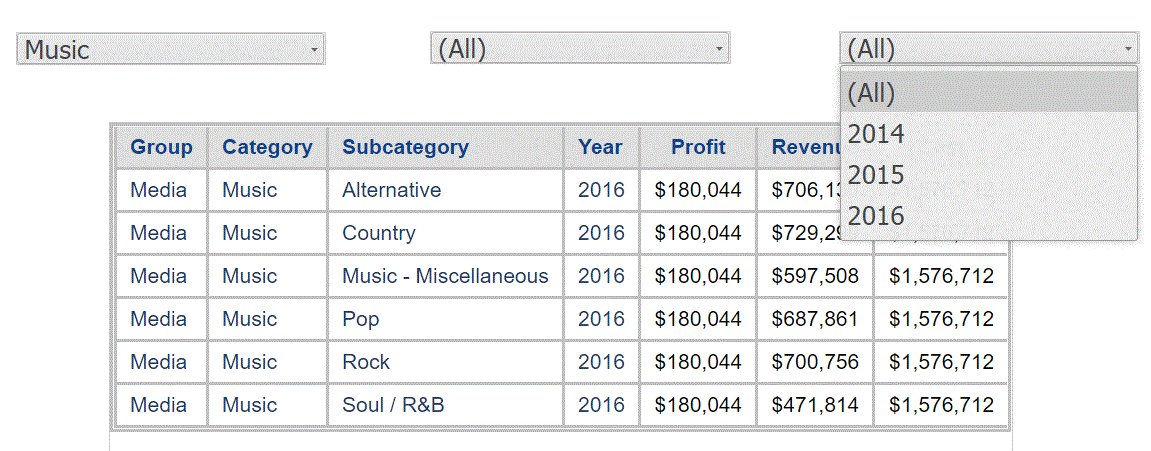
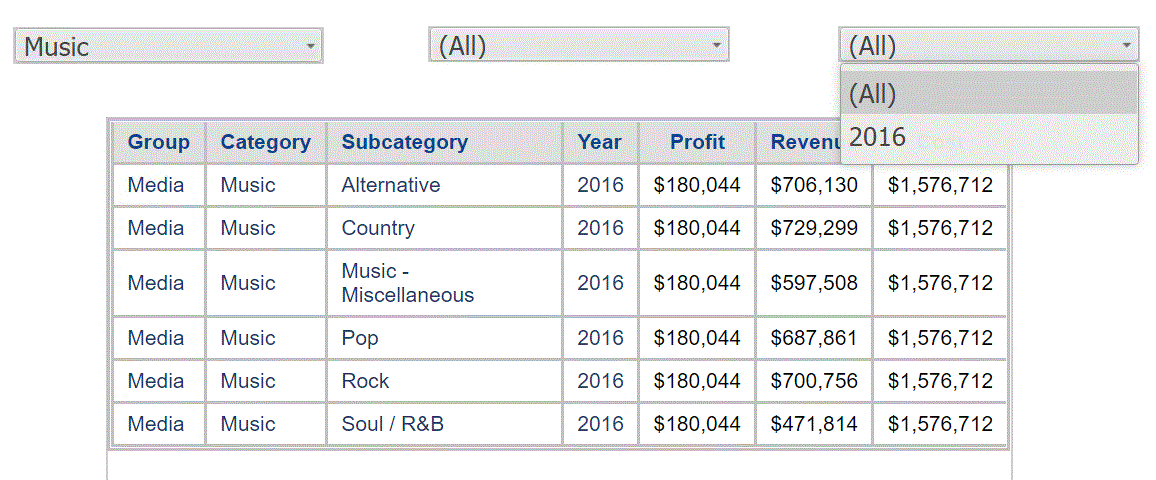
This issue has been classified as a limitation by MicroStrategy. The impact is limited to MicroStrategy Web where data blending does not work for selectors if there is no schema relationship between attributes that are coming from different data sources. As shown on the image below the “Year” Selector shows all years while it should only return 2016 attribute element for “Music” category. The data blending works correctly on the grid but not in the selector.

Symptom

Users notice that if a Report Services Document contains several datasets, where one is a FFSQL report and other reports are based of schema objects, and the common attributes (no schema relationship) are linked in the Report Services Document, the selectors are not filtered correctly in Strategy Web.
 

Steps to reproduce

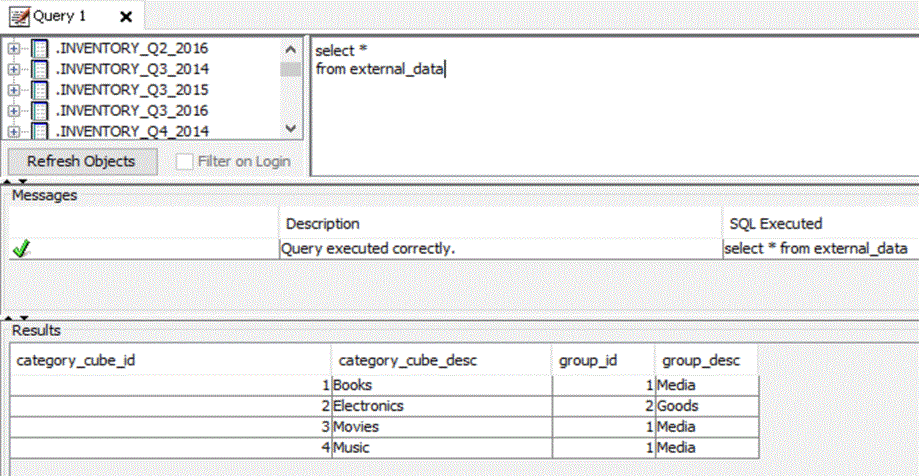
  • The following table was created with category_cube_id, category_cube_desc, group_id and group_desc coloumns and populated with data.
ka04W000000OcpaQAC_0EM44000000WNRI.gif
  • Import the table in Warehouse Catalog.
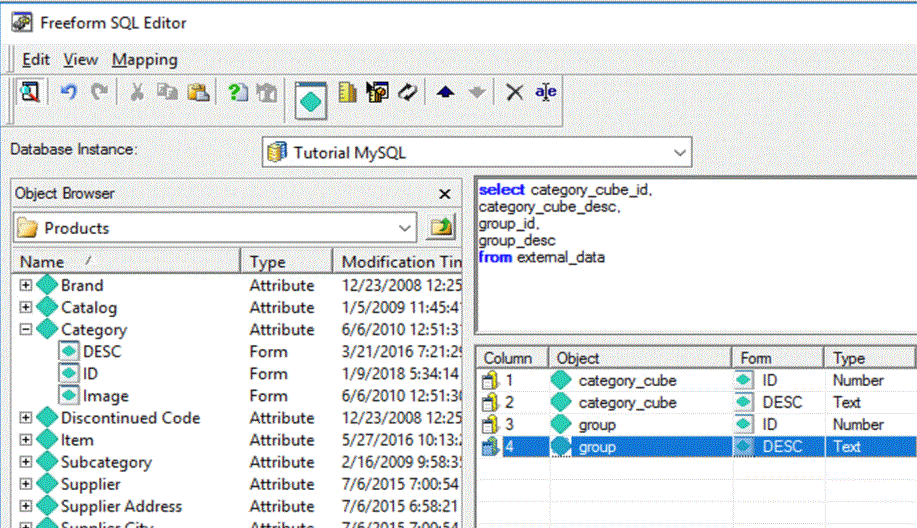
  • In Strategy Developer, create a FFSQL report and new objects called “category_cube” for ID and DESC and “group” with ID and DESC as shown below:


ka04W000000OcpaQAC_0EM44000000WNRS.gif

         Note: Because new objects were created, there is no relationship between the attribute “category” from the project and “category_cube” created in FFSQL report.
  1. In Strategy Tutorial create a document with few datasets based of project schema objects and add the FFSQL report that was just created
  2. Link “category_cube” attribute to “Category” attribute in a Report Services Document
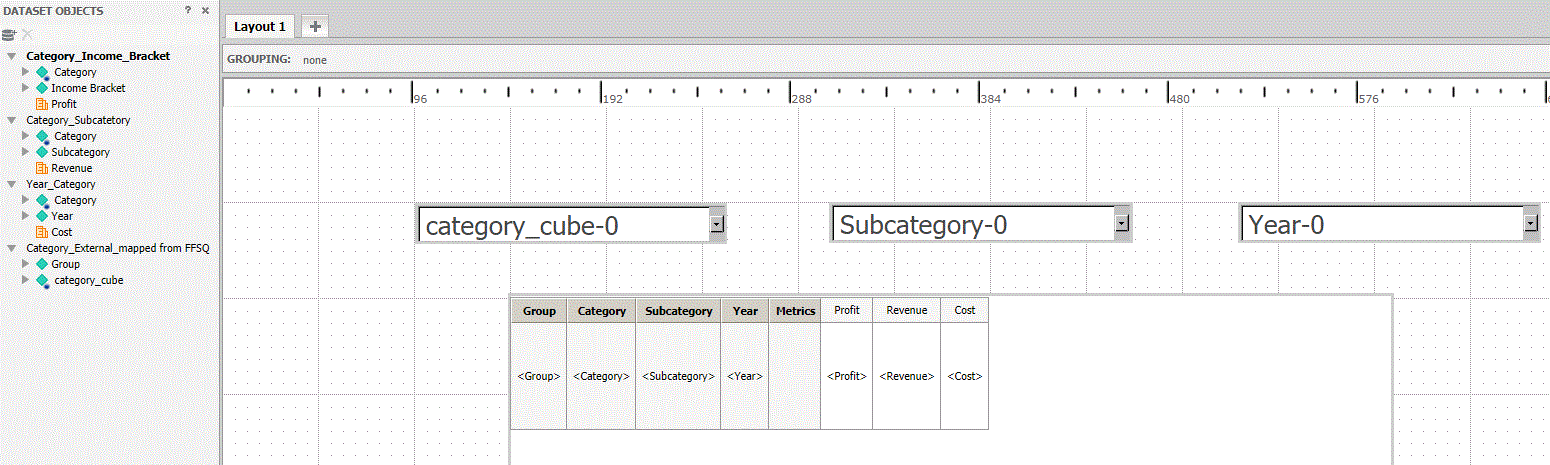
  3. Create selectors and add a grid as shown below. Category_cube selector targets the Subcategory selector, Subcategory targets Year selector:


ka04W000000OcpaQAC_0EM44000000WNRX.gif
  1. Run the Report Services Document to Presentation Mode, and select Music in the first selector. Users expect to see only  2016  for Year selector, however, the selector shows all elements for Year attribute.  The grid filtered correctly and display only 2016 while the selector shows 2014, 2015, and 2016:


ka04W000000OcpaQAC_0EM44000000WNRc.gif


Cause

The described scenario is a Strategy Web data blending limitation. Data blending was designed for filtering data on grids and not specifically designed for selectors.
 

Action

Currently, this limitation is not scoped to be addressed for any upcoming Strategy release. Consider using the following workaround.
 

Workaround

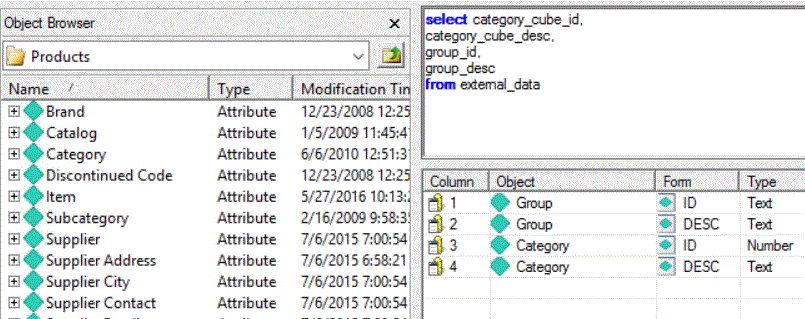
  1. Instead of creating a new attribute object (“category_cube” in this example) in a FFSQL report, use the "Category"  attribute that exists in the project, in this case there would be schema relationship.


ka04W000000OcpaQAC_0EM44000000WNRh.gif

      2. Run the document in Strategy Web and noticed that the issue no longer occurs:
          

ka04W000000OcpaQAC_0EM44000000WNRm.gif


Comment

0 comments

Details

Knowledge Article

Published:

May 15, 2018

Last Updated:

May 15, 2018