EducationSoftwareStrategy.com
StrategyCommunity

Knowledge Base

Product

Community

Knowledge Base

TopicsBrowse ArticlesDeveloper Zone

Product

Download SoftwareProduct DocumentationSecurity Hub

Education

Tutorial VideosSolution GalleryEducation courses

Community

GuidelinesGrandmastersEvents
x_social-icon_white.svglinkedin_social-icon_white.svg
Strategy logoCommunity

© Strategy Inc. All Rights Reserved.

LegalTerms of UsePrivacy Policy
  1. Home
  2. Topics

KB441190: "Data source name not found and no default driver specified" error appears when connecting MicroStrategy Desktop or Workstation 10.10 and up to a 32-bit Microsoft Access database on Windows 7 and Windows 10 machines


Xiaodan Ma

Senior Cloud Support Engineer III • MicroStrategy


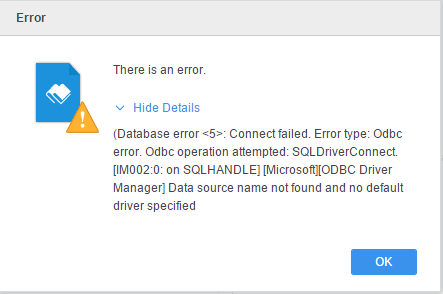
"Data source name not found and no default driver specified" error appears when connecting MicroStrategy Desktop 10.10 and up to a 32-bit Microsoft Access database on Windows 7 and Windows 10 machines

Description

Strategy Desktop or Workstation 10.10 and up cannot connect to a 32-bit Microsoft Access database on Windows 7 and Windows 10 machines.
When adding a Microsoft Access data source with DSNLess connection and retrieving tables the error appears as below:
ka04W000001IrNxQAK_0EM44000000WVKe.png


Why is this happening?


This is a known issue with Microsoft Windows 7 and Windows 10 and 32-bit Access driver.
 

Solution


Download a 64-bit Access driver from Microsoft website:
https://download.microsoft.com/download/2/4/3/24375141-E08D-4803-AB0E-10F2E3A07AAA/AccessDatabaseEngine_X64.exe


Comment

0 comments

Details

Knowledge Article

Published:

July 2, 2018

Last Updated:

January 31, 2020