SYMPTOMS
Some users may notice when creating a report combining both derived elements with derived metrics will see results they do not expect to see.
STEPS TO REPRODUCE
In Strategy Tutorial
1. Create a derived element as demonstrated below:

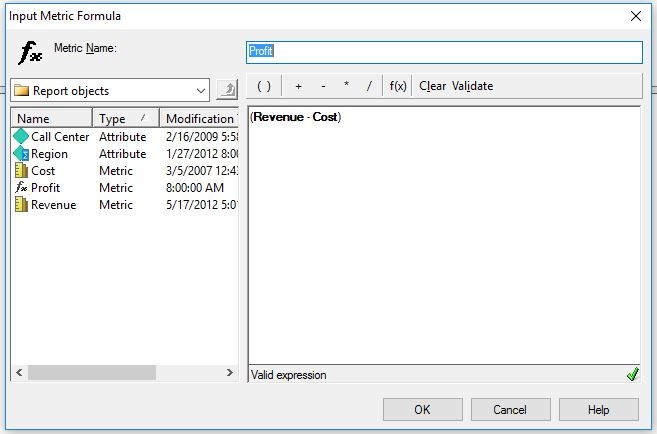
2. Create the derived metric as demonstrated below:
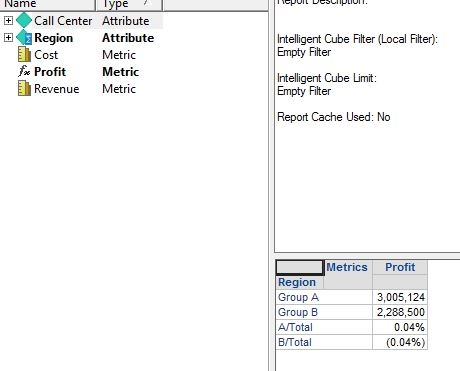
3. Add the objects to a Strategy report and different results are returned then expected:
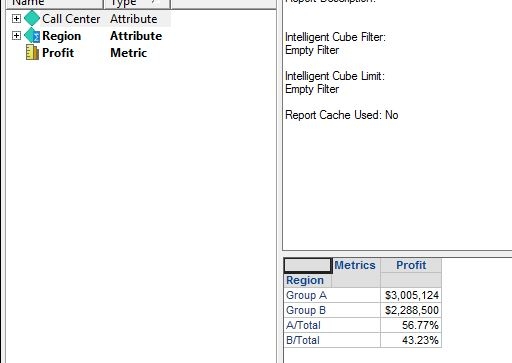
4. When changing the removing the profit derived metric from the data set notice the expected results are returned:
CAUSE
The wrongly calculated Profit is a simple derived metric. A/Total is calculated as (Revenue1 + Revenue2 + ...) / Total_Revenue - (Cost1 + Cost2 + ...) / Total_Cost, which is clearly not what we thought.
ACTION
This issue was reviewed by our Technology team for feasibility and will not be scoped for a code fix in any upcoming Strategy release.
WORKAROUND
This issue may be adverted by changing the Evaluation Order. If we calculate Profit first, then group, and then (Profit1 + Profit2 + ...) / Total_Profit should be correct. However, by design, this way has no related DynamicFunc (i.e. None), and it will not be calculated actually.
A workaround is as follows:
1. create a standalone Smart Metric called Profit,
2. set the Aggregation Function to Sum, allow Smart Metric.
3 Change the Evaluation Order (Region as 2, Profit as 1, since Profit needs to be calculated first). And the results are correct. KB441352
