Introduction
Strategy Developer is the business intelligence software component that provides integrated monitoring, reporting, powerful analytics, and decision support workflow on an intuitive Windows-based interface. Moreover, Strategy Developer is a simple, but expansive tool geared towards Strategy Administrators and Strategy Developers. This tool provides extensive options and features to administer, create, and deploy solutions for any enterprise.
This section of our Community Site will allow you to collaborate on any items that you wish to discuss, quickly browse any KBs for a quick solution to a known issue or discover any helpful instructions to a unique requirement, and post any ideas that you would like to see added in the future specifically in terms of the Strategy Developer tool.
Below, you will find a brief overview of what the main set of users have at their disposal while using the Strategy Developer tool.
Developers
Strategy Developer is ground zero for developers when it comes to creating the powerful analytics and crucial decision support workflow. For a quick breakdown of the knowledge required to integrate your metadata with your warehouse, object creation required for reporting in Strategy, and other items to adjust Strategy to your needs, see the video below.
Figure 1
Administrators
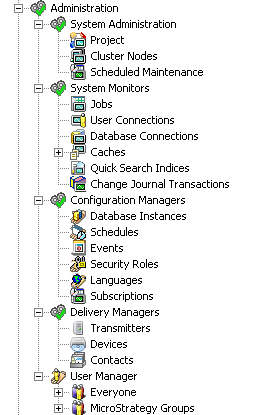
Strategy Developer is the Administrator's Home and the primary source of administering Strategy Enterprise. From Developer, you can manage multiple environments, apply and enforce security, and monitor environment usage. Upon opening your Project Source for a particular environment, the 'Administration' section provides all the tools needed to effectively administer your environment on a top-level. You can manage anything from the clusters active in your environment down to the transmitters responsible for your subscriptions. Below is a screenshot of some of the administrative items at your grasp.
Figure 2
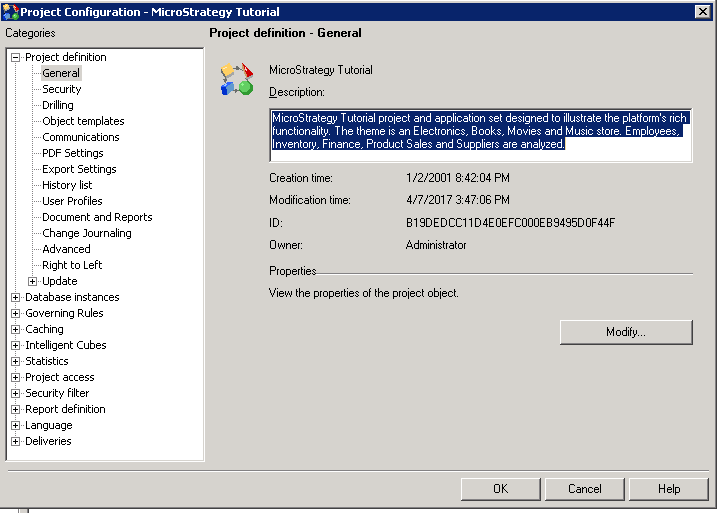
The flexibility of administration is not only at the top-level. We also allow a multitude of configuration options at the project level as well. This is where you properly assign your database instances available for the project, apply security filters, specify the governing rules for a project by project basis, and much more. Below is a screenshot of the wide-array of options at your disposal at the project level.
Figure 3
Please browse this section for anything Strategy Developer related. If you have any issues with the part of our tool or the product overall, do not hesitate to contact Strategy Technical Support for assistance.
