Strategy 2020以降、PostgreSQL データベース用のTutorial Project Files が提供されます。
以下の手順を従ってTutorial環境をセットアップしてください。
1. ご利用のバージョンに合わせてダウンロードサイトより 「Tutorial Project Files」をダウンロードして解凍してください。
https://community.strategy.com/products?language=en_US.
2. Strategy製品にバンドルされるPostgreSQLデータベース、あるいは、お客様ご自身のPostgreSQLデータベースにStrategyTutorial_2021_Files\Databases配下の.sqlファイルを復元してください。
.sqlファイルの復元手順について:
https://www.postgresqltutorial.com/postgresql-restore-database/
3. Developerのマシンにて、それぞれのDSNを作成してください:
4. 2-tierプロジェクトソースを作成してDSN「poc metadata」に接続してください。
※Administratorとしてパスワード無しでログインできます。
※2Tierプロジェクトソースの作成について、以下のナレージをご参考ください。
https://community.Strategy.com/s/article/How-to-test-2-tier-and-3-tier-project-source-JA
5. 管理→構成マネージャ→データベースインスタンスを展開し、データベースインスタンス「Tutorial Postgres」を編集し、Tutorial warehouse用のデータベースログイン情報を更新してください。

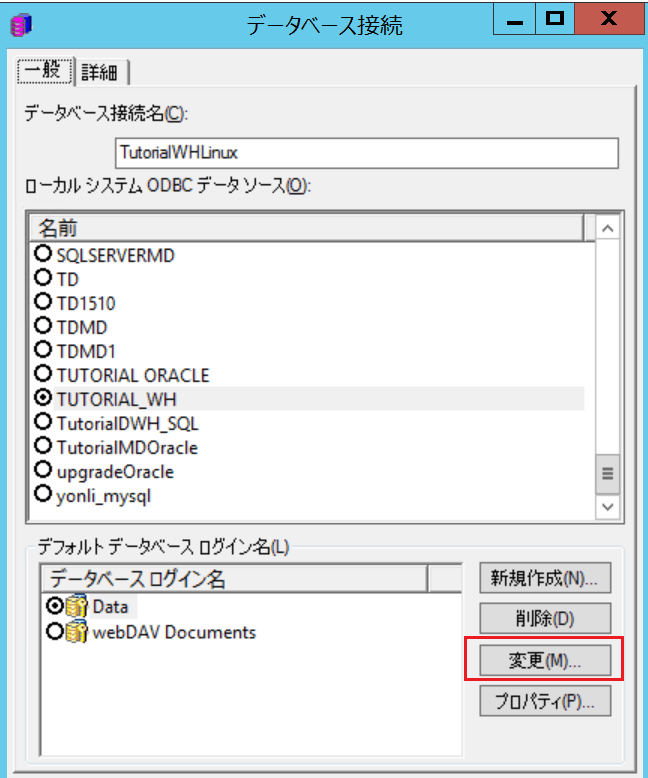

6. データベースインスタンス「Operational Datamart」に対して同様な手順を実施し、Operational datamart用のデータベースログイン情報を更新してください。
7. プロジェクト「Strategy Tutorial」を右クリックしてプロジェクト構成を選択してください。
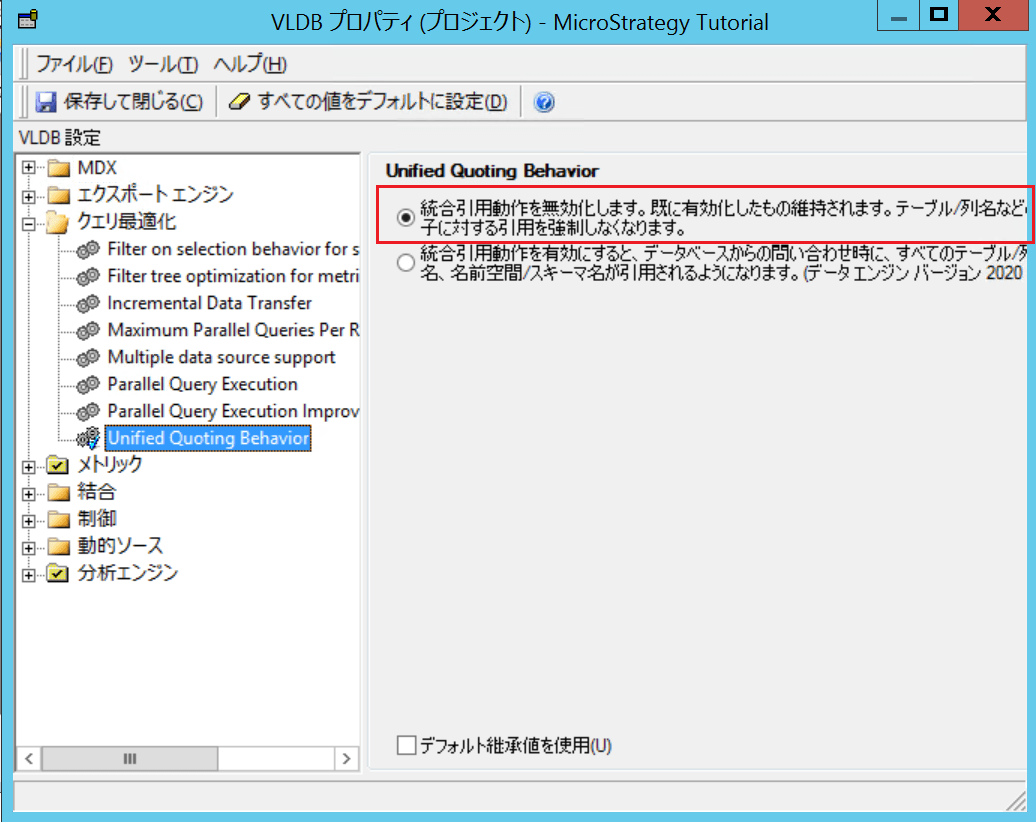
7-1. プロジェクト定義→詳細の配下の「分析エンジンVLDB設定」の「構成」をクリックしてください。

「クエリ最適化」のUnified Quoting Behavior を無効化してください。
7-2. 言語→データを開き、日本語の列パターンを変更します。

大文字の「_JA」より小文字の「_ja」に変更してください。

ここまで実施すると、Developerで2-TierのTutorialプロジェクトの利用が可能になります。
3-TierのWeb、Library、Workstationでの利用が必要な場合、続いて以下の手順を実施してください。
8. 以下いずれかの方法を利用し、3-TierでのTutorialプロジェクトを有効化してください。
8-1. Configuration WizardでIntelligence Serverを復元されたメタデータに構成してください
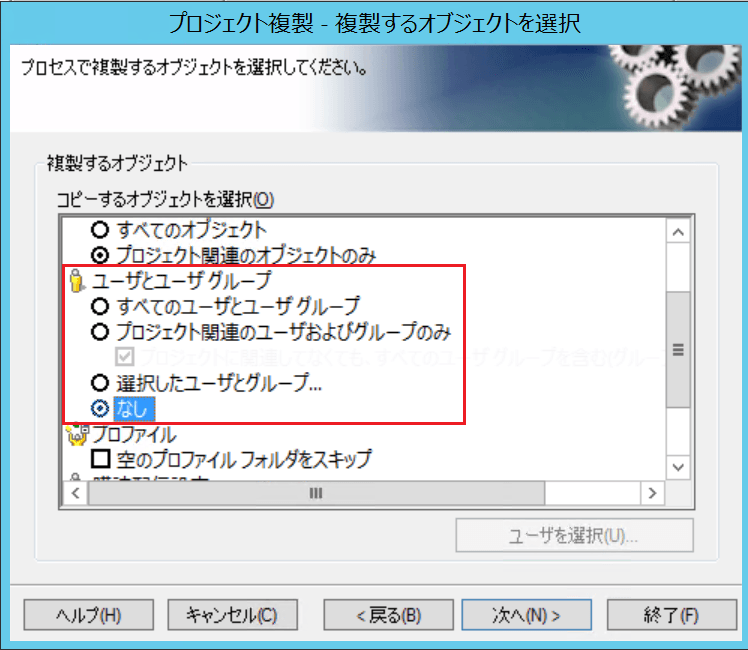
8-2.プロジェクト複製機能を利用し、Tutorialプロジェクトのみをお客様のメタデータに複製してください。
Tutorial環境のサンプルユーザを追加したくない場合、プロジェクト複製オプションの「ユーザとユーザグループ」を「なし」に設定してください。
9. Intelligence server はDeveloperと別のマシンにホストされる場合、必ずIntelligence serverマシンにて以下2つのDSNを作成してください。
10. \StrategyTutorial_2021_Files\Images 配下の画像をWebサーバにコピーしてください。
MobileとLibraryの利用も必要な場合、それぞれのimagesフォルダにコピーしてください。
11. Intelligence Serverサービスを停止してください。
12. StrategyTutorial_2021_Files\Cubes配下のファイルを以下のフォルダにコピーしてください。
<Strategy Install Path> >\Intelligence Server\Cube\<サーバ定義名>\ Server_<サーバな>_P<TutorialプロジェクトのID>
※<TutorialプロジェクトのID> は「プロジェクト構成」より確認できます。
13. Intelligence Server サービスを再起動してください。
Web/Library/Workstation でTutorialプロジェクトの利用は可能になります。
■他の注意点:
\StrategyTutorial_2021_Files\Data_Filesの配下にいくつかのデータファイルが提供されております。.
データインポートのキューブに必要です。キューブの再公開が求められる場合、該当のファイルをアップロードして再公開してください。
例えば、Strategy Platform Capabilities>Strategy Report Services>Visual Insight配下のドシエCasino Analysis を実行すると、キューブ再公開必要なエラーメッセージが表示され、Slots_Past_6Months.xlsx を選択してキューブを再公開してください。
