EducationSoftwareStrategy.com
StrategyCommunity

Knowledge Base

Product

Community

Knowledge Base

TopicsBrowse ArticlesDeveloper Zone

Product

Download SoftwareProduct DocumentationSecurity Hub

Education

Tutorial VideosSolution GalleryEducation courses

Community

GuidelinesGrandmastersEvents
x_social-icon_white.svglinkedin_social-icon_white.svg
Strategy logoCommunity

© Strategy Inc. All Rights Reserved.

LegalTerms of UsePrivacy Policy
  1. Home
  2. Topics

KB484281: How to disable HTML containers in dossiers and documents via MicroStrategy Web


Doris Dai

Quality Engineer, Senior • MicroStrategy


This article provides instructions for disabling HTML containers for your dossiers and documents via MicroStrategy Web.

Starting with the release of Strategy ONE (March 2024), dossiers are also known as dashboards.
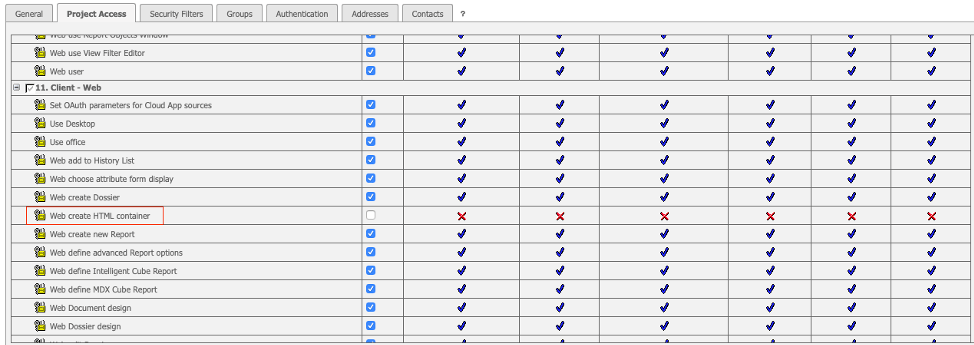
For security reasons, administrator can disable HTML containers in dossiers and documents. This will prevent users from creating HTML containers. For an existing dossier or document that contains HTML containers, users will be unable to edit the existing content.
 

Disable HTML Containers

  • Go to the server admin page for your environment. For example:
    https://env-xxxxxx.customer.cloud.Strategy.com/Strategy/servlet/mstrServerAdmin.
  • Log in and select the server > User Manager.
  • Choose the user you want to modify the privilege for and under Actions, click Edit.
ka0PW0000001JcRYAU_0EM2R000000fglT.jpeg
  • Select the Project Access tab and scroll down to 11. Client - Web.
ka0PW0000001JcRYAU_0EM2R000000fglY.jpeg
  • Return to Web, log out and log back in.
  • Open a new dossier.
    The entry point for HTML container from the top toolbar is gone.
ka0PW0000001JcRYAU_0EM2R000000fgli.jpeg
  • Note: The privilege for Surveys are also controlled by HTML Container, thus, the Survey icon will not appear.
  • Open a new document and notice the HTML container option from the Insert menu is not longer there.

Comment

0 comments

Details

Knowledge Article

Published:

May 22, 2020

Last Updated:

March 21, 2024