The Intelligence Server’s REST API is the method through which some of Strategy’s most modern and latest features work through. This includes functionalities such as HyperCards, as well as Library Web Bookmarks.
Customers who are concerned about security will be pleased to learn that Strategy 2021 features new security hardening on the Intelligence Server’s REST API port. Out of the box, the Intelligence Server on Linux now disallows the use of all version of the Secure Sockets Layer (SSL) protocol, and supports only the latest version of Transport Level Security: TLSv1.2. Furthermore, the use of all non-forward security ciphers have been disabled as well.
For customers who deploy their Intelligence Servers on a distribution of Windows Server, the same offerings are available, however, there are several manual steps you will need to take in order to reach to same level of security.
The solution in this article covers users of Microsoft Windows Servers, versions 2016, 2019 and 2022.
Out of the box, the Intelligence Server installed on any version of Microsoft Windows Server is not configured to use the latest and most secure versions of TLS. Windows Server does not allow for individual applications to choose their own level of transport-level security, instead, it will handle transport-level security choices and configurations at the operating system level. Out of the box, Windows Server is prepared to use a least-restrictive set of transport-level security policies. This means that secure connectivity between external applications, include the Strategy REST Gateway (also called LibraryWeb) can be facilitated use out of date, and potentially insecure procedures such as SSLv2, SSLv3, TLSv1.0, or TLSv1.1.
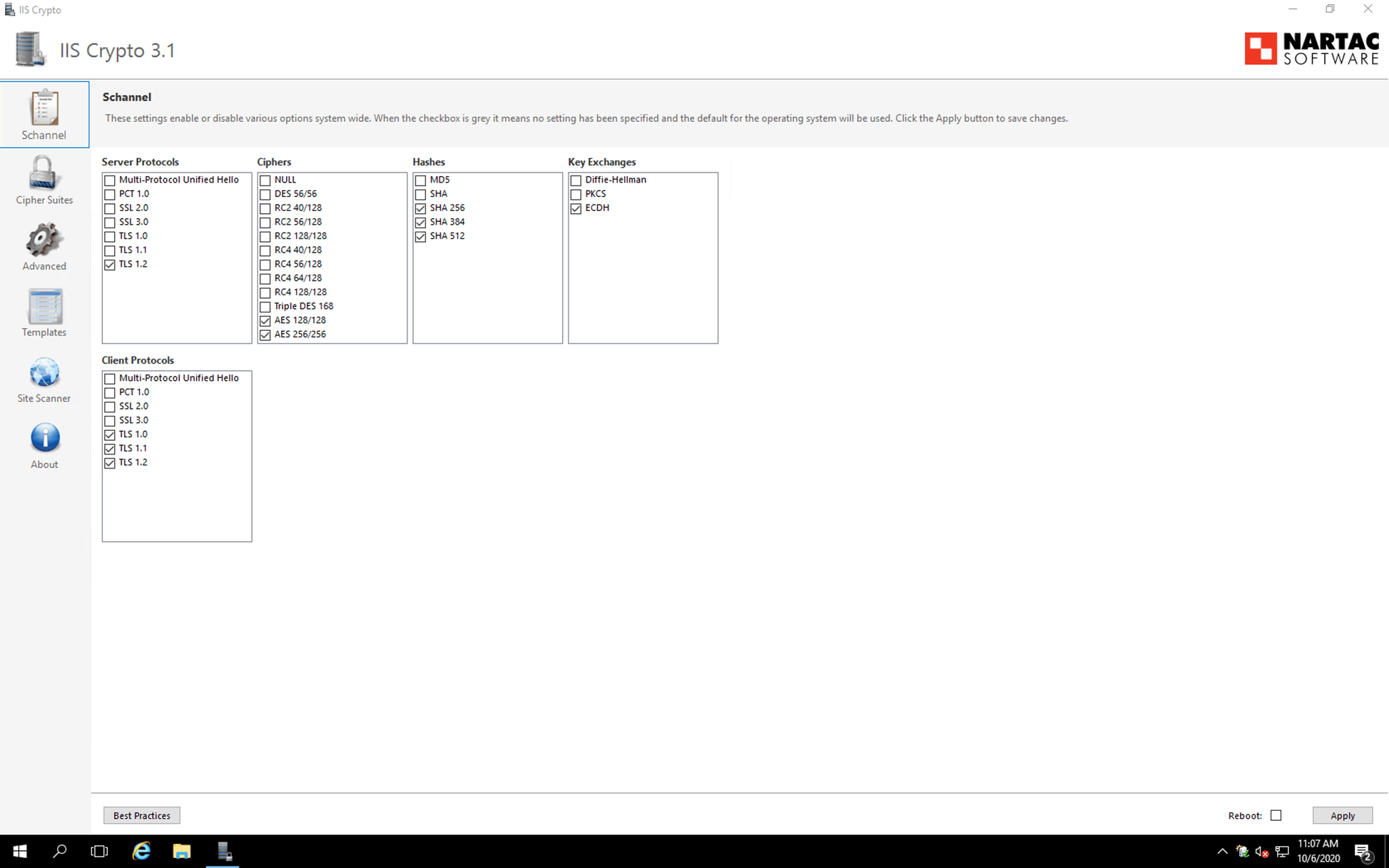
Customers on any Microsoft Windows Server distribution can guarantee the security of their Strategy traffic by configuring the operating system-level security policies through the system registry. The system registry can be configured manually by following the official Microsoft Schannel Configuration Documentation, or by using a 3rd Party tool called IIS Crypto1*.
To learn more about IIS Crypto, use the following resources:
IIS Crypto is a tool that allows System Administrators to configure operating system-level network security policies including allowing and disallowing particular versions of SSL and TLS, as well as controlling Windows' use of hashing and cipher algorithms.
The following steps cover how to use IIS Crypto to properly configure your Windows Server to create the strongest level of transport-level security for your Strategy Enterprise Installation.
*Copyright (c) 2011-2019 Nartac Software Inc.
