EducationSoftwareStrategy.com
StrategyCommunity

Knowledge Base

Product

Community

Knowledge Base

TopicsBrowse ArticlesDeveloper Zone

Product

Download SoftwareProduct DocumentationSecurity Hub

Education

Tutorial VideosSolution GalleryEducation courses

Community

GuidelinesGrandmastersEvents
x_social-icon_white.svglinkedin_social-icon_white.svg
Strategy logoCommunity

© Strategy Inc. All Rights Reserved.

LegalTerms of UsePrivacy Policy
  1. Home
  2. Topics

​KB440999: Display issue in the filter panel of 10.9 Dossier when opened in Google Chrome


Community Admin

• Strategy


This Knowledge Base article describes a known issue in MicroStrategy Web 10.9 that affects the display of filters in Dossiers. The issue is limited to Google Chrome when used with a zoom other than 100%. The issue is currently still under investigation, but has a workaround.

Starting with the release of Strategy ONE (March 2024), dossiers are also known as dashboards.
SYMPTOM:
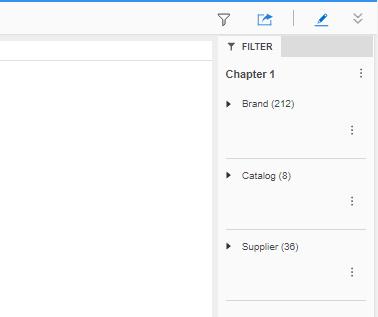
The three dots in the filter pane are shifted down in Strategy Web 10.9 when opening Dossiers in Google Chrome:
ka0PW0000001JQFYA2_0EM44000000WRkd.png

The issue occurs both in Edit and Presentation Modes and can be reproduced both with IIS and Tomcat web servers. In Strategy 10.11, however, the issue can seemingly only be reproduced with Tomcat.
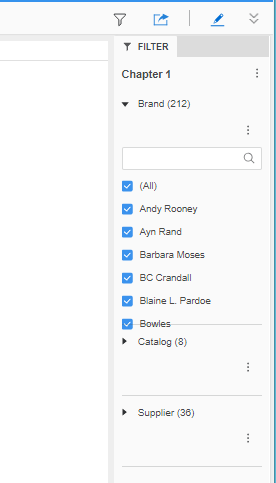
When expaning the filters, the attribute elements may overlap the area of the filter below:
ka0PW0000001JQFYA2_0EM44000000WRki.png

STEPS TO REPRODUCE:

  • create a Dossier with Brand, Catalog and Supplier as dataset
  • drag all the attributes to the filter pane and make them display as check box
  • zoom out to 90% (either by doing "ctrl -", or from the webpage menu), notice everything looks fine                                       
ka0PW0000001JQFYA2_0EM44000000WRks.png
  • refresh the page or Dossier (zoom still 90%) and notice the issue

CAUSE:
This is an identified defect in Strategy Web 10.9.
ACTION:
Currently this issue is still being reviewed for feasibility by our Technology team and it is not scoped for any upcoming scheduled Strategy release.
Strategy will continue to post updates as soon as they're available. 
WORKAROUND:
Ensure that the webpage zoom level is set to 100%.
It should be noted that the zoom feature can work (and remember when it was turned on) per website. This means that a specific website can have a different zoom level than the default Chrome zoom value. In such cases, a little magnifying glass appears in the top right, at the end of the address bar:

ka0PW0000001JQFYA2_0EM44000000WRkx.png

The user might have the zoom disabled everywhere, but enabled when visiting Strategy Web by accident. If not set to 100%, please reset it and refresh the page.
KB440999


Comment

0 comments

Details

Knowledge Article

Published:

June 11, 2018

Last Updated:

March 21, 2024