EducationSoftwareStrategy.com
StrategyCommunity

Knowledge Base

Product

Community

Knowledge Base

TopicsBrowse ArticlesDeveloper Zone

Product

Download SoftwareProduct DocumentationSecurity Hub

Education

Tutorial VideosSolution GalleryEducation courses

Community

GuidelinesGrandmastersEvents
x_social-icon_white.svglinkedin_social-icon_white.svg
Strategy logoCommunity

© Strategy Inc. All Rights Reserved.

LegalTerms of UsePrivacy Policy
  1. Home
  2. Topics

KB485824: Dossier Free form layout layers are missing in Web and Library after upgrading to MicroStrategy ONE 2021 updates 6, 7, or 11


Katarzyna Olszewska

Senior Cloud Support Engineer III • MicroStrategy


This article outlines an issue with Dossier's missing free form layout layers in MicroStrategy Web and Library.

Starting with the release of Strategy ONE (March 2024), dossiers are also known as dashboards.

Symptom


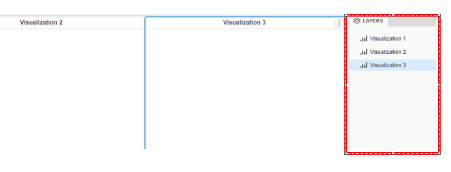
Layers panel of Dossier Free-form Layout are appearing empty.
Before upgrade, the Layers Panel on the right hand side of the Dossier will display the visualization and object names in the currently opened Dossier page (shown below)
ka0PW0000001JmXYAU_0EM4W000006HRMk.jpeg

After upgrading to Strategy ONE Update 6, 7, or 11 while the Dossier is using Free-Form layout, the Layers Panel on the right hand side of the Dossier no longer displays the visualization object names. (shown below)

ka0PW0000001JmXYAU_0EM4W000006HRMp.jpeg


Cause


This is a known issue with Strategy Web and Library which has been logged as a Defect.
 

Workaround


The issue can be mitigated by clearing browser caches as mentioned in point 4 of KB42534. 


Comment

0 comments

Details

Knowledge Article

Published:

December 2, 2022

Last Updated:

March 21, 2024