Starting with the release of Strategy ONE (March 2024), dossiers are also known as dashboards.
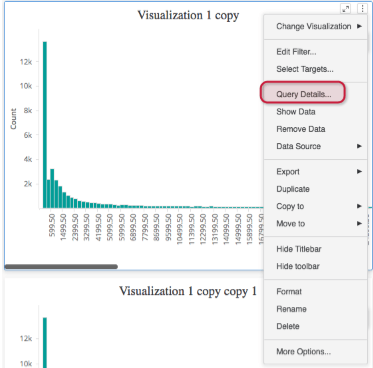
In Strategy 11.0+, you have the ability to see how long it takes each visualization to execute, what query is being sent to the DataWarehouse, or what request is being done to an In-Memory intelligent cube. This feature allows you to discover which visualization is consuming most of the time in your dossier to improve performance. To access this information, on your selected visualization click more > Query Details:
For more information on this feature, see this PDF.
Make sure that the data combination setting is set to "Use minimum relations to join attributes using mostly binary relations (faster, less memory usage)". To apply this change, follow the steps located in the data_combinations video .
When intelligent cubes of 2 million rows or more are used as data sources for a dossier it’s always recommended to turn on partitioning. This will improve the publishing time for the intelligent cubes, the processing time for derived metrics and attributes, as well as aggregation calculations.
There are two main settings involved in cube partitioning configurations:
For more information on cube partitioning, download this PDF.
You can choose to enable cube partitioning in MTDI cubes either automatically or manually. For an automatic set up, watch the mtdi_partition_automatic video . For a manual set up, follow the steps in the mtdi_partition_manual_attribute video .
To enable cube partitioning in OLAP cubes, follow the steps in the olap_partition video. After the previous changes, you'll have to save the cube and republish it.
It's always recommended that you use the intelligent cubes directly in your dossier- avoid using view reports. The only reason you may want to use a view report in your dossier is if you need to use prompts.
For more information on why you should choose direct cubes over view reports, download this PDF.
Derived attributes and metrics are calculated on the fly by the Strategy AE, even when the data comes from an intelligent cube. Depending on the size and complexity of these calculations, this process could take minutes and slow performance.
To ensure performance quality, it is recommended that you only create derived attributes or metrics when you require them based on the business definition. For more information on why you should and should not use derived elements, download this PDF.
To avoid sending multiple requests of the same data to the Warehouse, you can enable caches and Intelligent Cubes. Even when you have prompts or security filters on your dossier, it's recommended to turn on caches. Caches speed up requests and avoid unnecessary recurrent requests to the warehouse.
Download this PDF to learn about two scenarios where you would turn on your dossier cache.
To achieve the best performance possible, it's important to delete all unused objects like datasets, visualizations, tabs (for VIs), chapters (for Dossiers), pages (for Dossiers), and derived metrics/attributes.
Whenever a Dossier is executed, the IServer will create a virtual dataset by joining all datasets included in the Dossier. So the more datasets there are, the more time it will take for your dossier to be executed. Download this PDF for tips on how to optimize performance.
Using symbols instead of images in thresholds can significantly improve your dossier's performance. Rendering an image takes more time than rendering a symbol, and symbols also have more formatting flexibility than images.
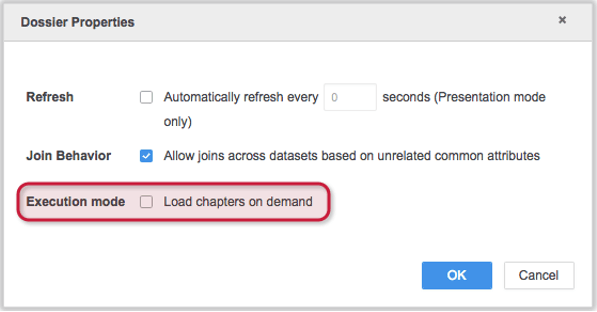
In Strategy 10.11+ you can load dossier chapters on demand by enabling the "Load chapters on demand" feature in Dossier Properties. This setting will allow the end user to render only the chapter that is selected by default. This setting can also significantly improve the initial loading performance of a dossier. To learn how to enable this setting, watch the enable_load_chapters_on_demand video .
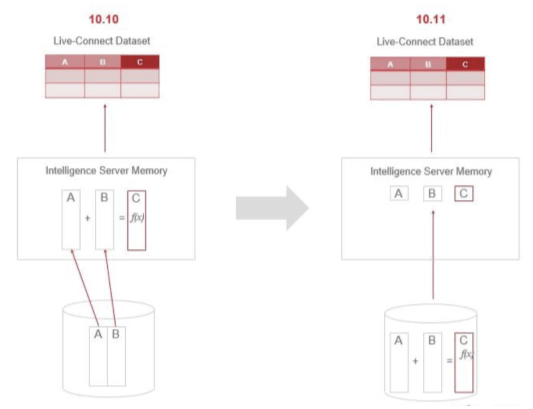
In Strategy 10.11+, derived attributes are evaluated at the source when all the required columns come from the same table- which is the case for most users.
This feature supports big data scenarios where moving large amounts of data to memory is not practical. Time-derived columns such as "Month of timestamp" or "Day of timestamp" and other out of the box time-based derived attributes are now calculated at the source.
This feature also supports multiple attribute forms if the ID attribute form is supported by the datasource, or there is an attribute form that is not supported other than the ID.
The larger your dossier is, the longer it will take to execute on the server. This also affects the time it takes to render your dossier on the client. If you have two or more separate business stories to tell, try to put them in two or more dossiers. It's important to only add necessary components to your dossier to tell a business story.
To understand live-connect intelligent cube performance, it's necessary to understand how many steps are involved in both the live-connect and in-memory process.
Live-Connect Intelligent Cube:
In-Memory Intelligent Cube:
The in-memory intelligent cube has less steps to go through and is thus faster, however there is a trade off. Because in-memory technology keeps the data in memory, there are RAM memory implications using this approach. However, if that is the only concern you should still use the in-memory cube and add more RAM to your Intelligence Server. Live-connect cubes are recommended only for datasets that must constantly be refreshed.
KB483176
