EducationSoftwareStrategy.com
StrategyCommunity

Knowledge Base

Product

Community

Knowledge Base

TopicsBrowse ArticlesDeveloper Zone

Product

Download SoftwareProduct DocumentationSecurity Hub

Education

Tutorial VideosSolution GalleryEducation courses

Community

GuidelinesGrandmastersEvents
x_social-icon_white.svglinkedin_social-icon_white.svg
Strategy logoCommunity

© Strategy Inc. All Rights Reserved.

LegalTerms of UsePrivacy Policy
  1. Home
  2. Topics

KB442437: Dossier Performance: Why should we avoid duplicated datasets?


Community Admin

• Strategy


In this KB we will focus on recommendations and considerations that will help to improve your dossiers performance, hence reducing the execution and manipulation time. The main point is to answer the question: Why should we avoid duplicated datasets?

Starting with the release of Strategy ONE (March 2024), dossiers are also known as dashboards.

Avoid duplicated datasets

Whenever a Dossier is executed, the Intelligent Server will create a virtual dataset by joining all datasets included in the Dossier. Hence, the more datasets, the more time it can take for your Dossier to be executed.
 
A good performance practice is to avoid duplicated dataset and merge them into a single dataset. For instance, let’s say you have a Dossier with 3 datasets and it’s taking 1 minute to run and users expectation is that this Dossier can be opened in less than 10 seconds.

ka0PW0000001JTGYA2_0EM44000000Ra6u.png

You then analyse the datasets in Developer and realize that all of them are reports coming from the same intelligent cube.The steps of this analysis are:

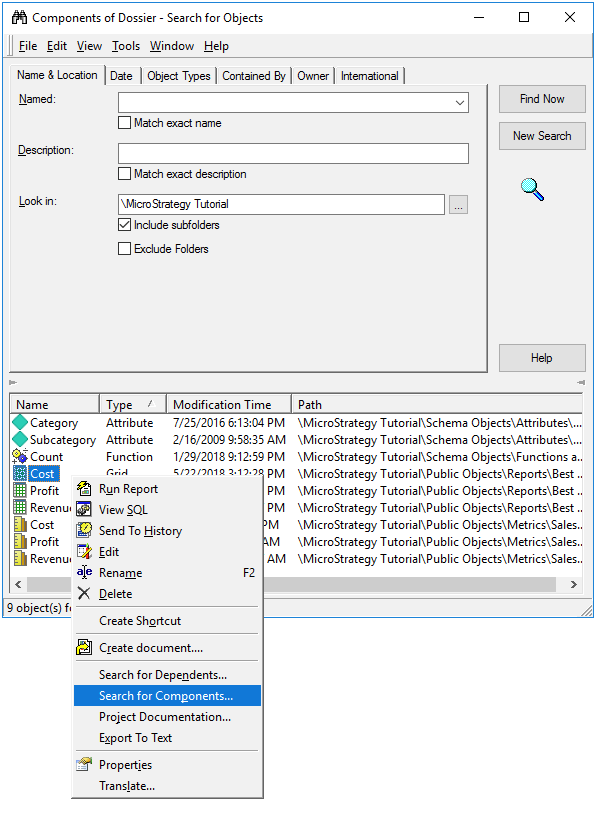
  • In Developer right click the dossier and select the option “Search for Components…”.
ka0PW0000001JTGYA2_0EM44000000Ra7E.png
  • In the next window, select a dataset and right click on it and then select “Search for Components…”.
ka0PW0000001JTGYA2_0EM44000000Ra7O.png


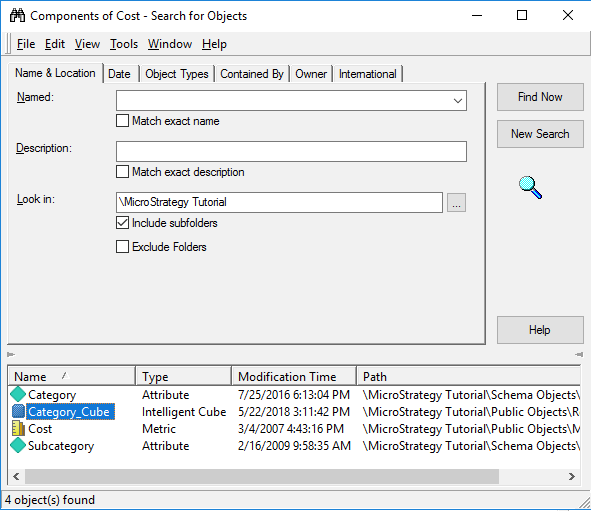
  • You then can see the cube that is used by the dataset as data source, you can also see the cube location. After this you can perform the same exercise for each dataset and determine if they are coming from the same cube.
ka0PW0000001JTGYA2_0EM44000000Ra7Y.png
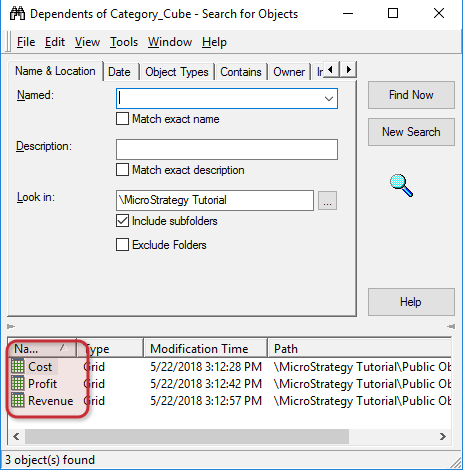
  • Another method that you can use, is to search for the Cube dependents by right clicking on the cube and then select on the option “Search for Dependents…”.
ka0PW0000001JTGYA2_0EM44000000Ra7n.png
  • This will show you which datasets are depending on this cube, you can compare this result with the result of the first step.
ka0PW0000001JTGYA2_0EM44000000Ra7s.png

In the previous example two methods are detailed on how to search for duplicated datasets in a Dossier. Also, based on the results we can conclude that the Dossier design is not following the best practices in terms of performance. It’s not recommended to have multiple datasets in dossier when they can be merged by using the source intelligent cube. When this situation occurs, you can replace the datasets with the source intelligent cube, in this example replace the datasets Cost, Profit and Revenue with the cube “Category_Cube”
After these changes you’ll notice how the execution time for the Dossier is highly reduced, in this example it was reduced from 1 minute to 10 seconds. In conclusion, whenever possible, reduce the number of datasets in a dossier by following the previous method.
  KB442437


Comment

0 comments

Details

Knowledge Article

Published:

December 21, 2018

Last Updated:

March 21, 2024