EducationSoftwareStrategy.com
StrategyCommunity

Knowledge Base

Product

Community

Knowledge Base

TopicsBrowse ArticlesDeveloper Zone

Product

Download SoftwareProduct DocumentationSecurity Hub

Education

Tutorial VideosSolution GalleryEducation courses

Community

GuidelinesGrandmastersEvents
x_social-icon_white.svglinkedin_social-icon_white.svg
Strategy logoCommunity

© Strategy Inc. All Rights Reserved.

LegalTerms of UsePrivacy Policy
  1. Home
  2. Topics

KB485733: Dossier grid returns no data when security filter qualifying on DESC form


Danfeng Zhan

Principal Product Specialist • Strategy


This article narrates Grid returns no data when security filter qualifying on DESC form is applying in dossier in MicroStrategy 2021 Update 7 due to a known defect.

Starting with the release of Strategy ONE (March 2024), dossiers are also known as dashboards.

Symptom


In Strategy 2021 Update 7, dossier grid returns no data when security filter qualifying on DESC form is being applied to the user.  The attribute security filter based on is a linked attribute that source from both In-memory cube and standard report. 
 

Steps to reproduce

  1. Create a security filter with expression ‘Country@Desc in list (USA)’ as shown below:
ka0PW0000001JjOYAU_0EM4W000005nvtE.jpeg
  1. Create a user with the security filter and login to Tutorial
  2. Create a report named R1 with attribute ‘Country’, ‘Call Center’ and metric ‘Cost’.
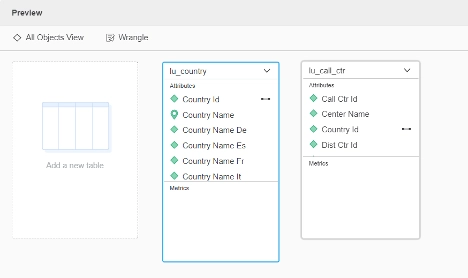
  3. Create a MTDI cube with table LU_COUNTRY and LU_CALL_CTR, import as in-memory dataset, then create a dossier as shown below: 
ka0PW0000001JjOYAU_0EM4W000005nvtJ.jpeg
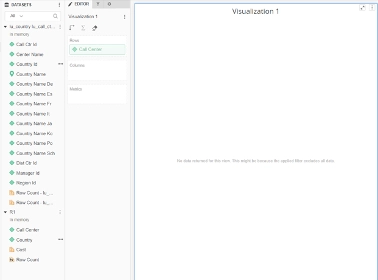
  1. Add the previously created dataset R1, Link the Country ID with R1 to ‘Country’ as shown below: 
ka0PW0000001JjOYAU_0EM4W000005nvtO.jpeg
  1. Drag the attribute ‘Call Center Name’ to the grid, set grid source to none. No data returned for the view as shown below: 
ka0PW0000001JjOYAU_0EM4W000005nvtT.jpeg
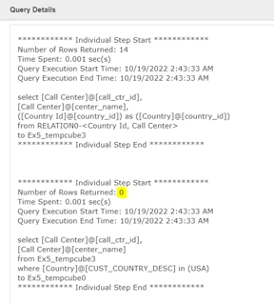
  1. Query details shows the rows returns 0 when applying the security filter. 
ka0PW0000001JjOYAU_0EM4W000005nvtY.jpeg


Cause

Currently this issue is being reviewed by Strategy for a potential code fix on an upcoming Strategy release.
 

Action

Strategy will continue to investigate and post updates as soon as they are available.
 

Workaround

There are two workarounds available:
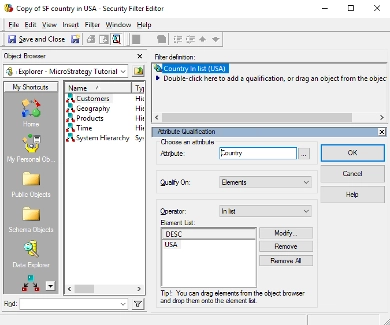
Workaround 1 - Change non-ID form Security filter to ID form security filter.
In below example, change the security filter to Qualify On Elements. 
ka0PW0000001JjOYAU_0EM4W000005nvts.jpeg

Data returns when security filter logs in. 

ka0PW0000001JjOYAU_0EM4W000005nvtx.jpeg

And query details show security filter doesn’t exclude expected data.
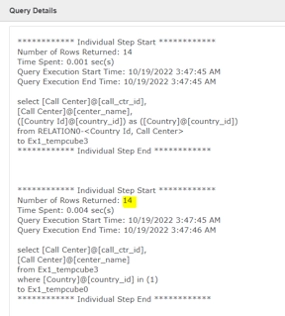
ka0PW0000001JjOYAU_0EM4W000005nvu7.jpeg

Workaround 2 - Add Security filter Attributes with both ID form and the form in security filter in all datasets.


Comment

0 comments

Details

Knowledge Article

Published:

October 19, 2022

Last Updated:

March 21, 2024