EducationSoftwareStrategy.com
StrategyCommunity

Knowledge Base

Product

Community

Knowledge Base

TopicsBrowse ArticlesDeveloper Zone

Product

Download SoftwareProduct DocumentationSecurity Hub

Education

Tutorial VideosSolution GalleryEducation courses

Community

GuidelinesGrandmastersEvents
x_social-icon_white.svglinkedin_social-icon_white.svg
Strategy logoCommunity

© Strategy Inc. All Rights Reserved.

LegalTerms of UsePrivacy Policy
  1. Home
  2. Topics

ERROR: Unable to Use New Office And Get The Blank page


Zhanghao Zhan

Cloud Support Engineer II • MicroStrategy


Symptom  

The user cannot access the office after inputting the credential and it shows a blank page.   

ka04W000001MKsSQAW_0EM4W000008KGYk.jpeg


Cause  

For such issues, we try to check it via the fiddler log and get some related information. 
 

  1. It indicates that the user doesn’t have the privilege; 
  1. It says: You need to enable JavaScript to run this Office Add-in. 
  1. The most possible cause is that you haven’t configured CORS for the office. 


Action/Workaround  


  1. Grant the office privilege to the user; 
  1. Check if you enable JavaScript in the browser: https://support.microsoft.com/en-us/help/3135465/how-to-enable-javascript-in-windows 
  1. Check the methods in: https://www2.Strategy.com/producthelp/Current/Office/en-us/Content/enable_cors_settings.htm 
     

             For example, in our aws environment, you need to configure apache http server: 
             Go to etc/httpd/conf and find the httpd.conf, then add the code as the sample in article: 
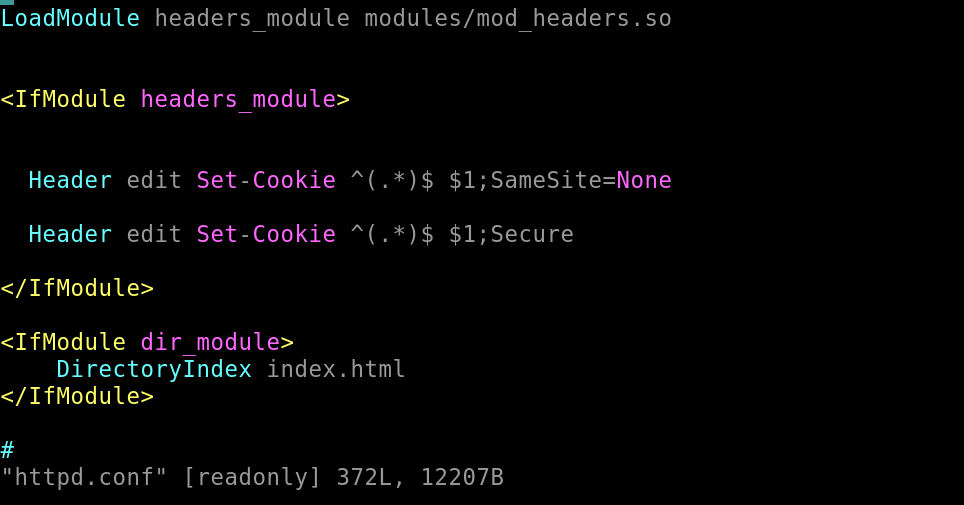
ka04W000001MKsSQAW_0EM4W000008KGYl.png


Comment

0 comments

Details

Knowledge Article

Published:

June 26, 2023

Last Updated:

June 26, 2023