EducationSoftwareStrategy.com
StrategyCommunity

Knowledge Base

Product

Community

Knowledge Base

TopicsBrowse ArticlesDeveloper Zone

Product

Download SoftwareProduct DocumentationSecurity Hub

Education

Tutorial VideosSolution GalleryEducation courses

Community

GuidelinesGrandmastersEvents
x_social-icon_white.svglinkedin_social-icon_white.svg
Strategy logoCommunity

© Strategy Inc. All Rights Reserved.

LegalTerms of UsePrivacy Policy
  1. Home
  2. Topics

KB440344: Emails sent as a Notification from MicroStrategy Library Collaboration Server 10.x use IP Address in the address link


Darren Burns

Senior Cloud Support Engineer III • MicroStrategy


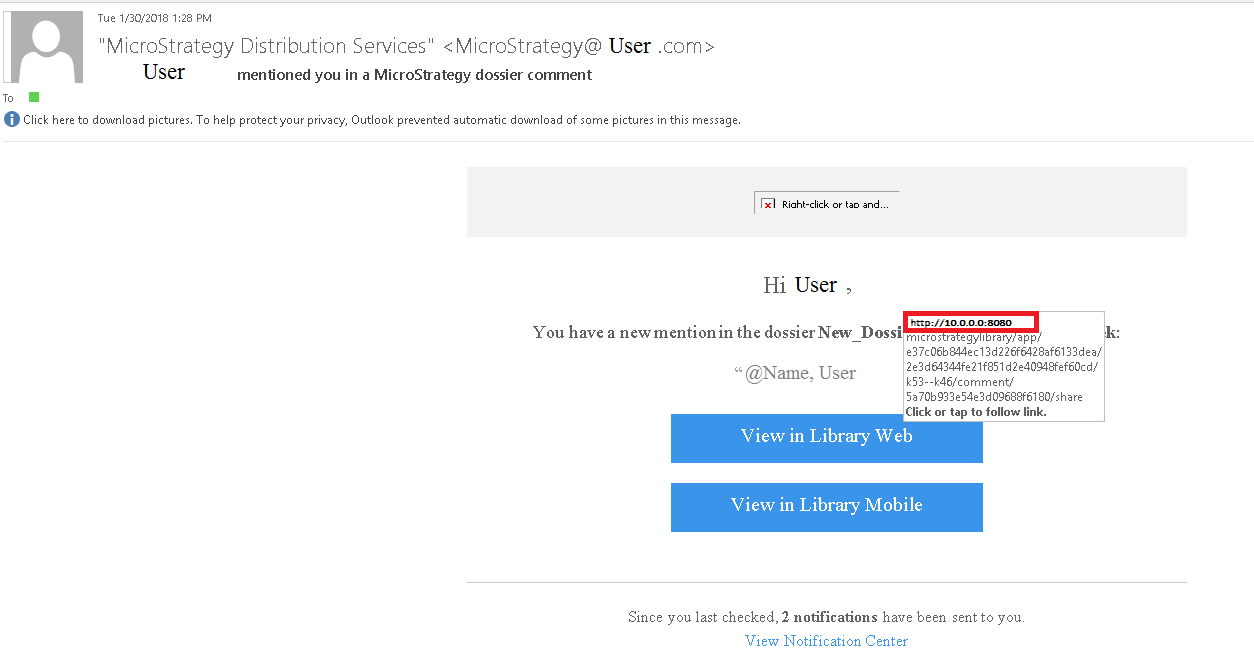
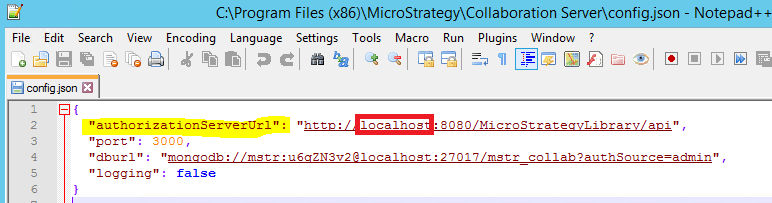
In MicroStrategy Library 10.x when users are tagged in a Dossier in MicroStrategy Library using MicroStrategy Collaboration services, a notification is sent to their email with a link to that dossier. However, the link to the dossier contains an address that utilizes the collaboration servers IP address instead of the server name. This address can be changed to instead include the server name in the config.json file at “<MicroStrategy installation folder>/Collaboration Server/”

Starting with the release of Strategy ONE (March 2024), dossiers are also known as dashboards.
SYMPTOM
When a user tags another user in a dossier, users receive a notification email from Collaboration services that they have been tagged on a Dossier in Strategy Library. The email contains a link to the dossier, and that link address utilizes the IP address instead of the server name (in some cases this is not information that should be public facing)
ka0PW0000001JVWYA2_0EM44000000A5pc.png

 
CAUSE
This is working as designed in Strategy Web. In the authorizationServerURL, the default address is “localhost” which defaults to the IP address of the Collaboration Server in the link in the notification email.
ka0PW0000001JVWYA2_0EM44000000A5ph.png

ACTION
The change this IP address to be a server name:

  1. Open the Config.Json in a text editor
    1. located at: “<Strategy installation folder>/Collaboration Server/”
  2. On the Second line, “AuthorizationServerURL=” change ‘localhost’ to the server name.
    1. Localhost will default to the IP address
  3.  Save the config.json


THIRD PARTY SOFTWARE INSTALLATION WARNING:
The third-party product(s) discussed in this technical note is manufactured by vendors independent of Strategy. Strategy makes no warranty, express, implied or otherwise, regarding this product, including its performance or reliability.
Strategy Internal Reference Number KB440344 KB440344


Comment

0 comments

Details

Knowledge Article

Published:

March 27, 2018

Last Updated:

March 21, 2024