Strategy Enterprise Manager is a tool that provides reports and dashboards that display statistical data on usage of Strategy software. You can use these reports and dashboards to make decisions about tuning the Strategy system or identify problem areas. When you log into the Enterprise Manager project, you can run reports that help you do the following:
• Allocate system resources according to data warehouse usage
• Research efficient aggregation, partitioning, and indexing strategies
• Determine the optimal time to run scheduled jobs, load data, or perform system and database maintenance
• Determine the most popular reports so you can schedule and cache them, thus making them more responsive and reducing the load on the system
• Identify unused objects from your metadata repository so they can be deleted
• Identify peak usage times and patterns and tune your Intelligence Server to respond appropriately
• Determine whether you need to add more threads to the database connection threads if queue times are long
• Profile users by their system resource usage
You can use the predefined reports and dashboards as they are, copy them and then modify the copies, or build your own custom reports and dashboards to suit your needs. The Enterprise Manager project includes many metrics and predefined reports and dashboards. You can create new metrics, prompts, filters, templates, reports, or dashboards to suit your preferences or to perform the type of analysis needed. All the predefined objects are in the Public Objects folder in the Enterprise Manager project.
The Strategy projects on each Intelligence Server can be configured to log usage statistics to the staging tables.
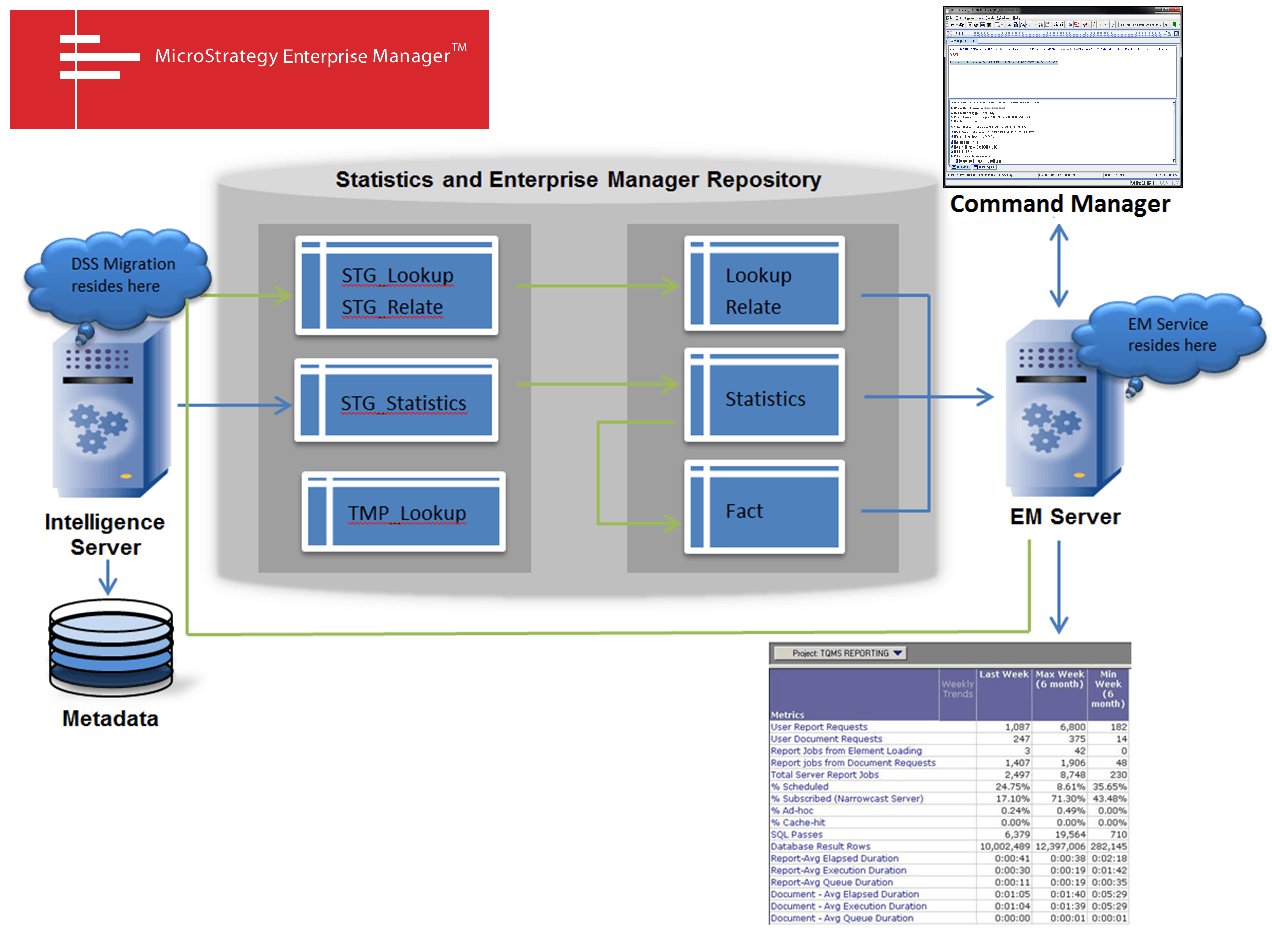
Enterprise Manager consists of a Strategy project, the Enterprise Manager server (service), and an interface in Strategy Command Manager where administrators can control how the server operates.
▫ The Enterprise Manager project is the heart of Enterprise Manager. It runs against the Enterprise Manager data warehouse (as shown above). The project contains facts, attributes, hierarchies, metrics, filters, and prompts that are used in the reports and dashboards. These are designed to help users monitor and tune their entire Strategy system. For detailed descriptions of each report and dashboard, see Reporting in Enterprise Manager .
▫ The Enterprise Manager server directs Intelligence Servers to load statistics about the monitored projects into the statistics repository and runs the data load, which moves statistics data into the repository fact tables.
▫ Strategy Command Manager is used to schedule the Enterprise Manager data loads and maintain Enterprise Manager. You can also use it to monitor data load progress.
— For steps on configuring Enterprise Manager via Strategy Command Manager, see Configuring Enterprise Manager .
The statistics repository contains data on the Strategy system’s usage and performance; the staging tables are populated by all projects that are configured to log statistics. For an explanation of the collected statistics, see the System Administration Guide . For details about the contents of the statistics tables, see the Statistics Data Dictionary in the Supplemental Reference for System Administration.
The Enterprise Manager data warehouse is in the same database as the statistics repository. The data warehouse contains the following:
▫ Lookup tables contain descriptive information about each object in the monitored projects, such as name, owner, creation date, folder path, and so on. In the data load process, the lookup tables are loaded with data from the staging lookup tables.
▫ Statistics tables contain raw statistics data that has been loaded from the staging statistics tables by the data load process.
▫ Fact tables contain data that has been processed and loaded from the statistics tables by the data load process.
Enterprise Manager has three major processes:
You choose which Strategy projects log usage statistics into the staging statistics tables. For details about the statistics logging process, including steps to configure a project to log statistics, see the System Administration Guide.
Before the raw information in the statistics staging tables can be analyzed with the Enterprise Manager project, it must be migrated into the Enterprise Manager repository and converted into a form that can be reported on. In addition, Enterprise Manager needs up-to-date information about the projects it monitors to report accurately on topics like per-user resource usage. The data load process populates the lookup and fact tables in the Enterprise Manager data warehouse. For a detailed description of the data load process, see Data loading .
The Enterprise Manager users execute reports in the Enterprise Manager project to analyze the information in the repository. For detailed descriptions of each report, see Reporting in Enterprise Manager.
