SYMPTOM:
After upgrade from Strategy 2021 Update 5.1 to Strategy 2021 Update 5.2 on Linux, Enterprise Manager service failed to startup with error of ‘MExec::ApplicationProxy_Impl::Run: Attempt to 'start' failed with error code -1 (0xFFFFFFFF)’ as shown below:
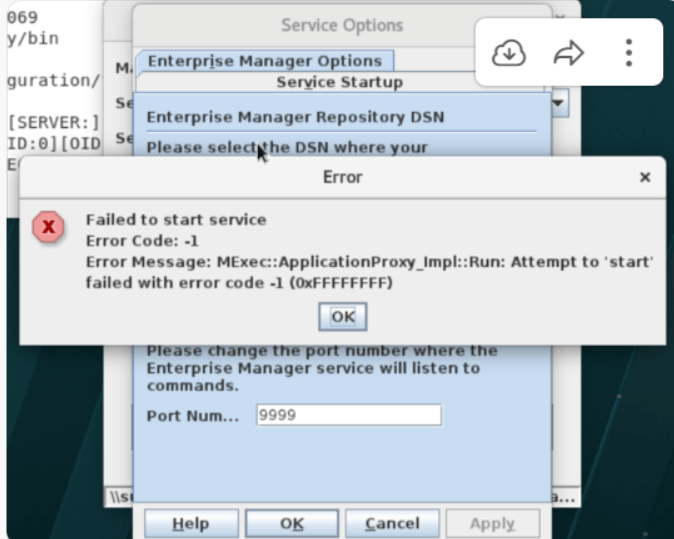

The error display from mstrctl utility too as shown below:
[root@xxxxxx ~]# /var/opt/MicroStrategy/bin/mstrctl -s EMService gs
<status>
<computer_name>xxxxxx</computer_name>
<login>root</login>
<process_id>122815</process_id>
<process_creation_time>2022-05-26 05:19:03.170Z</process_creation_time>
<boot_time>2022-04-27 05:42:44.000Z</boot_time>
<state>stopped</state>
<execution_mode>service</execution_mode>
<exit_code hex_value="0xFFFFFFFF">-1</exit_code>
<exit_message>MExec::ApplicationProxy_Impl::Run: Attempt to 'start' failed with error code -1 (0xFFFFFFFF)</exit_message>
<version_info>
<file_version>11.3.0560.01502</file_version>
<file_description>11.3.0560.01502</file_description>
<company_name>Strategy Incorporated</company_name>
<original_filename>libMSTREMService.so~</original_filename>
<product_name>Strategy 2021</product_name>
<product_version>11.3.56</product_version>
<legal_copyright>Copyright (c) 2000-2022 Strategy Incorporated. All rights reserved.</legal_copyright>
<legal_trademarks>Strategy (r) is a registered trademark of Strategy Incorporated</legal_trademarks>
<build_machine_name>ip-xxxxxxx.internal.microstrategy.com< /build_machine_name>
</version_info>
NOTE: For Strategy 2021 Update 5.2 installed on empty machine, Enterprise Manager service startup successfully.
CAUSE:
This is a known issue with Strategy 2021 Update 5.2 upgraded from Strategy 2021 Update 5.1.
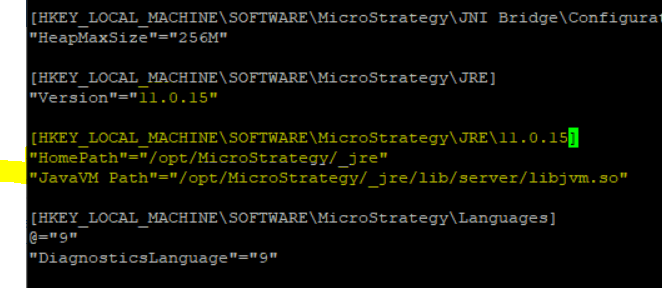
HKEY_LOCAL_MACHINE\SOFTWARE\MicroStrategy\JRE\11.0.14 is failed to be updated to 11.0.15, and following key is missing from MSIReg.reg file during upgrade:
[HKEY_LOCAL_MACHINE\SOFTWARE\MicroStrategy\JRE\11.0.15]
"HomePath"="/opt/MicroStrategy/_jre"
"JavaVM Path"="/opt/MicroStrategy/_jre/lib/server/libjvm.so"
ACTION:
Strategy will continue to investigate and post updates as soon as they are available.
WORKAROUND:
3rd party warning:
Third Party Software Installation WARNING
The third-party product(s) discussed in this technical note is manufactured by vendors independent of Strategy. Strategy makes no warranty, express, implied or otherwise, regarding this product, including its performance or reliability.
